Programming and Computers
You do not need previous programming experience for this lesson. We will begin with something familiar: cooking rice.
1. Programming begins with ordered instructions
Imagine that you want to cook rice. You would follow a sequence:
- Wash the rice to remove dirt.
- Add an appropriate amount of water.
- Place the rice and water in a suitable container and heat them.
- Wait until the rice is cooked.
- Serve it.
The amount of water and cooking time depend on the quantity of rice and the cooking method. “Add water” and “wait” are useful starting points, but a complete recipe must make those details clear.
Now imagine changing the order: heat the dry rice first, then try to wash it. You have used some of the same actions, but you will not achieve the intended result in the same way.
Programming is the act of creating precise, ordered instructions for a computer to carry out a task. The word ordered matters. Having all the steps is not enough; they must happen in the right sequence.
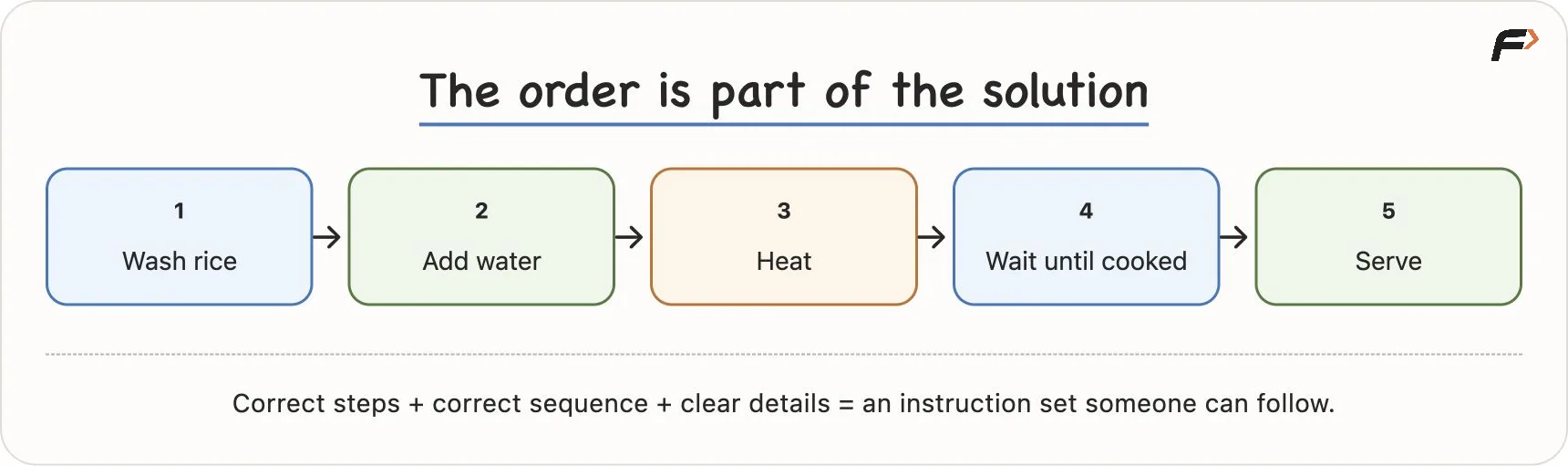
Ordered instructions: cooking rice
A recipe is an analogy for a program, not computer code itself. A human cook can fill in missing details from experience. A computer needs those details to be expressed through its instructions and the rules of its environment.
2. What is a computer?
A computer is a machine that follows instructions. It can execute enormous numbers of stored instructions at a speed that would be impractical for a person performing the same operations manually.
For a beginner, a useful mental model is:
Computer = speed + obedience, without an automatic understanding of your intentions.
Suppose you tell someone, “Bring water.” You have stated what you want, but you have not specified the container. A person might infer that you mean a glass of water. A program cannot be relied on to invent a missing requirement correctly.
The same applies to a command such as “delete this file”. If the operation is permitted, the system can carry it out even when you selected the wrong file. It does not automatically know that the file is important to you. A confirmation prompt or recovery feature exists only because someone designed that behaviour.
This is the idea behind describing a computer as having “no common sense”: the programmer is responsible for expressing the intended behaviour precisely. A computer can carry out comparisons and decisions, but those decisions follow programmed rules.
Think also of a fan rotating when its switch is turned on, or a light glowing when its switch is turned on. These illustrate an action producing a predictable response. A basic fan or light can work through electrical circuitry without running a stored program. A general-purpose computer goes much further: different programs allow the same machine to perform many different tasks.
3. Hardware and software: the machine and its behaviour
To understand a computer, first separate its physical components from the programs that run on them.
Hardware means physical components. Examples include the screen, keyboard, mouse, CPU, memory chips, battery, camera, storage devices and wires. The CPU is a processor inside the machine; the computer’s entire cabinet is not the CPU.
Software means programs and related information. Examples include a browser, calculator, games, WhatsApp, YouTube, and operating systems such as Windows, macOS, Android and iOS.
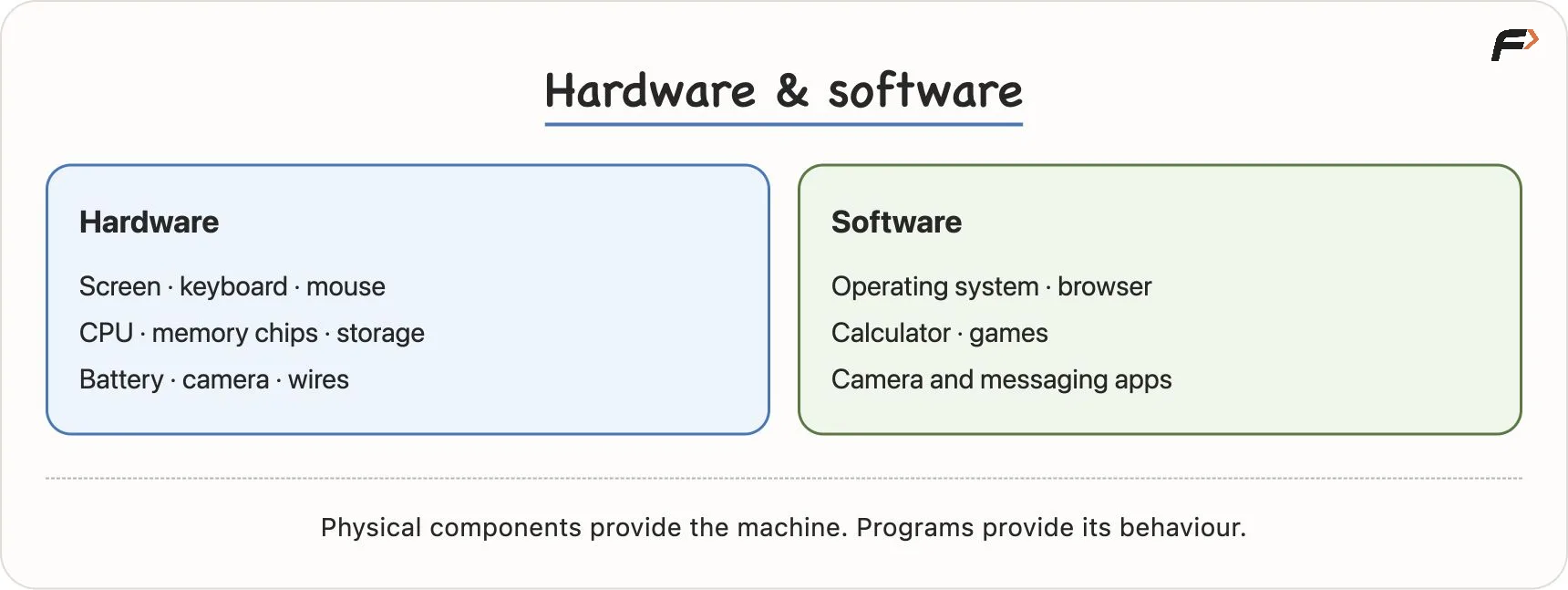
Hardware and software
Software is not a physical component that you can hold separately, but it is represented and stored physically as data in hardware. Installing an app therefore takes storage space.
The body–mind analogy helps here: hardware is like the physical body, while software supplies instructions and behaviour. This is only a comparison; an actual human brain is physical.
Your phone makes the distinction easy to see. Its screen, battery and camera are hardware. Android or iOS, the camera app and the messaging app are software. Software needs hardware on which to run, and a general-purpose computer needs software to perform its useful tasks.
4. How storage, the operating system, RAM and the CPU work together
Three hardware terms will keep appearing: CPU (Central Processing Unit), RAM (Random Access Memory), and storage. To understand their relationship, let us follow an application being opened and used.
Start with storage
Storage keeps installed application files, saved photos, videos and other data. A computer may use an HDD (Hard Disk Drive) or SSD (Solid-State Drive). External devices such as pen drives can also store files.
Saved data remains there when the power is switched off. This is called persistent storage. Persistent does not mean indestructible: files can still be deleted or lost if a device fails.
The operating system coordinates access
You tap an app because you want to open it. Something must identify that app and arrange for its required code and data to be made available for execution.
The operating system, or OS, manages applications and hardware resources. Android, iOS, Windows, macOS and Linux are examples. It coordinates loading programs, managing memory and providing access to devices and files.
Suppose the app wants to display photos from your gallery. In a typical modern system, it requests access through operating-system services. The OS applies the relevant access rules and, where required, checks whether permission has been granted. If access is allowed, it arranges for the requested data to be read.
The app does not simply gain unrestricted access to every file on the device.
Why introduce RAM?
Reading from storage takes time. That delay is called latency. Repeatedly reading the same data from a storage device would waste time when a faster working copy could be kept nearby.
RAM is the computer’s fast, temporary working memory. It holds instructions and data currently needed by running programs.
When photos are read from storage, copies of their data can be kept in RAM. If the same data is requested again and a suitable copy is still available, the system can reuse it instead of reading it from storage again. Keeping data for reuse this way is called caching.
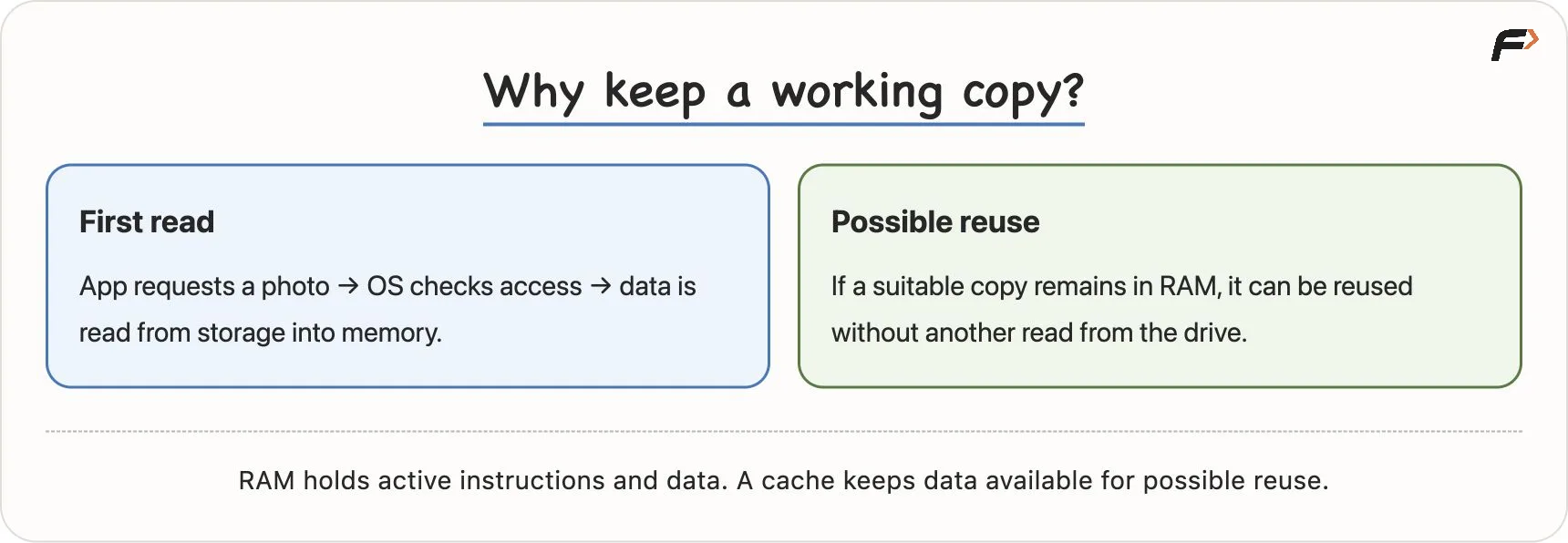
RAM and caching
The same principle applies to application code: required instructions are made available in memory for execution. The system does not need to read every instruction afresh from the drive each time it is used.
RAM is much faster to access than ordinary storage drives, but it has limited capacity. A cached copy may eventually be removed to make room for other work, so reuse is possible rather than guaranteed.
What does the CPU do?
The CPU executes instructions. It performs calculations, comparisons and other processing needed to run programs, including operating-system software.
When we say “the OS loads the app” or “the OS requests a file”, we are describing software coordinating work that hardware carries out. The CPU executes the relevant instructions, while memory and device controllers participate in moving data.
Calling the CPU the computer’s “brain” is a useful shortcut for its processing role. It does not mean that it understands the goal behind your program like a person would.
This is a high-level model of an ordinary app running on a phone or computer. It is enough for now to distinguish who stores data, who provides working memory, who executes instructions, and which software coordinates the activity.
5. The study-table model
Imagine a student studying from books. The relationship becomes easier to remember:
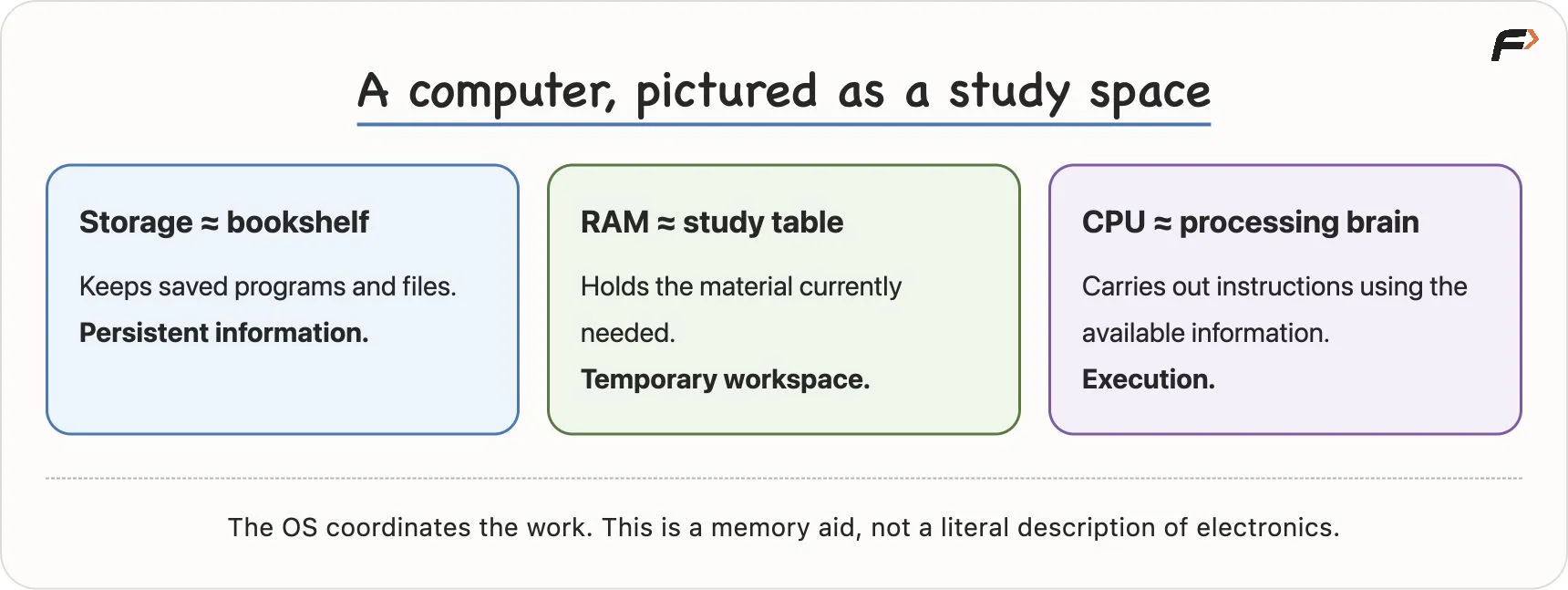
CPU, RAM and storage: study-table model
The bookshelf holds all the books. When the student needs one, they bring it to the study table. Keeping it on the table avoids walking to the shelf every time they want to read another paragraph. The student’s brain does the current work.
In the same way, application files remain in storage, required code and data become available in RAM, and the CPU executes instructions using that working information.
One app’s journey
Consider opening WhatsApp:
- The app’s installed files are in storage.
- The OS loads the required instructions and active data into RAM.
- The CPU executes the instructions.
- The display shows chats and responds to your actions.
- When the app closes, its working memory can be reclaimed. Saved data remains in storage.
Closing an app does not necessarily clear all related memory immediately; the OS may retain cached data. The key distinction is between temporary working information and saved information.
Ordinary RAM is volatile: it loses its contents when power is removed. Storage is non-volatile and retains saved data without power. An unsaved change that exists only in RAM can therefore be lost when power fails. IBM’s explanation of memory and storage describes this distinction.
What changes when a computer has more resources?
| Resource | What more capacity or speed helps with |
|---|---|
| More RAM | Holding more active program instructions and working data, which can help when several apps are open |
| More storage | Keeping more saved photos, videos, documents and installed apps |
| A faster CPU | Executing processing work more quickly, depending on the task |
If many applications are installed, their files can sit in storage. Running many of them creates a different demand: their active work needs memory. More storage does not substitute for more RAM, and more RAM does not automatically make every calculation faster.
Overall performance also depends on the software, the storage device, other hardware and the work being done.
Remember the limit of the analogy: real computers use electronic components. Reading data into RAM normally creates a working copy; it does not remove the original file from storage as though a physical book had left its shelf. Changes must be saved if they are to persist.
6. Programs, programmers, bugs and debugging
What is a program?
A program is a set of instructions that tells a computer what to do. Programming is the activity of creating those instructions; a program is what you create.
Return to a familiar task: preparing chai. One recipe might ask you to take a pan, add water and tea leaves, boil them, add milk and sugar, let the mixture cook, filter it into a cup, and serve it. Quantities and timing would need to be specified for a complete recipe.
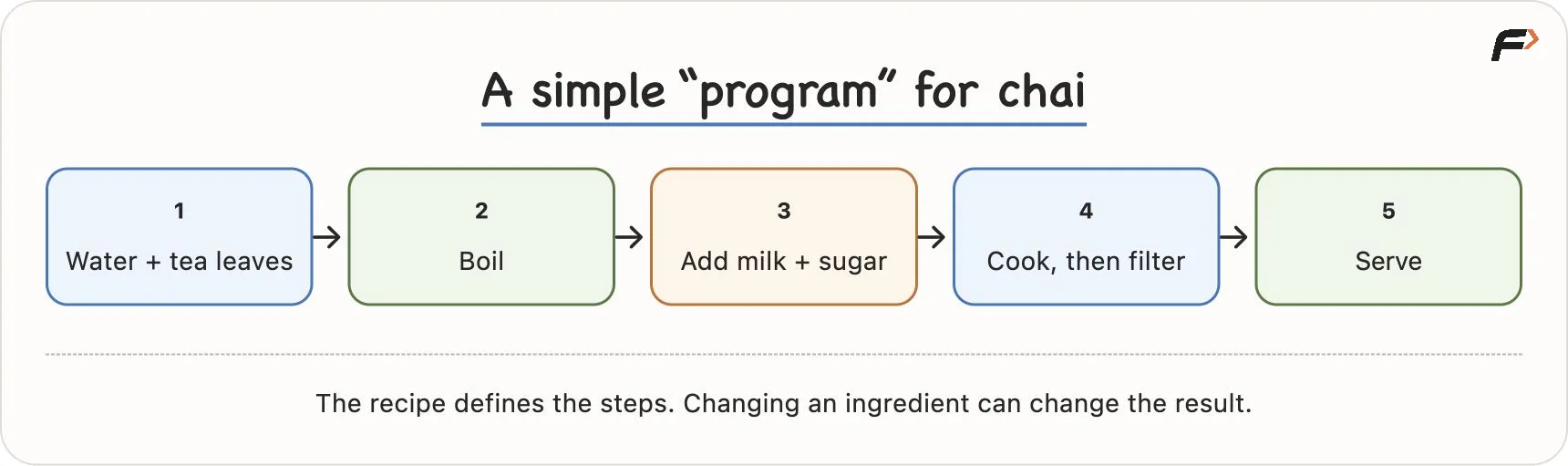
Image 5
Software expresses instructions in a formal way. For example:
- A calculator uses its entered numbers and selected operation to perform addition.
- An alarm checks its configured time and triggers an alert when appropriate.
- A messaging app starts the delivery process when you press Send.
These familiar actions involve instructions and decisions behind the interface. An app may contain many cooperating parts, but it is still built from programs.
Who writes the instructions?
Programmers write them. You will also hear people use terms such as developer, coder and software engineer, although specific job responsibilities can vary.
Their responsibility includes understanding the task and expressing its rules accurately. If a required case is missing, the computer does not automatically fill it in correctly.
What is a bug?
A bug is a defect that causes wrong or unexpected behaviour. It may come from an incorrect step, an incorrect order, a missing condition or another mistake in the program’s design or implementation.
Imagine replacing sugar with salt in the chai recipe. Someone might follow the recipe exactly and still make salty tea. The execution followed the instructions; the instructions did not produce the intended result.
A bug can similarly cause an app to crash, a game to freeze, or a website to display an incorrect result. Those symptoms can also have other causes, such as hardware or network problems, so we investigate rather than assume.
A famous historical story involves a moth found in a relay of the Harvard Mark II computer in 1947. It is a memorable literal computer bug, but the engineering use of the word “bug” predates that incident. The Computer History Museum records the event and the earlier use of the term.
What is debugging?
Debugging is the process of finding and fixing the cause of a defect, then checking that the fix works. It is a systematic investigation.
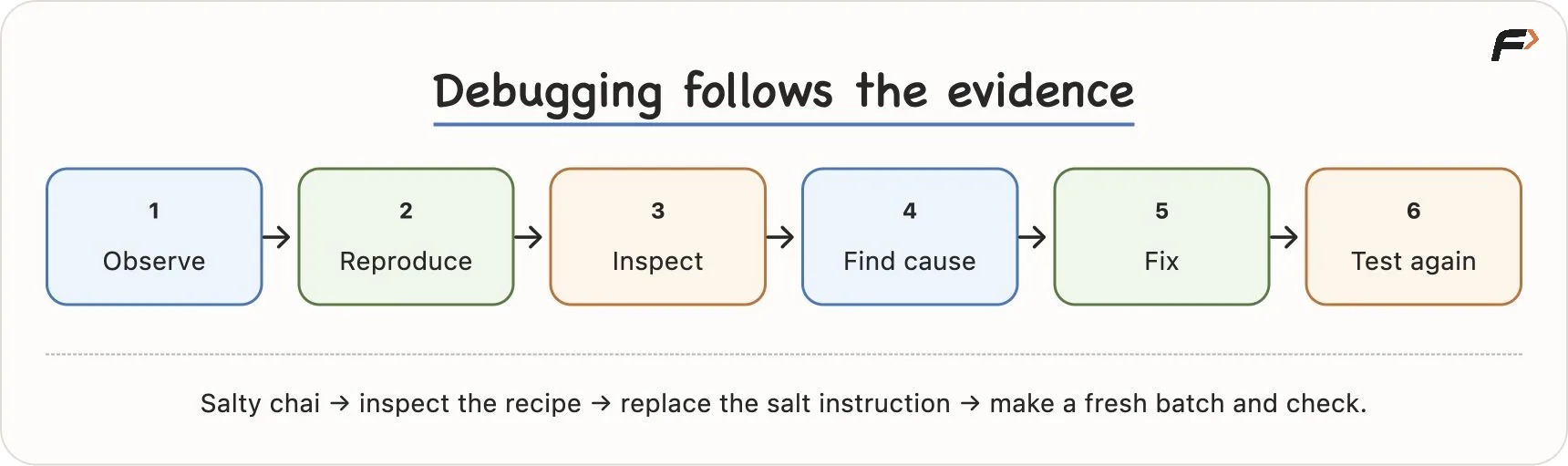
Let us debug the salty chai:
- Observe: The chai tastes salty rather than sweet.
- Reproduce: Follow the same recipe to understand how the result occurs.
- Inspect: Check each step and ingredient: water, tea leaves, boiling, milk, then the ingredient used for sweetness.
- Find the cause: The recipe specifies salt where it should specify sugar.
- Fix: Correct that instruction.
- Test again: Make a fresh batch using the corrected recipe and check the result.
Debugging process
Looking only at the final cup tells you that something went wrong. Inspecting the earlier steps helps you discover why. In a program, the instruction causing a failure may be far from the point where the failure becomes visible.
Errors are a normal part of programming. The skill is to investigate them carefully rather than change instructions at random.
7. Why programming languages exist
At a low level, a processor executes machine instructions represented using bits, whose values are 0 and 1. Data is also represented using bits. A sequence of binary digits is therefore not automatically a machine instruction; its meaning depends on how it is interpreted.
Writing a large application directly as long sequences of binary instructions would be impractical for most people. Programming languages give us a readable, formal way to express instructions. Examples include C++, Java and Python.
Abstraction: using something without managing every detail
Think of driving a car. Pressing the accelerator asks the car to accelerate. You do not personally coordinate every mechanical and electronic operation needed to produce that response.
This is abstraction: a useful interface lets you work with an action while hiding lower-level implementation details.
Programming languages and their libraries offer similar help. A function can provide a defined operation without requiring you to rewrite all the instructions behind it every time. You still need to understand what it expects and what it does.
A car also offers brakes, gears and other controls. Different car models offer different features. Similarly, programming languages provide different features and ways to express work.
From source code to execution
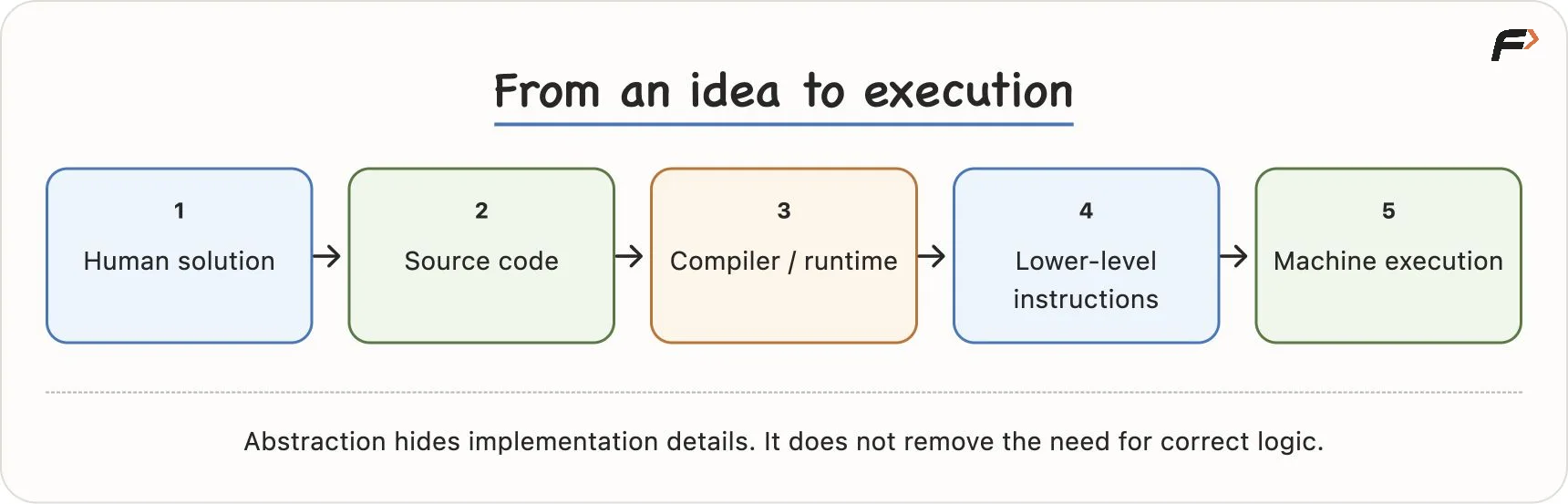
A compiler translates code into another representation. A runtime provides an environment that carries out program behaviour, sometimes interpreting or translating intermediate instructions. The exact route depends on the language implementation. For now, the key idea is that tools connect human-readable code to machine execution.
The translator analogy
Imagine that one person speaks Hindi and another speaks Japanese. A translator helps them communicate. In a similar way, programming tools process source code into a form that can be executed.
Why are there several languages?
Different languages and their surrounding tools make different kinds of work convenient. Their common strengths include:
| Language | Common areas of use |
|---|---|
| Python | Automation, data work and AI |
| Java | Backend systems and enterprise applications |
| C and C++ | Systems and performance-sensitive software; C++ is also commonly used for DSA |
| JavaScript | Interactive websites and server applications |
| Swift | Applications for Apple platforms |
These are examples, not exclusive boundaries. The same task may be possible in several languages. A language’s ecosystem includes its libraries, tools and supporting community, which also affect what is convenient to build.
The concepts you learn transfer between languages. Changing the language does not remove the need for correct instructions.
The analogy has a limit: a translator can translate an incorrect instruction accurately. Likewise, a compiler or runtime can process a program whose logic is wrong. Tools may detect certain errors, but they do not automatically repair your understanding of the problem.
8. Everyday technology is a flow of instructions and decisions
An interface may make an action look simple. Behind that action, several programs, devices and networks may be cooperating. Let us follow the examples in the lesson.
An ATM withdrawal
A simplified successful withdrawal involves these steps:
- Read the inserted card.
- Ask for the PIN and verify it through the bank’s system.
- Read the requested withdrawal amount.
- Check whether the withdrawal is allowed, including whether sufficient funds are available.
- Dispense cash for an authorised withdrawal.
- Record the transaction and coordinate the account update.
This describes the visible journey. A real system must also coordinate authorisation, cash delivery and account records, and handle failures between steps.
What if two withdrawals happen together?
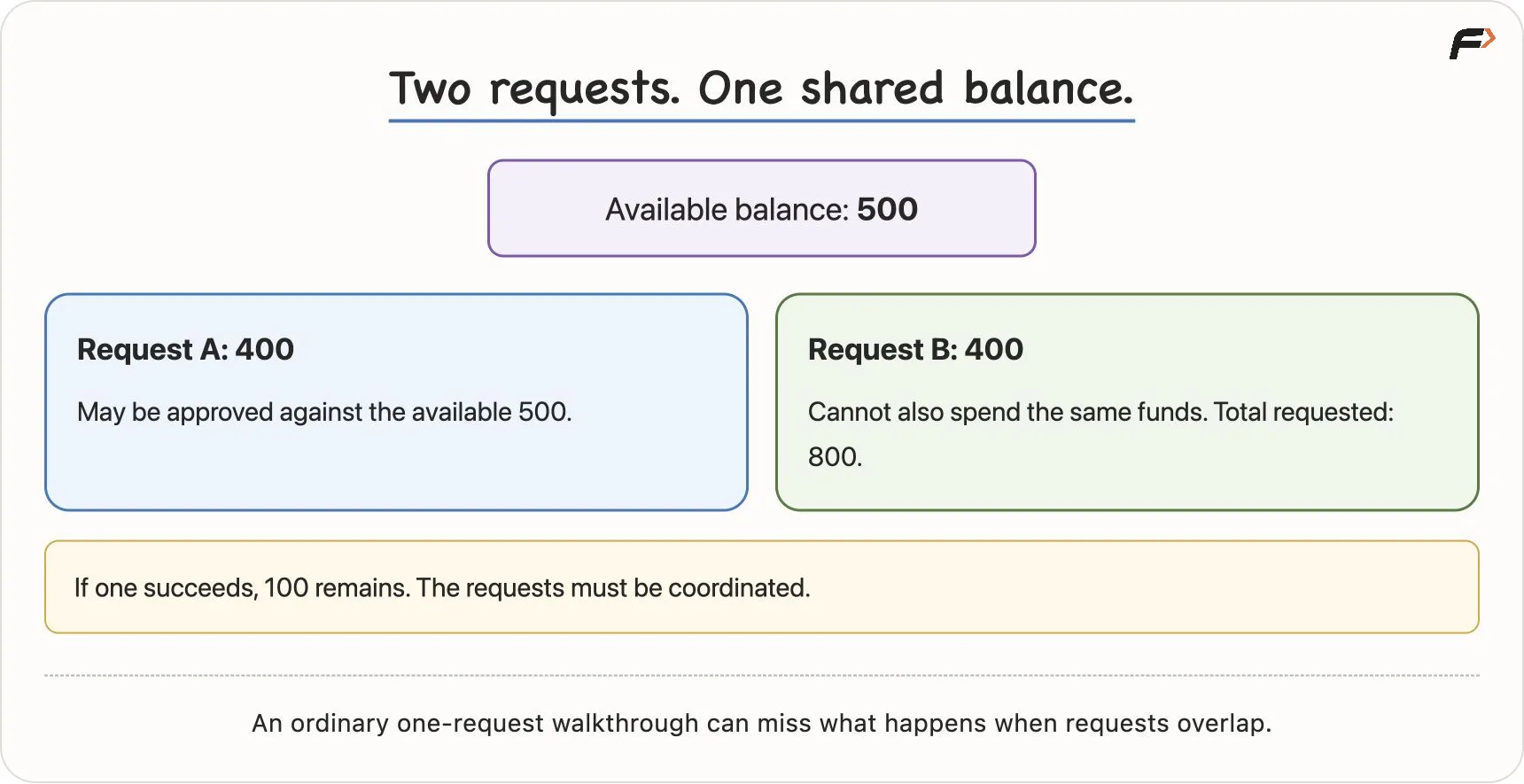
Suppose an account has 500 units available. Two requests, each for 400 units, arrive almost simultaneously: one from an ATM and one through another channel.
If each request independently checks the same old balance of 500, each could conclude that 400 is available. But both cannot successfully spend those funds: together they require 800.
Concurrent withdrawals from a shared balance
The system must coordinate the requests so that the same money is not authorised twice. If one request succeeds, only 100 remains available, and the other request cannot be approved against the original balance.
This is an example of an edge case: a situation that a simple, ordinary walkthrough may overlook. Here it involves concurrent activity, meaning operations happening at overlapping times. You do not need to implement the solution yet. Recognise why programming requires more than writing a short sequence for the easiest case.
Sending a message
When you send a message to a friend, the simplified flow is:
Type text → Store the draft → Press Send → Make a network request → Server routes the message → Friend’s device receives it → Display the message and notification.
The app must work with the network and server to deliver the message. Your single tap hides that coordination. This is another example of abstraction.
Ordering food
A food-delivery app also coordinates several steps: open the app, search for restaurants or a dish, select food, store the cart, calculate the total, request payment, send the order to the restaurant, and track delivery.
Each step has conditions to consider. For example, a payment that fails should not be treated as a successful payment. The visible interface sits above instructions that manage these possibilities.
Controlling traffic lights
A programmed traffic-light controller changes signals according to timings and rules, repeating its cycle. More complex systems may also respond to sensors. The exact signal sequence depends on the system and local rules; the programming lesson is that timing, state and permitted transitions must be defined precisely.
Across these examples, the pattern is the same: instructions receive information, make decisions and trigger actions.
9. What happens when Instagram opens?
Now connect the hardware and software concepts to a single action: tapping the Instagram icon.
- The touchscreen detects the tap. Hardware and software register your input.
- The OS identifies the app. It determines which application you selected.
- Required code and data are loaded into RAM. The system makes the parts needed to start the app available from storage.
- The CPU executes instructions. The app begins its work.
- The app requests information through network services. For example, it may request posts for your feed.
- The response is processed. Received data is used to prepare posts and interface elements.
- The screen displays the feed. The app responds as you scroll, tap or move to another screen.
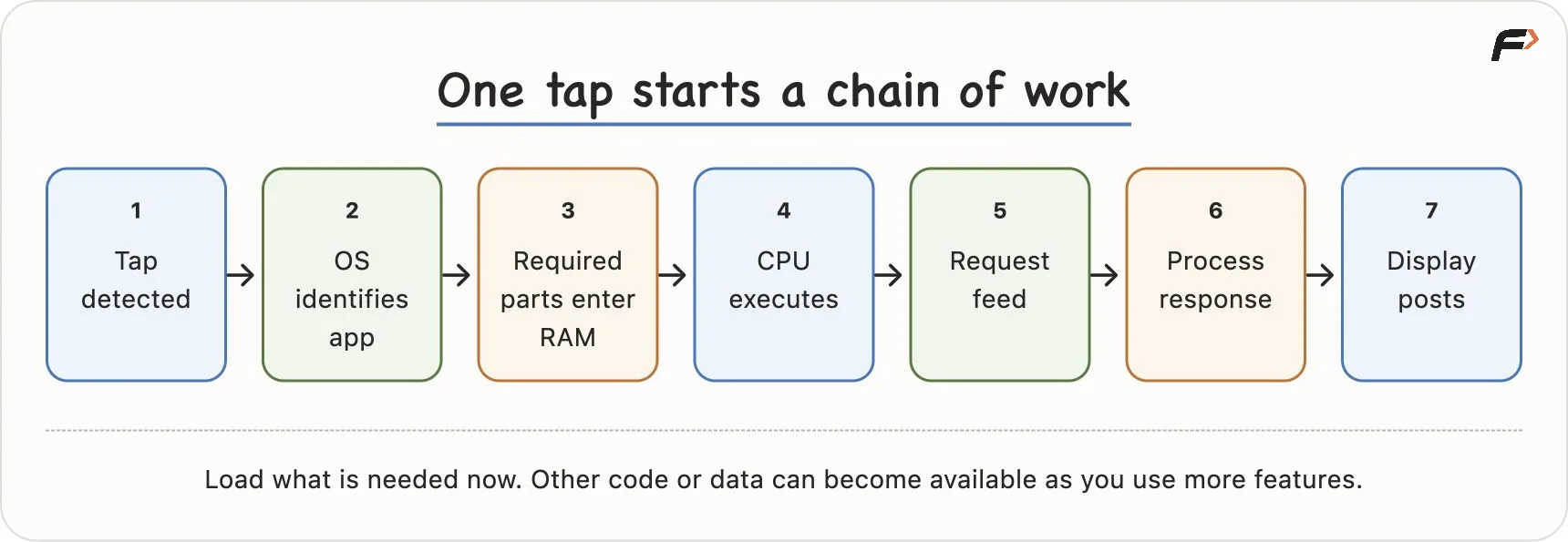
What happens when Instagram opens
Notice the word required. Opening an app does not mean its entire codebase and every possible piece of data must be loaded into RAM at once. Additional parts can be loaded when needed.
For example, moving from the feed to the profile screen may require code or data that was not needed initially. The system can make those parts available then. This helps avoid filling memory with everything the app might ever use.
These operations can happen very quickly, but opening speed is not fixed. It depends on the device, app state and any network requests involved.
10. From using programs to creating them
Until now, you may have mainly used apps such as Instagram, WhatsApp or YouTube. Learning programming changes your role:
Use programs → Understand how they work → Write instructions → Build programs.
You begin with small tasks. You learn to describe their rules, write a solution and think about cases it might miss. As those skills grow, you can combine them into larger projects.
The learning journey is:
- Learn one programming language well enough to express your ideas as working instructions.
- Learn data structures and algorithms (DSA) to organise data, solve problems and reason about correctness and efficiency.
- Build projects that combine those skills into complete products.
DSA concepts are largely language-independent, even though their implementations use a particular language. When building a product, the platform, available libraries and project requirements also influence the language you choose.
Knowing syntax helps you express a solution. You still need to understand the problem and decide what the solution should do.
Revision: make the ideas your own
Key terms
| Term | Meaning |
|---|---|
| Programming | Creating precise, ordered instructions to solve a task |
| Computer | A machine that executes instructions |
| Hardware | The physical components of a computing system |
| Software | Programs and related information |
| CPU | The processor that executes instructions |
| RAM | Fast, temporary working memory for active instructions and data |
| Storage | Persistent storage for saved programs and data |
| Operating system | Software that manages applications and hardware resources |
| Program | Instructions that describe work for a computer to carry out |
| Programmer | A person who creates programs |
| Bug | A defect that causes incorrect or unexpected behaviour |
| Debugging | Finding a defect’s cause, fixing it and testing the result |
| Binary | A representation using two digits: 0 and 1 |
| Programming language | A formal language for expressing program instructions |
| Abstraction | A useful interface that hides lower-level implementation details |