Programming Languages and Choosing a Path
An algorithm, flowchart or pseudocode describes how to solve a problem. To make that solution run, we express it in a programming language and use compatible tools to execute it. The logic comes first; the language gives that logic a precise, executable form.
1. What a programming language provides
A programming language is a formal system for expressing data and instructions that a computer can execute through a compiler, interpreter or runtime. Computers ultimately represent information in binary; languages let us work with meaningful names and statements instead of writing long sequences of zeros and ones.
Human instructions can be vague: “Meet me near the college after lunch.” A person can ask which place and what time. A program needs defined rules; it cannot reliably fill in missing intent.
| What a language supplies | What it lets us express |
|---|---|
| Vocabulary | Keywords and built-in names. |
| Syntax | Symbols arranged into valid statements. |
| Semantics | The meaning of those statements. |
| Data representation | Numbers, text, truth values and collections. |
| Control flow | Sequence, decisions, repetition and function calls. |
| Abstraction tools | Named, reusable pieces of behaviour. |
Consider this pseudocode for a teaching rule that includes everyone aged 18 or above:
IF age >= 18
    DISPLAY "Eligible"
END IF
Syntax asks whether the instruction follows the language’s writing rules. Semantics describes its meaning: compare age with 18, then display a message if the comparison is true. Correctness asks whether that meaning satisfies the requirement.
Changing >= to > can produce valid code that incorrectly excludes age 18. Braces, semicolons and Python indentation belong to syntax; choosing a condition with the right meaning is part of solving the problem correctly.
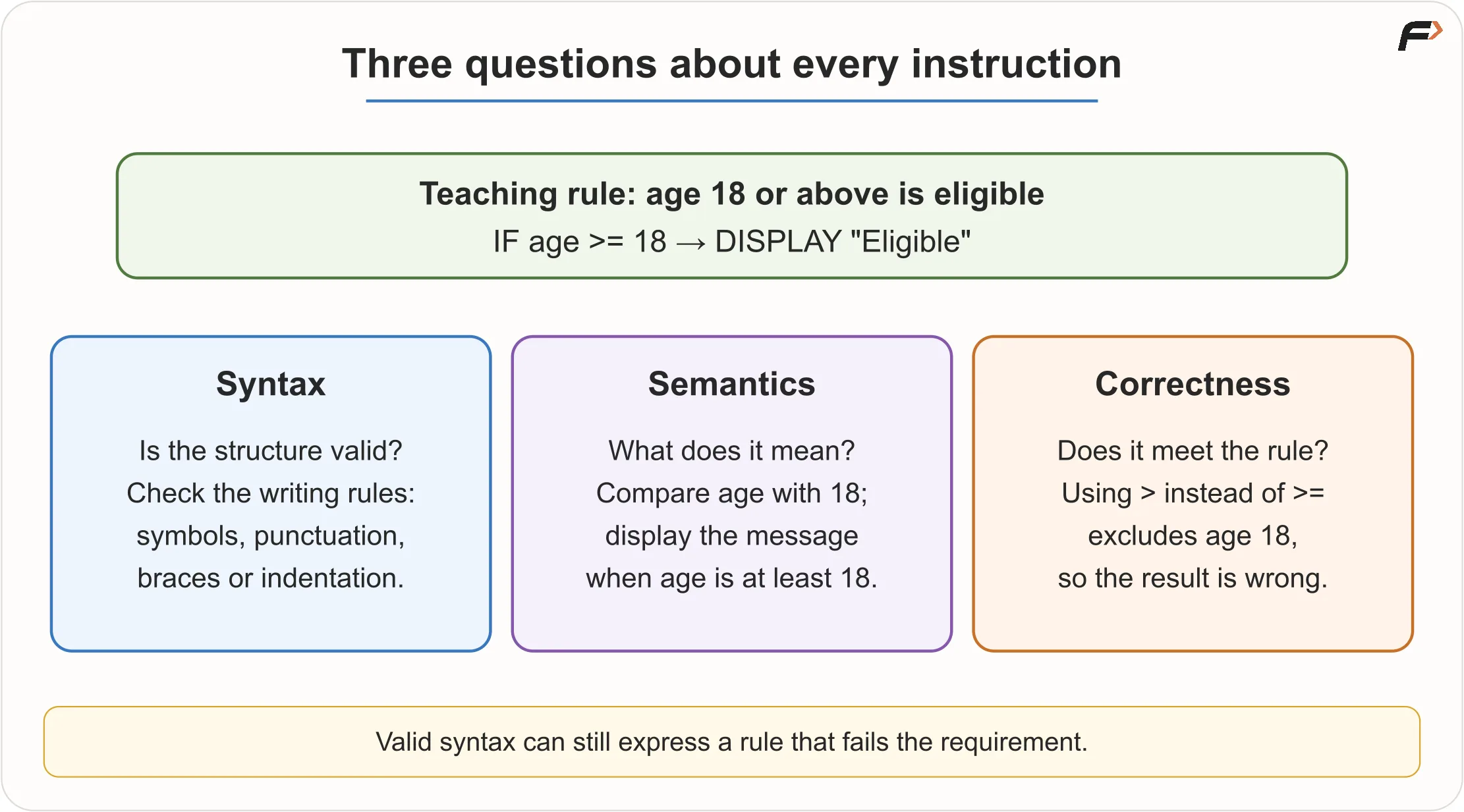
Syntax, semantics and correctness
2. The abstraction ladder
Abstraction lets us use a higher-level idea while lower layers handle its details. We move from a problem and its planned solution to source code, language tools, machine instructions, and finally the processor, memory and devices.
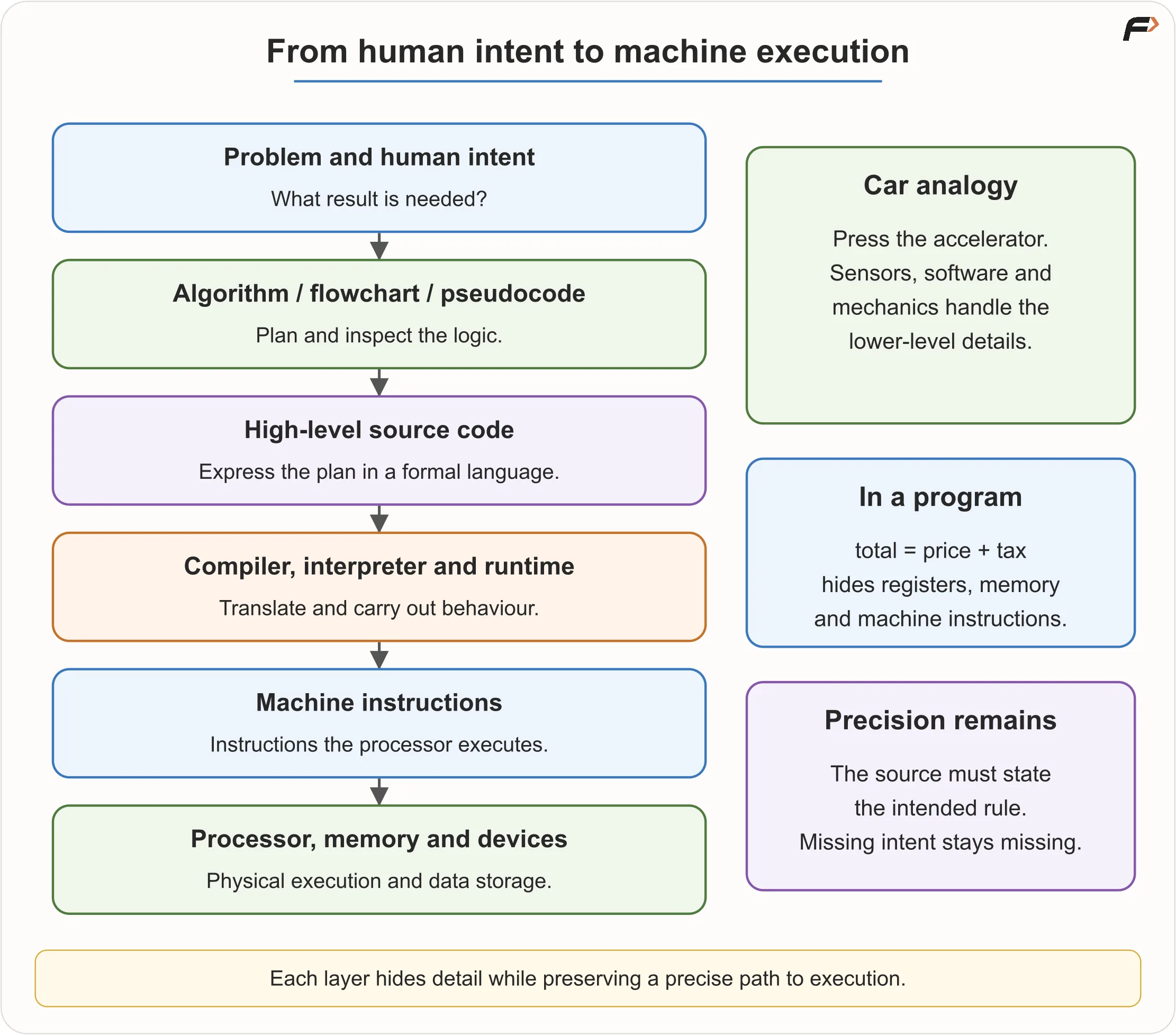
Abstraction Ladder
A driver presses an accelerator to move faster. Sensors, software and mechanical systems handle the details without the driver controlling fuel injection directly. Similarly, total = price + tax hides registers, memory locations and machine instructions.
The analogy has a limit: a physical control is designed for human movement, while source code remains a formal description. Abstraction reduces the detail we must manage; the program still needs precise instructions.
3. What happens when you press Run?
The human-readable program text is source code. For a program that adds two numbers, a simplified sequence is:
- The editor saves the source in a file or workspace.
- A compiler or runtime reads it and checks its syntax.
- Language tools translate it into a representation that can be executed.
- The operating system starts a process, with required code and data in memory.
- The program requests input, and the user enters the two values.
- The CPU performs the addition through lower-level instructions.
- The program asks its environment to display the result, such as in a terminal.
These are coordinated actions behind one button. Their exact order depends on the environment: for example, an interpreter process may already be running before it reads your source.
Know which tool does what
| Tool | Role |
|---|---|
| Code editor | Helps write and organize source text. |
| IDE | An Integrated Development Environment combines editing, project management, running and debugging tools. |
| Compiler | Translates source into another representation and reports errors it detects. |
| Interpreter | Carries out instructions from source or an intermediate representation. |
| Runtime / virtual machine | Provides services and an execution environment for program behaviour. A runtime may include an interpreter or compiler. |
| Terminal | A text interface for commands that start compilers, runtimes and programs. |
VS Code is an editor that works with separate language tools; installing an editor alone does not provide a C++ compiler. An IDE, such as IntelliJ IDEA, brings several development tools together. An online judge provides an editor and infrastructure that compiles or runs submissions and tests their output. VS Code’s C++ documentation explains this separation.
Three execution paths
A CPU does not directly understand a C++ loop or Python if. The implementation connects those statements to machine execution.
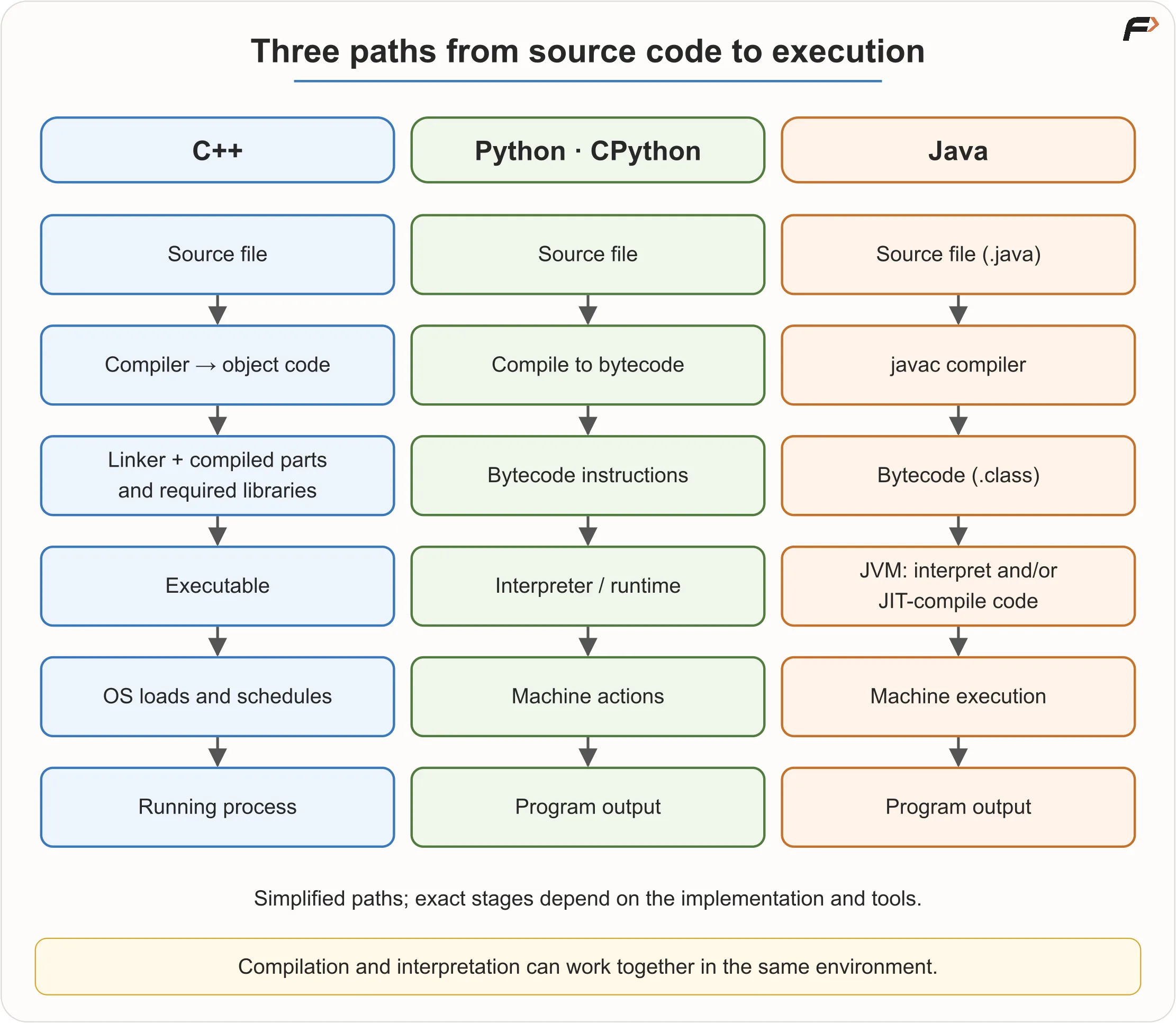
Execution Paths
C++: source passes through compilation into object code, then a linker combines required compiled pieces and libraries into an executable. The operating system loads runnable code and schedules the process. This is a simplified view; tools may expose preprocessing and assembly as additional stages. GCC’s compilation stages describe that fuller pipeline.
Python: execution depends on the implementation. In CPython, source is compiled into bytecode, an intermediate instruction representation executed by the interpreter. Calling Python “interpreted” does not mean that no translation occurs. Python’s bytecode definition explains this step.
Java: javac translates .java source into .class bytecode for the Java Virtual Machine (JVM). A JVM can interpret bytecode and use just-in-time (JIT) compilation to produce machine code during execution, including optimizing frequently executed code. The JVM provides an execution environment across supported systems. See the javac documentation and HotSpot runtime overview.
“Compiled” and “interpreted” usually describe implementation strategies. Learn your environment’s main path without treating these words as permanent, exclusive language categories.
4. Why do so many languages exist?
Software has different needs. Languages and their ecosystems balance performance, memory control, safety, concise expression, portability, developer productivity, concurrency, compatibility with existing systems, libraries, tooling, and suitability for a platform or domain.
A workshop contains a hammer, screwdriver, drill and saw because each makes certain jobs easier or safer. The comparison is useful, but languages overlap much more than those tools: C++, Java and Python are all general-purpose languages, and real products often combine several languages.
The ecosystem around a language
A library provides reusable code. A framework supplies a structured foundation that guides how an application is built. The ecosystem includes standard libraries, third-party packages, frameworks, build tools, debuggers, documentation, community knowledge and existing company codebases.
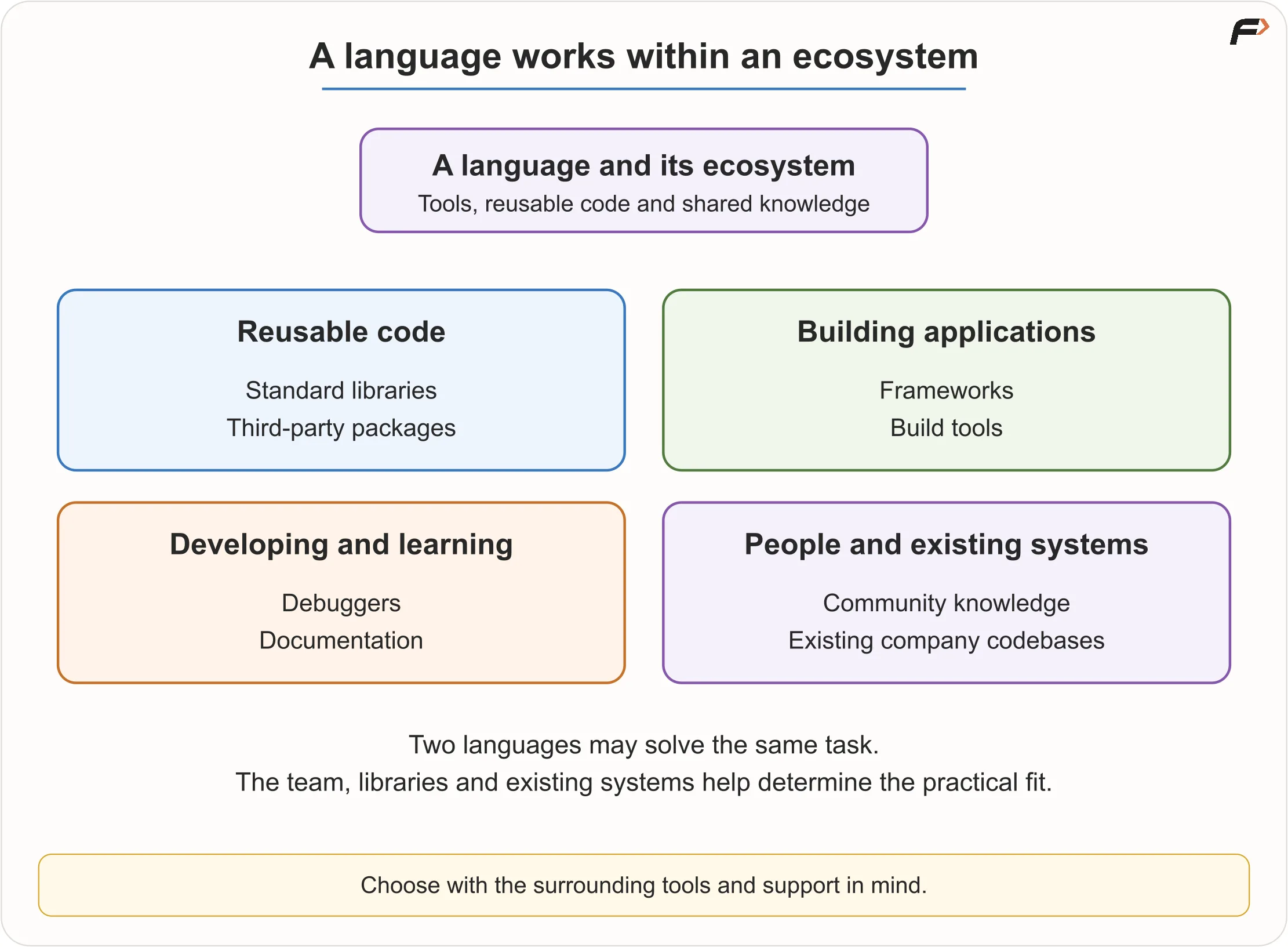
Language Ecosystem
Two languages may both be capable of building a backend service. A team may prefer one because its existing code, libraries and developers already support it. Technical capability and practical fit are separate considerations.
5. A practical map of languages
These are common strengths, not restrictions on what each language can do.
| Language | Useful mental model | Common uses |
|---|---|---|
| C | A relatively small, procedural language with direct access to memory and system resources. | Operating-system components, embedded devices and firmware, hardware-facing libraries, foundational systems software. |
| C++ | Performance and control with high-level abstractions and a rich standard library. | DSA and competitive programming, game engines, browsers and rendering, real-time and other performance-sensitive systems, financial and simulation software, large native applications. |
| Java | Explicit static types and structured, object-oriented development on a managed runtime. | Backend services, enterprise systems, financial and business applications, Android codebases, cross-platform application tooling. |
| Python | Readable, high-level expression with a large ecosystem. | Learning programming, automation and scripting, data analysis, AI and machine learning, scientific computing, testing and developer tools, web/backend development. |
| JavaScript | Interactive browser programming, also available through server runtimes. | Browser interactions, frontend applications, server services, full-stack products, desktop and mobile frameworks. |
| Go | A compact compiled language with support for concurrency. | Cloud and network services, web/backend systems, command-line tools, DevOps and infrastructure software. |
| C# | A managed language closely associated with .NET. | Backend services, Windows and cross-platform applications, enterprise software, Unity game development. |
| Kotlin | A modern language with a strong JVM and Android ecosystem. | Android applications and backend development. |
| Swift | A major language for Apple-platform applications. | iOS, macOS and related Apple-platform apps. |
| Rust | Systems performance with memory safety as a major design goal. | Systems and performance-sensitive native software, including safety-sensitive components. |
The trade-offs matter for learners:
- C exposes data and memory behaviour, but direct control means more responsibility and explicit management.
- C++ offers standard containers and algorithms associated with the Standard Template Library (STL), which help implement DSA efficiently. Its large feature set can be learned gradually.
- Java offers clear types and useful collections. Its extra structure can help, though small programs contain more setup than Python equivalents.
- Python reduces early punctuation and lets beginners reach values and control flow quickly. Short code can still perform substantial work and consume significant memory.
- Rust’s ownership model is valuable, but may add complexity before an absolute beginner needs it.
Java and JavaScript are distinct languages with different type systems, runtimes and ecosystems. Their similar names do not make them versions of one language. Go’s cloud, web, CLI and infrastructure roles are also reflected in its official use-case guidance.
6. Choosing between C++, Java and Python
All three are credible starting points for programming and DSA. Choose a route that fits your goals and available support.
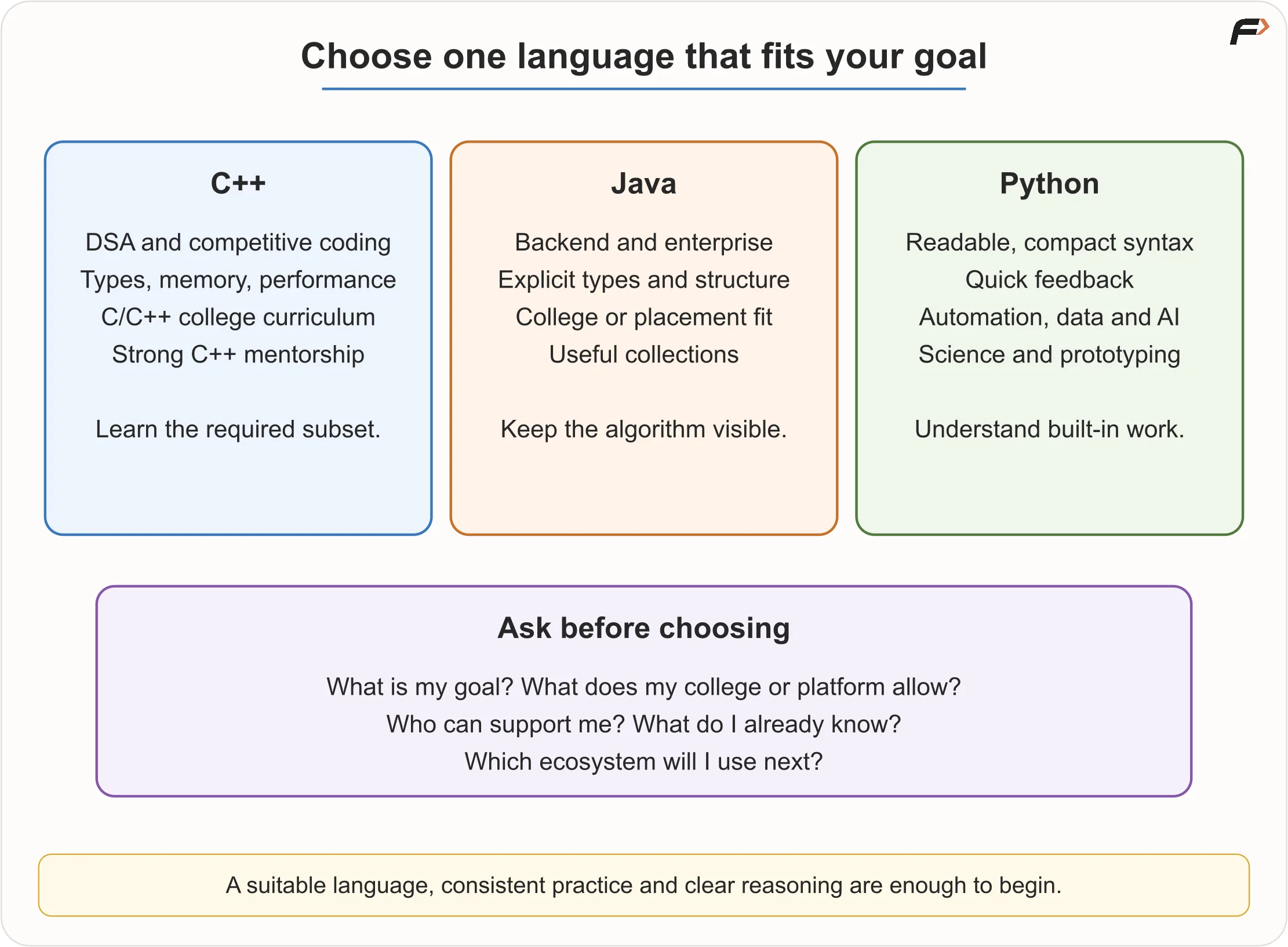
Choose a Language
| Start with | When it fits | Keep in mind |
|---|---|---|
| C++ | DSA/competitive programming is central; college uses C/C++; you want earlier exposure to types, memory and performance; or strong C++ mentorship is available. | Learn the subset needed for problems. You do not need the whole language first. |
| Java | College or placement preparation uses it; backend/enterprise work interests you; explicit structure and static types help; or OOP will matter later. | Keep the algorithm visible beneath the surrounding setup code. |
| Python | Syntax feels intimidating; you want quick feedback; automation, data, AI, scientific work or prototyping interests you; or readability helps you focus on logic. | Check that your assessments and target platforms allow it. Explain the work done by built-in operations. |
“Which language is best?” becomes useful when you ask:
- What is my immediate goal: DSA, college exams, web, apps, data or systems?
- What does my coursework or target coding platform accept?
- Where do I have strong teaching, mentorship and peer support?
- Do I already know the basics of a suitable language?
- Which ecosystem will I need after the fundamentals?
With no external constraint, C++ is a practical option for competitive programming, Java for structured learning and backend interests, and Python for an approachable start or automation/data interests. If you already know a suitable language, build on that foundation. Consistent practice usually teaches more than repeatedly restarting in another language.
7. One algorithm in three languages
Problem: read an integer and display whether it is even or odd.
First describe the logic without choosing a language:
READ number

IF number MOD 2 equals 0
    DISPLAY "Even"
ELSE
    DISPLAY "Odd"
END IF
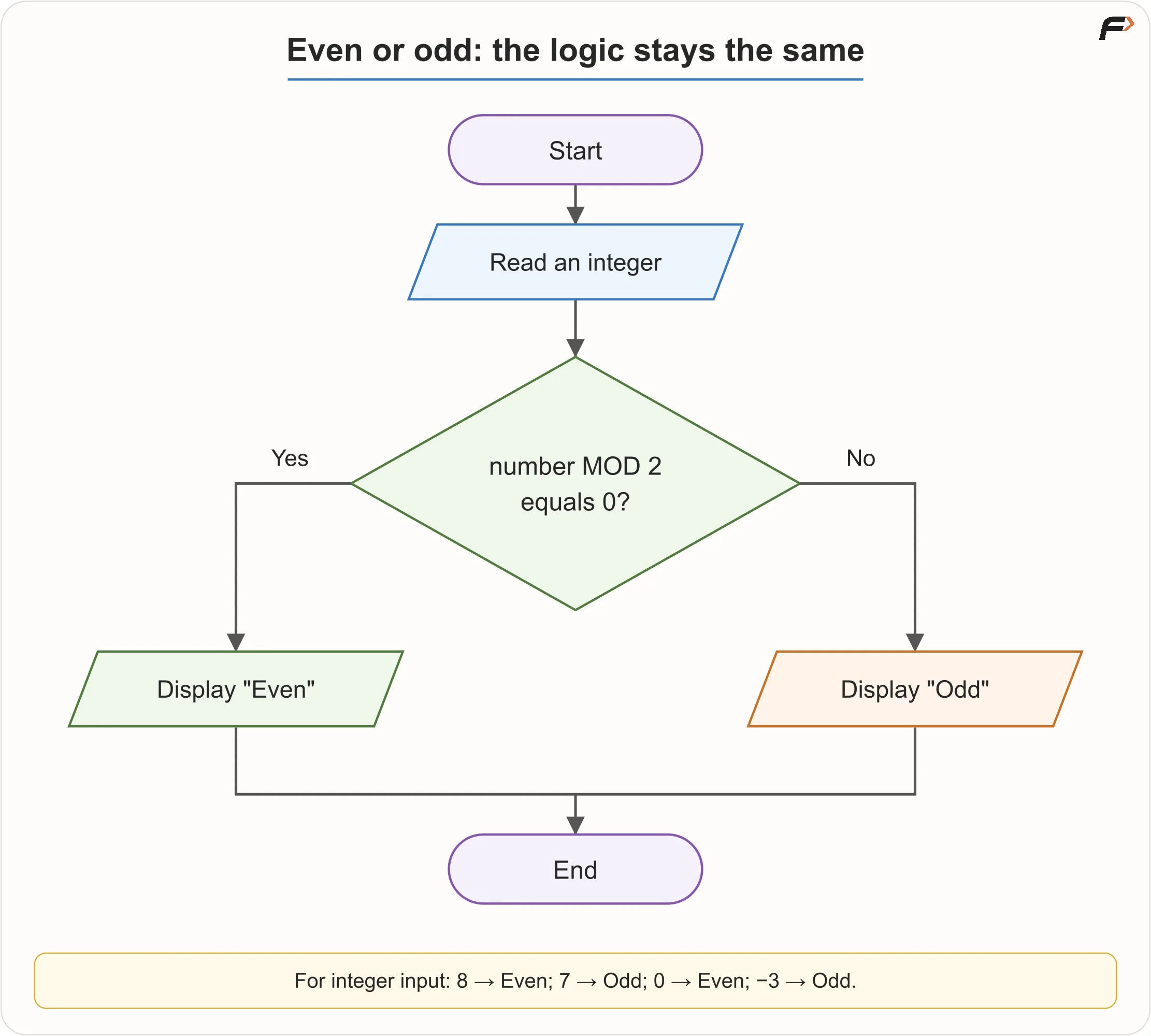
Even/Odd Flowchart
C++ preview
This fragment belongs inside main, with <iostream> included.
int number;
std::cin >> number;

if (number % 2 == 0) {
    std::cout << "Even";
} else {
    std::cout << "Odd";
}
Java preview
This fragment belongs inside a method, with scanner already created as a java.util.Scanner reading System.in.
int number = scanner.nextInt();

if (number % 2 == 0) {
    System.out.println("Even");
} else {
    System.out.println("Odd");
}
Python preview
This is a complete small script.
number = int(input())

if number % 2 == 0:
    print("Even")
else:
    print("Odd")
There is no need to memorize all three. Notice the four unchanged operations: receive a number, find its remainder after division by 2, compare that remainder with zero, and choose the output. Types, input/output syntax, braces, semicolons and indentation vary; the algorithm stays the same. Python uses indentation to group statements, so it must be consistent.
These previews assume valid integer input within the chosen language’s supported range. Zero is even, and negative integers can also be even or odd. Testing whether the remainder equals zero works in all three languages, including for negative inputs.
8. How much language knowledge is enough for DSA?
Learn one language well enough to:
- Write, run and read a basic program.
- Use input and output.
- Work with variables and fundamental data types.
- Use operators and expressions.
- Write conditions.
- Write loops.
- Define and call functions.
- Work with arrays or lists and strings.
- Read basic errors and debug simple programs.
- Use the standard containers common in that language’s DSA solutions.
Then begin solving DSA problems. Deeper recursion can come when problems require it. In C++, strengthen pointers and references before linked lists and trees. Advanced object-oriented design can wait unless your curriculum requires it; file handling, GUI development and frameworks are not prerequisites for starting DSA.
What DSA adds
Programming expresses instructions. Data structures and algorithms (DSA) help organize data and choose approaches that remain useful as input grows.
Checking ten contacts one by one is easy. Searching millions of records raises questions about search strategy, organization, time and memory. That is the shift from getting a program to run to choosing an effective solution.
The progression is: understand problems and express logic → implement that logic in one language → use DSA for correctness and efficiency → combine programming, data, interfaces and systems in projects.
9. Language myths to leave behind
| Misconception | What to remember |
|---|---|
| C++ guarantees better DSA skills. | Its tools help, but skill comes from reasoning and practice. |
| Python is not a real programming language. | It is a general-purpose language used in production and scientific work. |
| Short Python code always runs fast. | Code length and computational work are different. A short operation can hide a large computation. |
| Java is too verbose for interviews. | Java is a valid choice where it is accepted. Familiarity and correct implementation matter more than fashion. |
| Java and JavaScript are versions of one language. | They are distinct languages. |
| Compiled always means fast; interpreted always means slow. | Performance depends on the implementation, optimization, workload and environment. Build time and execution time are also separate measurements. |
| I should learn all three before DSA. | One language is enough to begin; learning three first repeats beginner work. |
| Switching languages will fix weak logic. | Easier syntax may help you express a solution, but you still need to understand that solution. |
| My first language decides my whole career. | Foundations transfer, and you can learn other languages later. |
| Advanced OOP must come before arrays. | Learn in dependency order; the essential programming subset is enough to start. |
Python’s AI ecosystem also does not mean C++ lacks AI libraries. For example, PyTorch provides a C++ interface for training and inference, while its Python interface uses a substantial C++ foundation. Ecosystems influence convenience, not exclusive ownership of a domain. PyTorch’s C++ frontend documentation demonstrates this overlap.
10. Choose a route and practise
Write three short answers:
- My immediate goal is…
- My college, mentor or target platform expects or supports…
- Therefore, I will start with C++ / Java / Python because…
Commit to that language for the foundations. Before implementing the even/odd problem, draw its flowchart, write pseudocode and dry-run it with 8, 7, 0 and -3. Use the reference diagram and pseudocode above to check your work. After learning input, conditions and output in your chosen language, implement the solution.
| Input | Is the remainder on division by 2 zero? | Expected output |
|---|---|---|
8 | Yes | Even |
7 | No | Odd |
0 | Yes | Even |
-3 | No | Odd |
Key terms
| Term | Meaning |
|---|---|
| Programming language | Formal system for expressing data and executable instructions. |
| Source code | Human-readable program text. |
| Syntax | Rules for valid written structure. |
| Semantics | Meaning of an instruction. |
| Compiler | Tool that translates source into another representation. |
| Interpreter / runtime | An interpreter executes instructions; a runtime supplies execution services and may include an interpreter or compiler. |
| Bytecode | Intermediate instructions used by some language implementations. |
| Linker | Tool that combines compiled parts and required dependencies. |
| Process | A running instance of a program. |
| IDE | Environment combining editing, project, running and debugging tools. |
| Library | Reusable code available to programs. |
| Framework | Structured foundation that guides application development. |
| Ecosystem | A language’s libraries, packages, frameworks, tools, documentation, community and existing codebases. |
| Abstraction | A useful higher-level interface that hides lower-level detail. |
Revision:
Computers execute precise instructions. Design the algorithm before coding it: use flowcharts to inspect routes, pseudocode to express logic, and dry runs with edge cases to check behaviour. A programming language supplies the syntax and meaning, supported by an ecosystem that makes execution and development practical. Choose one suitable language, learn its essentials, and start turning understood logic into running programs.