How to Think Like a Programmer
Logical thinking, computational thinking and algorithms
In the previous lesson, we learned that a computer follows instructions. We also saw how hardware and software work together to execute a program. Now comes the question that matters before writing code: how do we decide which instructions to give?
This lesson develops a practical approach: understand the requirement, represent the information, design the steps, test the logic, and then express the solution in a programming language.
1. Knowing syntax does not design a solution
You may know the keywords if, else, for and while. You may even know how to use them in several languages. That knowledge helps you write code, but it does not automatically tell you how to solve a problem.
Think again about cooking rice from our previous editorial. Knowing the words “boil”, “rice”, “water” and “serve” does not tell you how much water to use, which action comes first, or when to stop cooking. You still need to understand the task and work out a suitable process.
Programming has the same distinction. Syntax helps us express a solution; logical thinking helps us create one. Learning a language is useful, but collecting more languages cannot replace reasoning about the problem.
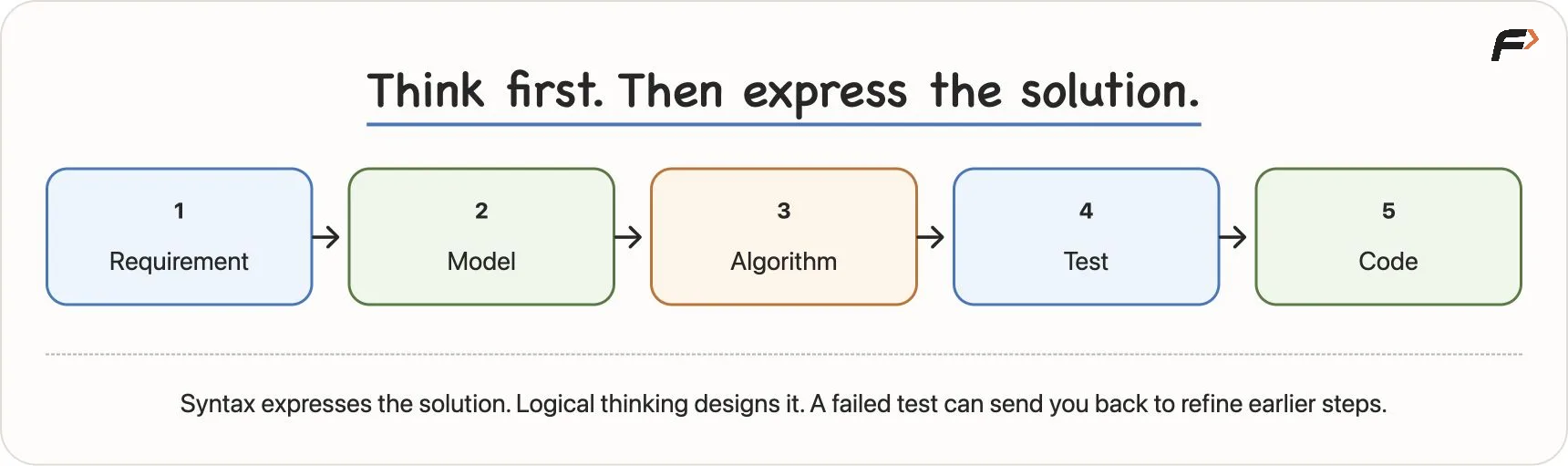
From understanding to working code
The sequence is a useful starting habit, not a rule that forbids revisiting earlier work. If a test reveals a missing condition, return to the requirement or algorithm and improve it.
2. Work through a problem before writing code
Consider this task: compare two numbers and report which is larger, or report that they are equal. Let us build the solution in stages.
Gather the requirement
A programming problem describes a task: we have some information and want a particular result. Here, we receive two numbers and must compare them.
The information given to the solution is its input. The result it must produce is its output.
For this task:
- Input: two numbers.
- Output: the larger number when they differ, or an “Equal” message when they match.
This distinction applies to many tasks. We may have two numbers and want their sum, student marks and want a result, a contact list and want one person’s details, or a shopping cart and want the final amount.
Build a model
A model is a useful representation of the information we need. We can name the two inputs a and b.
Those names stand for values that may change between runs. They allow us to reason about the general task instead of writing a separate solution for every pair of numbers.
Propose an algorithm
An algorithm is a finite sequence of clear steps for solving a defined problem. Our first attempt might be:
READ a, b

IF a > b
    DISPLAY a
ELSE
    DISPLAY b
END IF
This is pseudocode: a way to express logic without committing to the exact syntax of C++, Java or Python. READ means receive input, and DISPLAY means produce output.
The instruction a > b asks whether a is strictly greater than b. The ELSE path runs when that condition is false.
Before translating these steps into code, try them on examples.
Test ordinary examples first
For a = 8 and b = 13, the condition 8 > 13 is false, so the algorithm displays 13. That is the larger number.
For a = 100 and b = -4, the condition 100 > -4 is true, so it displays 100. This example also checks a comparison involving a negative number.
Both examples work. But do they cover every possible relationship between the inputs?
Test equality and refine the algorithm
Now use a = 7 and b = 7. The condition 7 > 7 is false, so the first algorithm displays the second 7.
For our task, that misses the required “Equal” message. Neither number is strictly larger than the other. We need a third outcome:
READ a, b

IF a > b
    DISPLAY a
ELSE IF b > a
    DISPLAY b
ELSE
    DISPLAY "Equal"
END IF
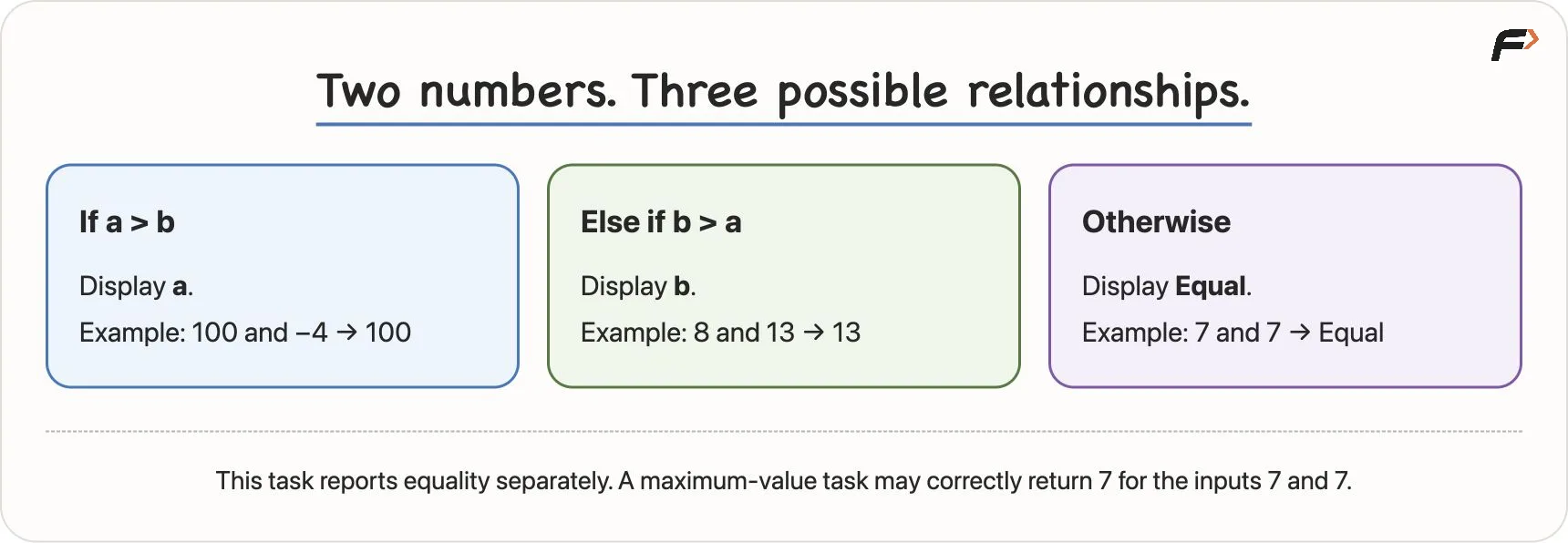
Comparing two numbers, including equality
| Inputs | First condition: a > b | Next step | Output |
|---|---|---|---|
8, 13 | False | 13 > 8 is true | 13 |
100, -4 | True | Use the first branch | 100 |
7, 7 | False | 7 > 7 is also false | Equal |
For ordinary numeric inputs, these three relationships cover the possibilities: a is larger, b is larger, or they are equal. The tests illustrate the branches; the relationship between the numbers explains why the branches cover the task.
The exact output requirement matters. If a different problem asks only for the maximum value, returning 7 for (7, 7) is correct. The explicit “Equal” branch is needed here because our task asks us to distinguish equality. A solution cannot be judged without its requirement.
Solve the problem, not just one instance
The general problem is comparing two numbers. Each particular input pair, such as (8, 13), (100, -4) or (7, 7), is a problem instance.
Hard-coding the output 13 would answer the first example but fail on other inputs. Using a and b lets the algorithm derive its answer from whichever valid pair it receives.
Once the logic and its cases are understood, we can implement it in C++, Java, Python or another suitable language. The syntax changes; the comparison logic remains the same.
3. Read every problem like a contract
A problem statement is a contract between the task and your solution. Before solving it, identify five things.
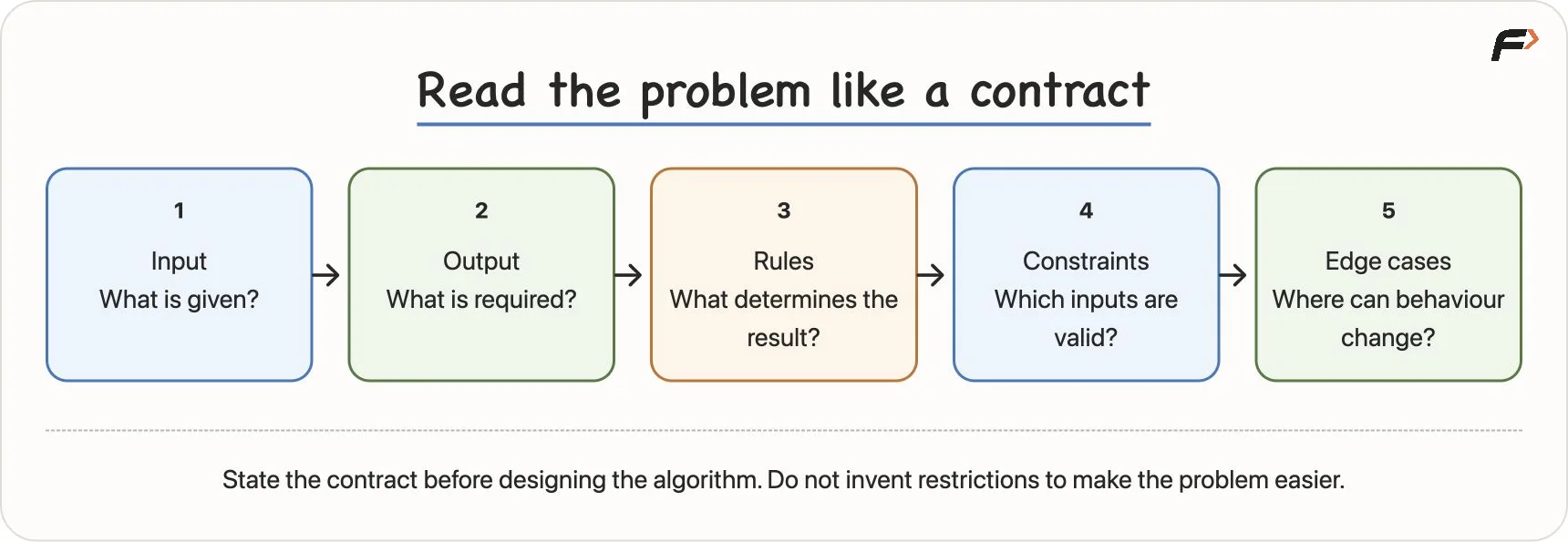
Input, output, rules, constraints and edge cases
Input: what is given?
In the comparison problem, the inputs are a and b. In a cab-fare problem, they might be distance travelled and waiting time. Identify the information available before deciding how to use it.
Output: what must be produced?
Do you need only a final fare, or a breakdown of base fare, distance charge and tax? Must equal numbers produce a number or a message? These are different output requirements.
Rules: what determines the result?
Rules connect the inputs to the output. Examples include “every subject must have at least 40 marks” or “delivery is free when the cart value is at least 499”. A leap-year task similarly depends on its stated divisibility rules.
Pay attention to words such as every, at least, greater than, equal, and only if. A small word can change the condition your solution needs.
Constraints: which inputs are allowed?
Suppose the two-number problem guarantees that the numbers are never equal. The original two-branch comparison is sufficient for that restricted task. If equal inputs are allowed and must be reported separately, it needs the equality branch.
Constraints can also describe ranges or sizes. If a task defines valid ages as 0 through 120, then 400 is outside that stated range. It is invalid data, rather than a valid edge case.
Whether your program must reject invalid data or may assume valid inputs depends on the contract. Do not invent a restriction just because it makes the solution easier.
Edge cases: where might the behaviour change?
An edge case, also called a corner case, is a valid input near a boundary or one that needs special consideration. Equality is useful when comparing numbers. For a hypothetical eligibility rule beginning at 18, the values 17 and 18 check the transition directly.
Constraints determine which cases are relevant. Negative numbers deserve testing when they are allowed; they are not automatically invalid or “advanced”.
When starting out, write this contract on paper. It helps reveal assumptions that are easy to overlook while coding.
4. Apply the contract to student marks
Consider a slightly richer requirement:
Read marks in three subjects. Display the average. Display Pass only if every subject has at least 40 marks; otherwise display Fail.
We can model the inputs as mark1, mark2 and mark3. Clear names make their roles easier to remember.
Calculate and display the average
The arithmetic is:
average = (mark1 + mark2 + mark3) / 3
The parentheses mean that we add all three marks before dividing the total by 3. Displaying this average satisfies one part of the output requirement.
Check the separate pass rule
The result depends on all three subjects meeting the threshold:
READ mark1, mark2, mark3

SET average = (mark1 + mark2 + mark3) / 3
DISPLAY average

IF mark1 >= 40 AND mark2 >= 40 AND mark3 >= 40
    DISPLAY "Pass"
ELSE
    DISPLAY "Fail"
END IF
>= means “greater than or equal to”. AND requires every condition joined by it to be true.
Computing the average correctly does not automatically determine whether the student passes. For 90, 90, 30, the average is 70, but the third subject is below 40. The correct result is Fail.
A rule such as “average is at least 40, so Pass” would produce the wrong result. Its arithmetic may be correct, but it translates the requirement incorrectly.
Test just below, at and above the threshold
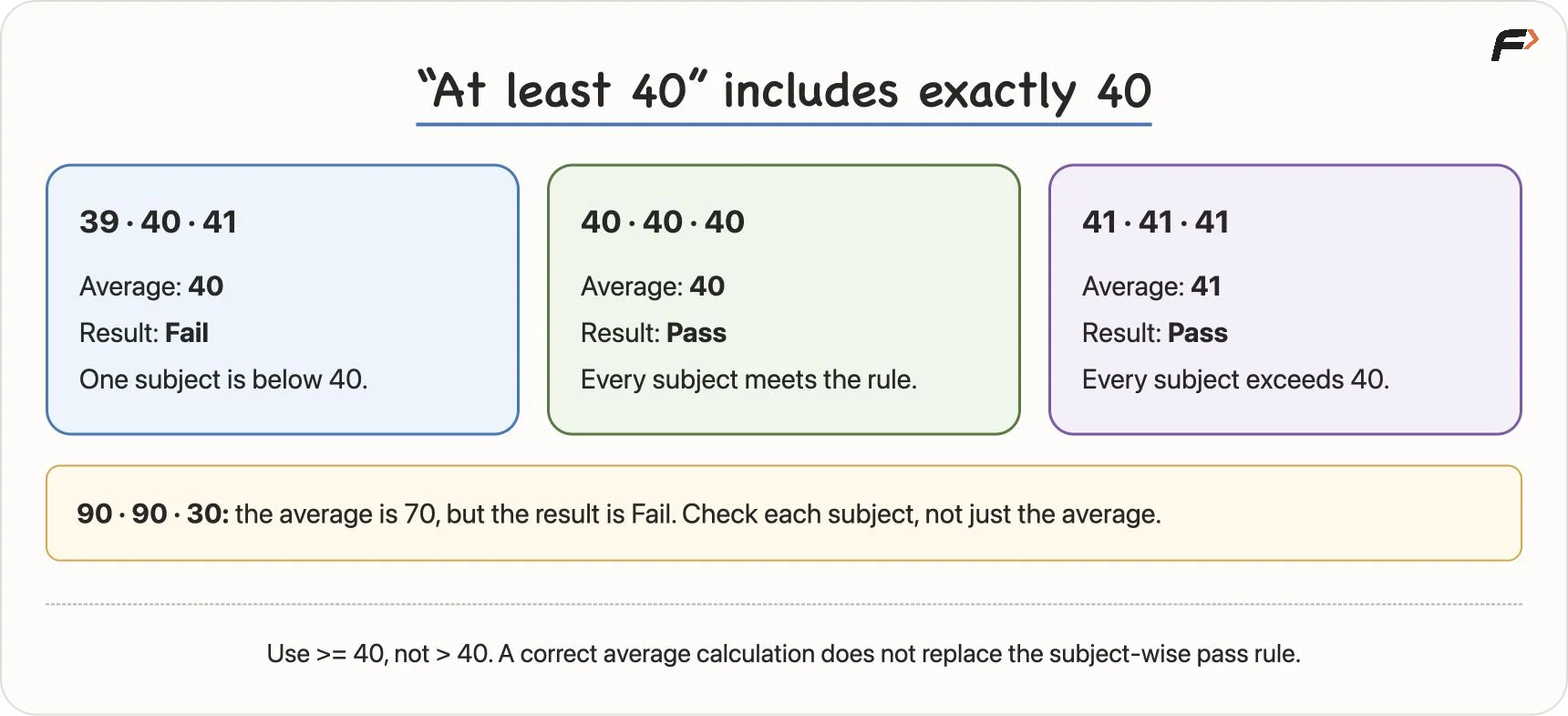
Testing the pass threshold at 39, 40 and 41
| Marks | Average | Result | What this checks |
|---|---|---|---|
39, 40, 41 | 40 | Fail | One subject just below 40 must fail |
40, 39, 41 | 40 | Fail | The second subject must also be checked |
40, 41, 39 | 40 | Fail | The third subject must also be checked |
40, 40, 40 | 40 | Pass | Exactly 40 is allowed |
41, 41, 41 | 41 | Pass | Values just above the boundary pass |
90, 90, 30 | 70 | Fail | A high average cannot hide a failing subject |
If we accidentally write > 40 instead of >= 40, (40, 40, 40) will fail even though it is a valid passing case. A tiny missing symbol changes the behaviour.
For these examples, we assume the supplied marks are valid numeric marks. A full specification should also state their permitted range and how to display an average that is not a whole number.
5. Computational thinking makes a problem manageable
A large task can look impossible when considered all at once. Computational thinking is a disciplined way to organise that task so that its solution can be carried out precisely.
It is useful beyond programming. A teacher divides a syllabus into lessons. A manager divides work into responsibilities. A programmer can similarly divide and organise a difficult problem.
Four ideas help:
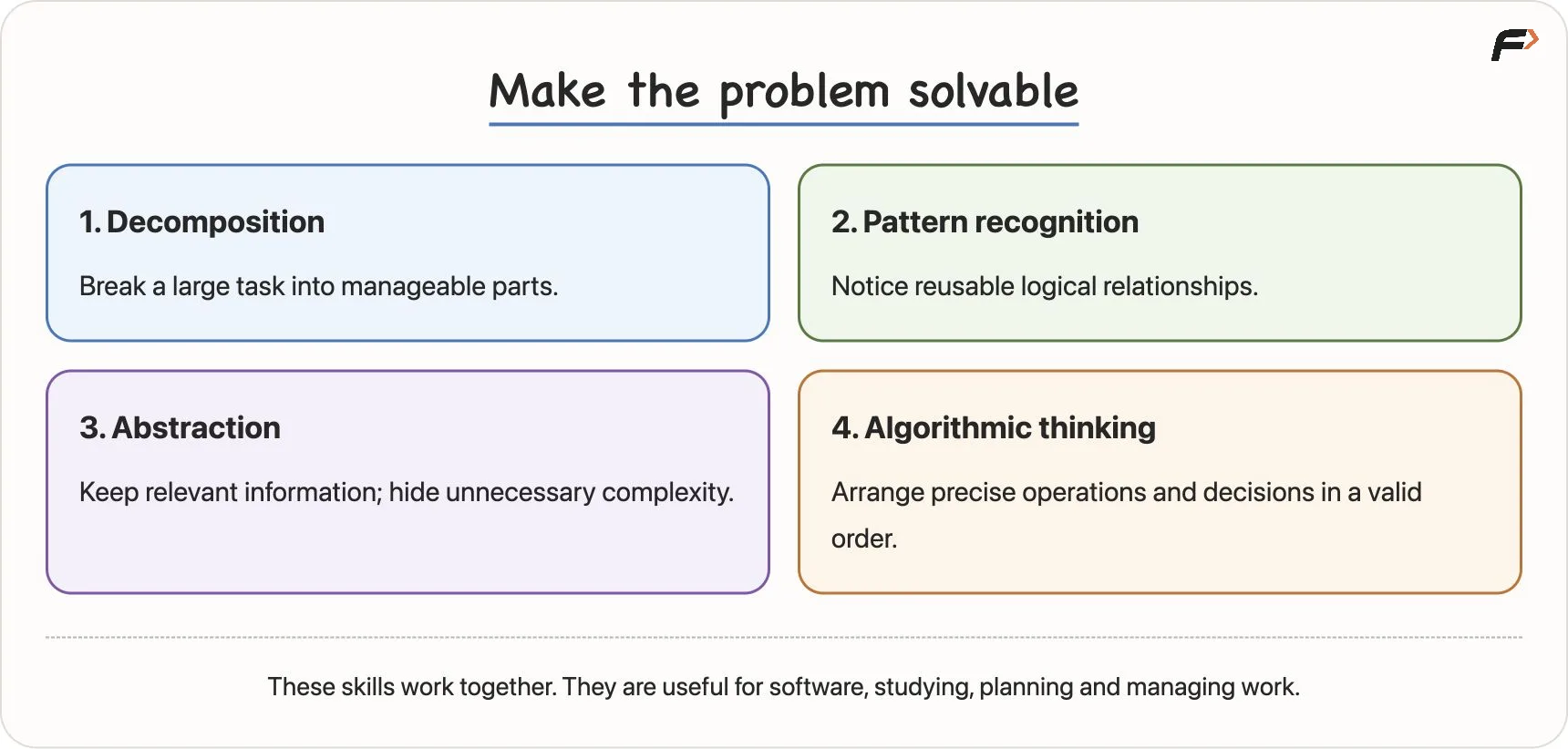
The four skills of computational thinking
Decomposition: divide the task
Break a large problem into smaller parts that you can understand and solve. Instead of asking only, “How do I build the entire system?”, ask, “Which smaller responsibility can I handle first?”
Pattern recognition: notice reusable logic
Look for relationships you have seen before. Voting eligibility under a stated rule, exam eligibility, free-delivery eligibility and checking whether a balance is sufficient all have a similar shape:
Read information → Compare it with a rule → Choose an outcome.
The stories differ, and their conditions differ, but recognising the common structure helps you reason about them. Later, DSA problems involving consecutive days, ranges of transactions or portions of text may also share logical patterns.
A familiar pattern is a starting point. Verify its assumptions and adapt it to the actual requirement.
Abstraction: keep the relevant details
Focus on the information needed for the current task and hide unnecessary implementation detail.
For example, if your chosen language or library supplies a suitable data structure, you may use its defined operations without implementing its internals from scratch. You must still understand what those operations do and any relevant limitations.
For a shopping-total calculation, prices, quantities, coupons, tax and delivery fees matter. The customer’s wallpaper colour or favourite song normally does not. A driver similarly uses steering and pedals without personally controlling every internal mechanism of the car.
Hidden details still exist. Abstraction chooses the appropriate level of detail; it does not remove a rule that changes the correct answer. Ignoring the subject-wise pass requirement would be a mistake, not a useful abstraction.
Algorithmic thinking: connect the parts in order
Arrange the operations and decisions into a valid process. Ask what happens first, which step depends on an earlier result, where a choice is needed, what repeats, and when the process stops.
The smaller parts must combine into a solution that satisfies the original requirement. A collection of individually useful operations is not enough if they run in the wrong order.
6. Decompose a food-delivery app, then a messy room
A large application has smaller responsibilities
Think of a food-delivery app such as Swiggy, Zomato or Uber Eats. “Build the app” is too large to be a useful instruction on its own.
We can divide that goal into responsibilities:
- Accounts: sign-up, login, names and addresses.
- Restaurant search: finding suitable restaurants.
- Menus: showing dishes and their details.
- Cart: storing selected items and coupon choices.
- Pricing: calculating discounts, taxes, fees and the payable total.
- Payment: requesting and handling payment.
- Restaurant confirmation: sending and managing the restaurant’s order response.
- Delivery: assigning and managing delivery work.
- Tracking: showing the order’s progress.
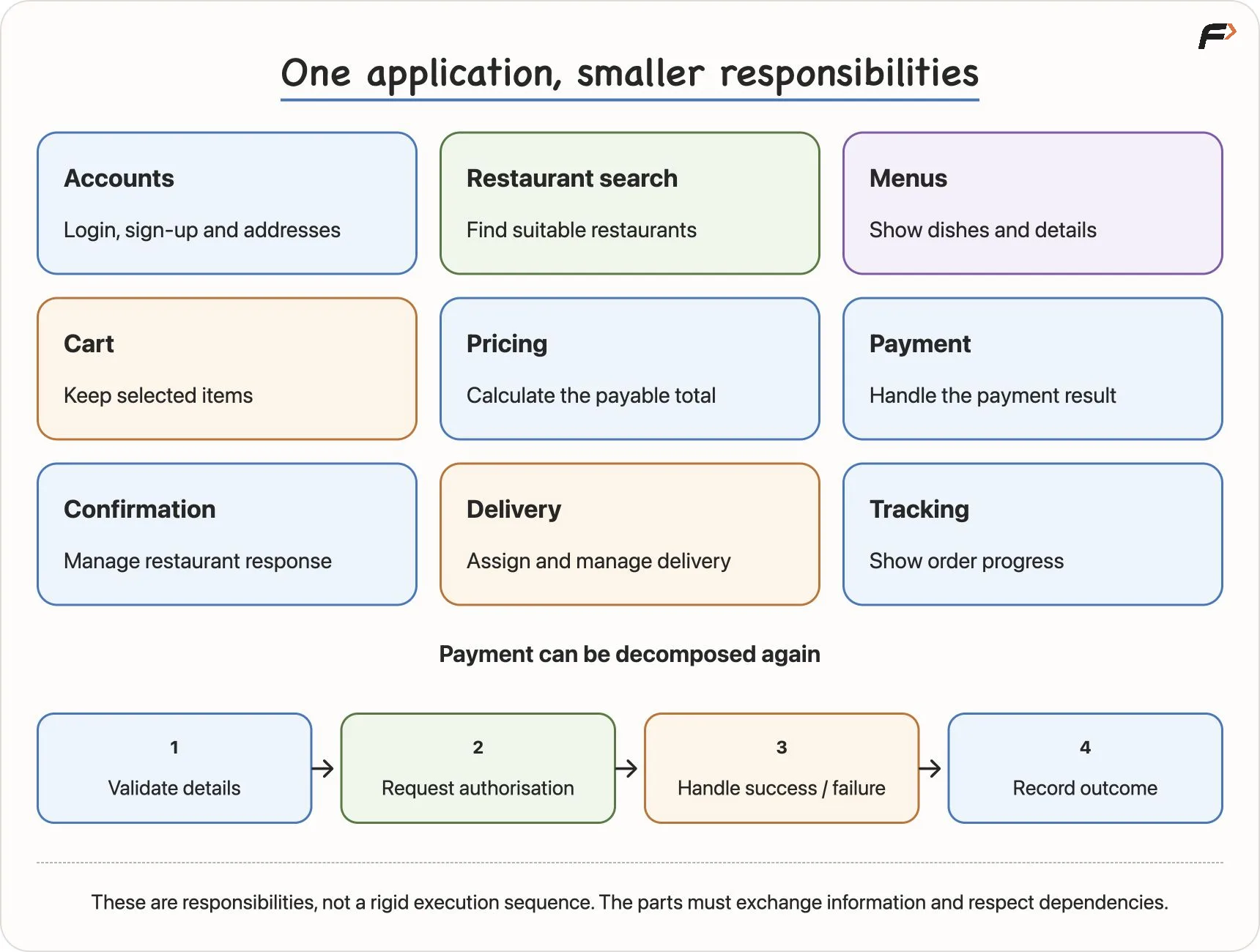
Breaking a food-delivery application into smaller responsibilities
These are illustrative responsibilities, not a claim that every company has exactly one team for each. Larger systems may also include advertising, support and other features.
Each responsibility can be decomposed again. Payment, for example, includes validating details, requesting authorisation, handling success or failure, and recording the outcome. Account management can similarly separate registration, login and profile updates.
Different teams can work on different parts, but the parts must exchange information. Payment success affects order state. Restaurant confirmation affects delivery. Cancellation may require a refund. Decomposition therefore includes understanding dependencies and how the parts cooperate.
Apply the same habit to cleaning a room
“Clean this very messy room” may feel overwhelming. Separate it into smaller tasks:
- Gather the clothes and separate clean items from dirty ones.
- Arrange the books.
- Remove rubbish.
- Wipe the surfaces.
- Clear and sweep the floor.
The room has not become smaller. The work has become easier to understand and organise. This is a useful plan, although it is not a proof that this sequence is always the fastest possible cleaning method.
The habit transfers to studying, managing work and programming: when the whole task feels too large, identify a smaller question you can solve.
7. One problem can have several correct algorithms
Suppose we need to find Aman among 1,000 names. There is more than one possible method.
Method A: linear search
Start at the beginning. Check each name in order. Stop when Aman is found or the list ends.
This works whether the names are sorted or unsorted. In the worst case, we inspect all 1,000 names: perhaps Aman is last, or perhaps Aman is absent.
The method is straightforward because it does not rely on a special ordering property.
Method B: repeatedly eliminate half
Now suppose the names are alphabetically sorted. We can use their order to narrow the search, much like finding a word in a dictionary.
- Inspect the name near the middle of the remaining range.
- If it is Aman, stop: the name has been found.
- If the middle name comes before Aman alphabetically, continue in the right half.
- If the middle name comes after Aman, continue in the left half.
- Repeat until Aman is found or no possible entries remain.
This is the central idea of binary search. Each unsuccessful comparison rules out roughly half of the remaining possibilities.
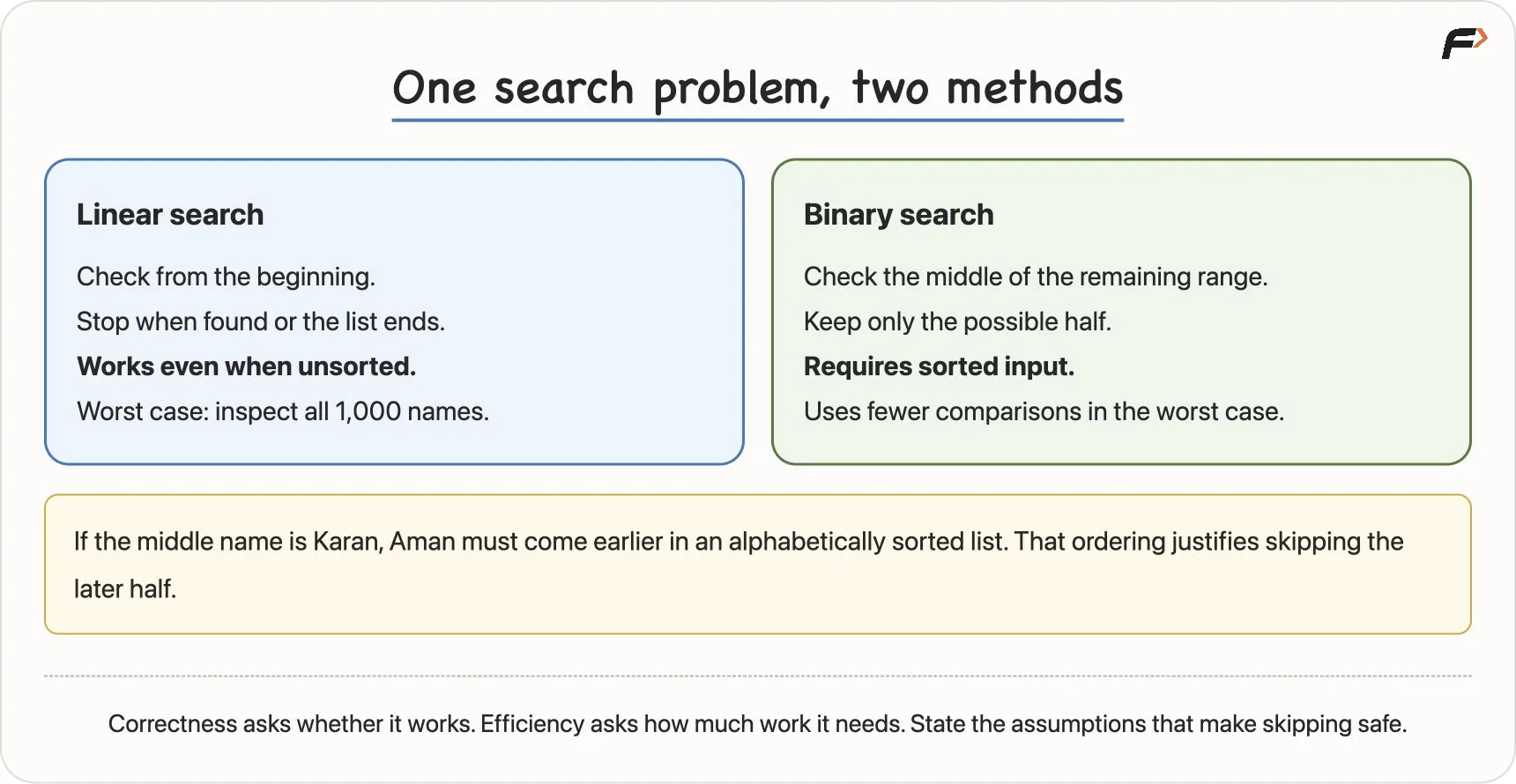
Linear search compared with binary search
If the middle name is Karan, Aman would have to be earlier in an alphabetically sorted list. We can therefore discard Karan and the later entries. We do not discard a half merely because a name “sounds early”; the comparison and sorted order justify it.
Correctness and efficiency are separate questions
Correctness asks whether the method produces the required result for every valid input under its assumptions. Efficiency asks how much work, time or other resources it uses.
Both search methods can be correct, but they do different amounts of work. With a sorted, directly accessible list, binary search needs far fewer name comparisons in the worst case than checking every entry.
However, the sorted order is a requirement for this method. On an arbitrary unsorted list, the comparison with the middle entry cannot justify discarding half. Sorting the data first also involves work, so the overall choice depends on the situation.
For now, the key questions are:
- What makes this method correct?
- Which input property does it rely on?
- Why is it allowed to skip this work?
State those assumptions explicitly. A faster method is useful only when its assumptions hold.
8. Common beginner mistakes and better habits
Starting to code immediately
Reading the story is not the same as understanding its contract. First identify the inputs, required outputs, rules and boundaries. Work through your proposed steps on paper before translating them into code.
Testing only the supplied examples
Samples are useful, but they cover only particular instances. After checking them, create your own cases. Test equality, boundaries, zero and allowed negative values where relevant.
Try to find an input that breaks your reasoning. The marks example shows why tests near 40 reveal mistakes that ordinary high marks may hide.
Treating abstraction as permission to drop a difficult rule
Using an existing data structure can hide implementation work. Removing a condition that affects the answer changes the problem. Keep every correctness requirement, even if it is inconvenient.
Treating a pattern as a ready-made answer
Knowing a pattern does not guarantee a solution. Understand the underlying topic, check the pattern’s conditions and limitations, and decide how it applies to this problem. Similar stories can require different boundaries or extra steps.
Believing there is only one correct algorithm
There may be several. Compare their assumptions, clarity and amount of work, as we did with the two search methods.
Expecting the computer to understand intention
“I meant it to handle this case” does not create the missing behaviour. The computer executes the logic you expressed. If a case matters, account for it explicitly.
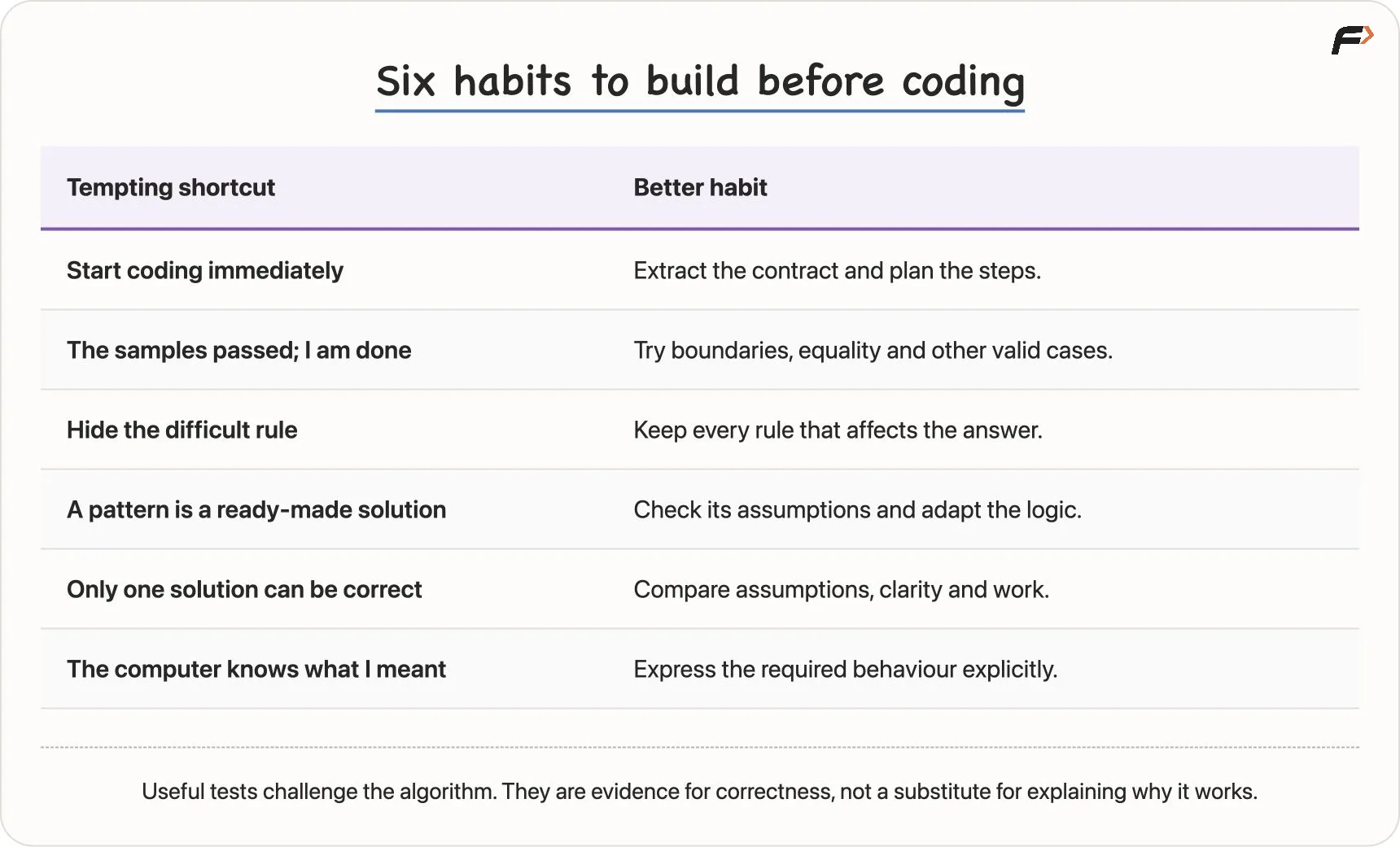
Common thinking mistakes and their corrections
Two related habits from the chapter notes also help: do not mistake a longer explanation for a better one, and do not dismiss allowed negative inputs. Break work into understandable parts without burying the logic under unnecessary steps.
9. Explain your assumptions and test your reasoning
In an interview or a discussion about a solution, start by stating the inputs, expected output and any assumptions. If a requirement is unclear, confirm it instead of silently choosing the version that is easiest to solve.
Once you have an algorithm, walk through it and challenge it with different cases. Explain why it should work, not only that it passed a sample. Finding no failing example increases confidence; it does not, by itself, prove every algorithm correct.
You can discuss your reasoning while you work. The aim is to avoid rushing into code before understanding the problem, rather than waiting for impossible certainty or hiding the thinking process.
See the same skills in real systems
The lesson closes by pointing to real-system examples. The chapter notes develop three of them:
| System | How the four thinking skills apply |
|---|---|
| ATM withdrawal | Decompose card reading, PIN verification, amount entry, authorisation and transaction handling. Recognise an authenticated-transaction pattern. Hide internal banking details behind an interface. Authorise before dispensing cash. |
| Food-delivery checkout | Separate cart, pricing, coupon, payment and confirmation. Recognise eligibility and conditional-calculation patterns. Present a clear total while services handle details. Calculate that total before requesting payment. |
| Contact search | Separate query input, record search, ranking and display. Recognise search across contacts, products, songs and documents. Hide indexing behind a search box. Apply the chosen matching rules and handle “not found”. |
For example, a case-insensitive contact search may normalise the query and names to a consistent case before comparing them. That behaviour must match the search requirement; normalisation is not an excuse to change meaningful input.
The lesson’s central habit is now clear: think through the solution, test its cases, then express it in code. DSA develops these problem-solving ideas across languages. Learning syntax helps implement them, but does not replace them.
Practice from the chapter notes
The following material extends the lesson with the detailed algorithm checklist and largest-of-three exercise from Chapter 2. Work through it after the main lesson.
What makes a useful algorithm?
For a defined problem, check these properties:
| Property | Question to ask |
|---|---|
| Defined input | What information does the algorithm receive, and what values are allowed? |
| Defined output | What result must it produce? |
| Unambiguous steps | Is each operation clear enough to follow precisely? |
| Termination | Does it finish after a finite amount of work for every valid input? |
| Correctness | Does it satisfy the requirement for every valid input? |
| Effective steps | Can each operation actually be carried out using the available operations? |
“Do the calculation” is vague. “Add the three marks and divide their total by 3” is specific. “Keep increasing the number” has no stopping condition.
A recipe can be a helpful analogy, but “cook until ready” relies on a human judgement. A machine needs a precise condition it can evaluate, and a process that reaches completion under the stated assumptions. Merely writing the word “until” does not establish that the process will stop.
Dependencies determine the order
Consider a simplified payment process. Confirming payment before requesting authorisation, or requesting authorisation before knowing the amount, puts the dependencies in the wrong order.
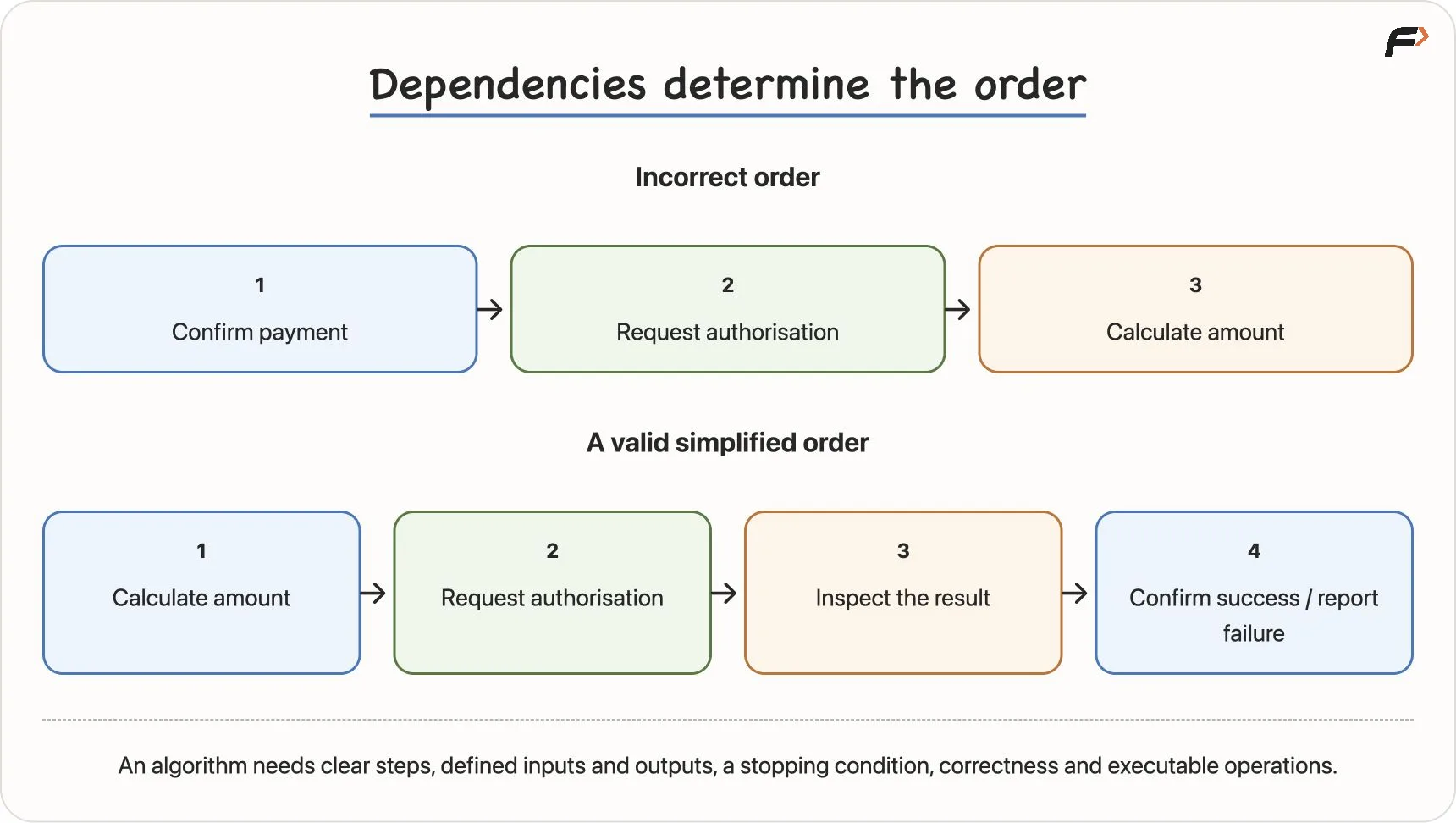
Ordering a payment process by its dependencies
The useful order is to calculate the amount, request authorisation, inspect the result, and then confirm success or report failure. If another attempt is allowed, its rules also need to be clear.
This is algorithmic thinking in practice: identify the dependencies, decisions, repetitions and stopping conditions before writing code.
Find the largest of three numbers
Task: read three numbers and display their largest value. Unlike our earlier comparison task, this task asks for a value and does not require a separate message for ties.
A first attempt might compare every pair using strict > conditions. For example, it might choose a if a > b and a > c, choose b if b > a and b > c, and otherwise choose c.
That version fails for (7, 7, 2): neither of its first two conditions is true, so it incorrectly chooses 2. Equality needs careful handling.
A simpler model is a current champion:
- Let
abe the champion. - Compare
bwith the champion; replace the champion ifbis larger. - Compare
cwith the current champion; replace it ifcis larger. - Display the final champion.
READ a, b, c
SET largest = a

IF b > largest
    SET largest = b
END IF

IF c > largest
    SET largest = c
END IF

DISPLAY largest
SET largest = a stores the value of a as our current best answer. Each later assignment updates that answer when a larger value appears.
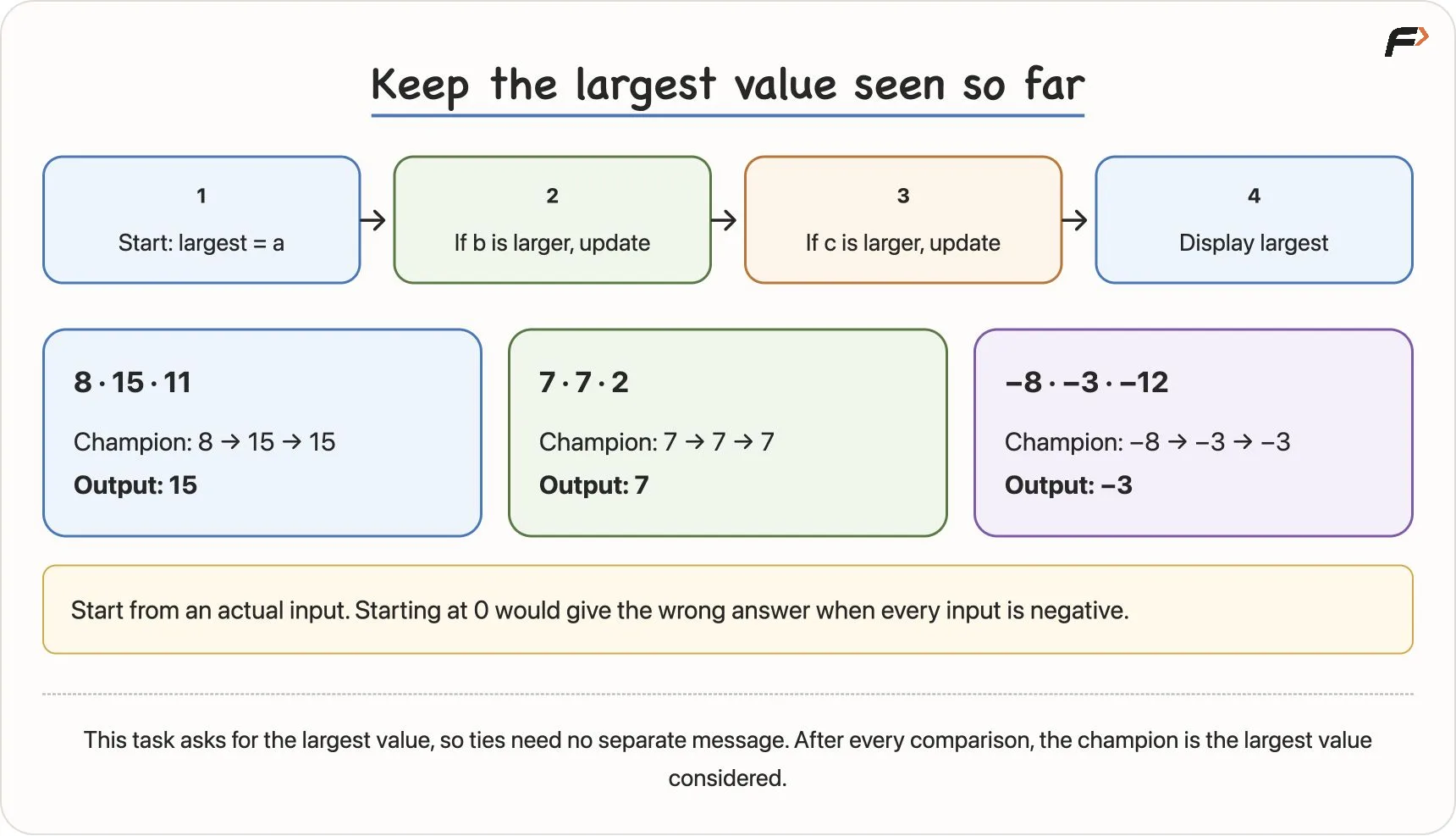
The current-champion algorithm and three dry runs
Dry-run the algorithm
A dry run means following the instructions manually while tracking the values. For (8, 15, 11):
| Moment | largest | Reason |
|---|---|---|
Initialise from a | 8 | The first value becomes champion |
Check b | 15 | 15 > 8, so update the champion |
Check c | 15 | 11 > 15 is false, so keep it |
| Display | 15 | All three inputs have been considered |
For (7, 7, 2), the champion remains 7. Equality does not require a replacement because the required output is the largest value, and 7 remains correct.
For (-8, -3, -12), the champion starts at -8, changes to -3, and stays there. The answer is -3.
If we had initialised largest = 0, none of those negative numbers would replace it. The output would incorrectly be 0, a value that was not even supplied. Starting from an actual input value avoids that mistake.
Explain why the champion method works
After initialisation, largest is the largest of the values considered so far: only a. After checking b, it is the largest of a and b. After checking c, it is the largest of all three.
The same statement remains true after every comparison: the champion is the largest value seen so far. Once every input has been considered, that statement establishes the required result.
This explanation goes beyond individual examples. It connects what each step preserves to what the final answer must mean.
Revision and self-explanation
Key terms
| Term | Meaning |
|---|---|
| Problem | A defined task or desired result |
| Problem instance | One particular set of inputs for a problem |
| Input | Information given to a solution |
| Output | The result the solution must produce |
| Model | A useful representation of the information involved |
| Rule | A condition that determines the required behaviour |
| Constraint | A limit or condition on valid inputs |
| Edge case | A valid boundary or other case needing special consideration |
| Computational thinking | Organising a problem so its solution can be carried out precisely |
| Decomposition | Breaking a large task into manageable parts |
| Pattern recognition | Recognising reusable similarities in logic |
| Abstraction | Focusing on relevant details and hiding unnecessary complexity |
| Algorithmic thinking | Arranging operations and decisions in a valid order |
| Algorithm | A finite sequence of clear steps for solving a defined problem |
| Pseudocode | A language-independent description of an algorithm’s steps |
| Dry run | Manually following steps while tracking values |
| Correctness | Producing the required output for every valid input |
| Efficiency | The work, time or other resources a solution uses |