Flowcharts and Pseudocode
An algorithm describes how to solve a problem. Before turning that algorithm into code, we need to check that its steps, decisions, and repetitions are clear. Flowcharts help us see the path of execution; pseudocode helps us write that path as structured instructions.
A useful planning ladder is Problem → Algorithm → Flowchart → Pseudocode → Program. The previous lesson supplied the foundations: separate inputs from outputs, break a problem into smaller parts, recognize patterns, remove irrelevant details, and arrange a valid algorithm.
This lesson moves from simple sequences to decisions, loops, and a decision inside a loop, before introducing pseudocode.
1. Why make the logic visible?
Understanding the problem comes first: identify the inputs, expected outputs, and rules. Next, arrange the steps into an algorithm. A flowchart can then help you inspect those steps before language syntax enters the picture.
A flowchart is a diagram that represents the operations, decisions, and repeated steps in a process. “Flow” means the movement of control; “chart” means a visual representation. Its value is in making missing logic easier to notice.
Consider this instruction: “Keep asking for the PIN until it is correct, then allow a withdrawal.” It leaves several questions unanswered. Is there a limit on attempts? What happens when that limit is reached? Is the card already blocked? Has an amount been entered before withdrawal begins? What if the requested amount exceeds the available balance?
Drawing the paths makes these questions harder to overlook. A useful flowchart shows:
- Where the process begins and ends.
- What information enters and what results leave.
- What calculations or changes happen.
- Which conditions choose between paths.
- Which steps repeat and what stops the repetition.
You do not need a diagram for every tiny problem. Flowcharts become particularly useful when a process has several paths or when people need a shared picture of how different parts fit together.
The purpose of a flowchart is to make the logic visible enough to inspect before writing code.
2. Read the shapes, then follow the arrows
Flowchart symbols give each step a recognizable meaning. Use them consistently so that readers can distinguish an action from a question at a glance.
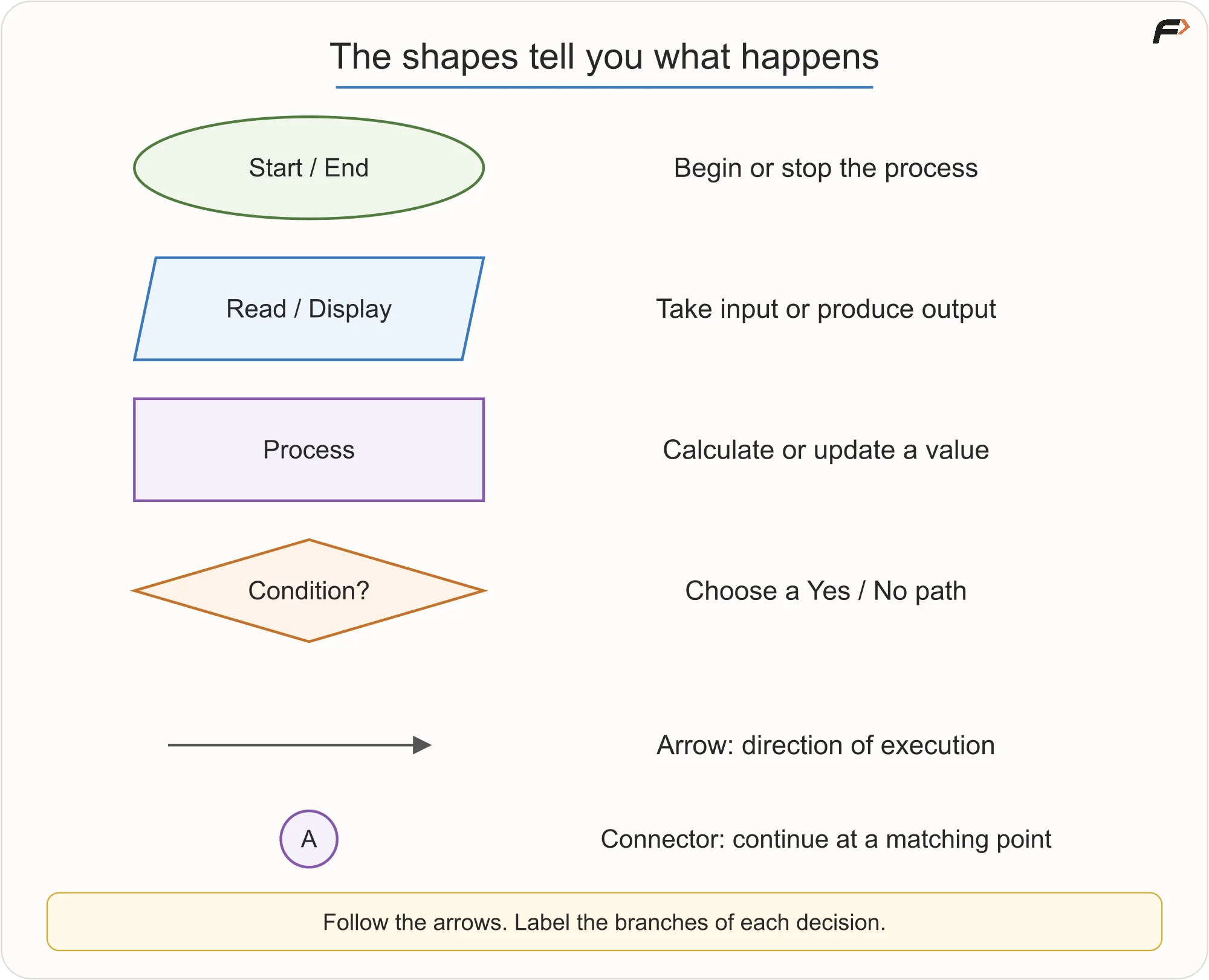
Flowchart legend: start and end, input and output, process, decision, arrow, and connector.
Use each symbol precisely
- Start/End: use an oval or rounded rectangle. Provide one clear Start; there may be several End points, although a shared End is often easier to follow. These define the entry and exits.
- Input/Output: use a parallelogram for “Read age,” “Accept three marks,” “Display Eligible,” or “Print final bill.” Receiving or displaying data is different from calculating it:
total = price + taxis a process; “Display total” is output. - Process: use a rectangle for a precise action such as
area = length × width,count = count + 1, orremainingBalance = balance - amount. “Handle payment” hides too much work if payment logic is what you are explaining. - Decision: use a diamond for a question such as “PIN correct?”,
age >= 18?,i <= N?, or “Balance at least the amount?” Label its outgoing answers. - Arrow: show which step happens next. The same boxes connected in a different order can describe a different algorithm.
- Connector: link separated portions using matching labels. Use connectors sparingly; a heavily tangled chart may be better broken into smaller charts.
What actually flows?
Control flow is the order in which instructions are considered and executed, not necessarily the movement of the data itself.
A process changes or calculates something, such as area = length × width. A decision asks a question, such as age >= 18?, and selects the outgoing path whose label matches the answer. Write the condition inside the diamond and label its branches Yes/No or True/False.
To read a simple flowchart, imagine a marker sitting at Start. This marker represents the current point of execution—a control-flow token. Move it along the arrows, performing each step it reaches.
At a decision, the marker follows one branch. A backward arrow takes it to an earlier step. Reaching End stops that execution. This is a model for the simple sequential algorithms in this lesson; we are not modeling concurrent tasks here.
Not every box must execute for every input. The input determines which decisions are true, and those decisions determine the path.
3. Sequence: perform steps in order
A sequence is a set of steps carried out one after another. Calculating the area of a rectangle is a simple example: read the length, read the width, multiply them, and display the result.
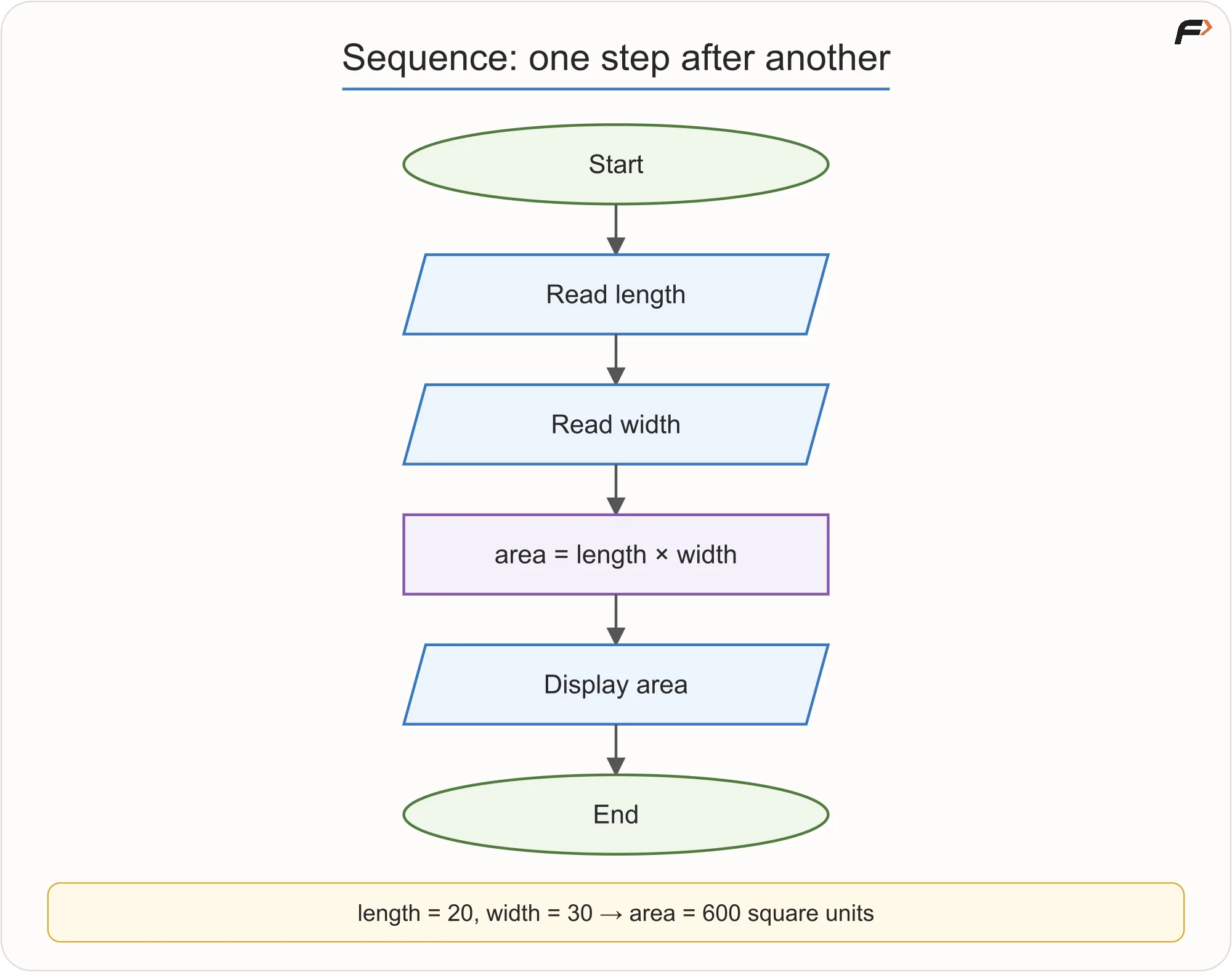
Start, read length, read width, calculate area as length times width, display area, end.
For a length of 20 and width of 30, the calculation gives 600 square units. There is no choice of path and no repetition in this example.
The order matters: both inputs must be available before the multiplication, and the area must be calculated before it is displayed. Assume the inputs are valid dimensions; checking invalid dimensions would add decisions to this simple chart.
4. Selection: choose a path
A selection uses a condition to decide what happens next. For a simplified voting-eligibility exercise, use this rule: a person aged 18 or above is eligible; otherwise, they are not eligible.
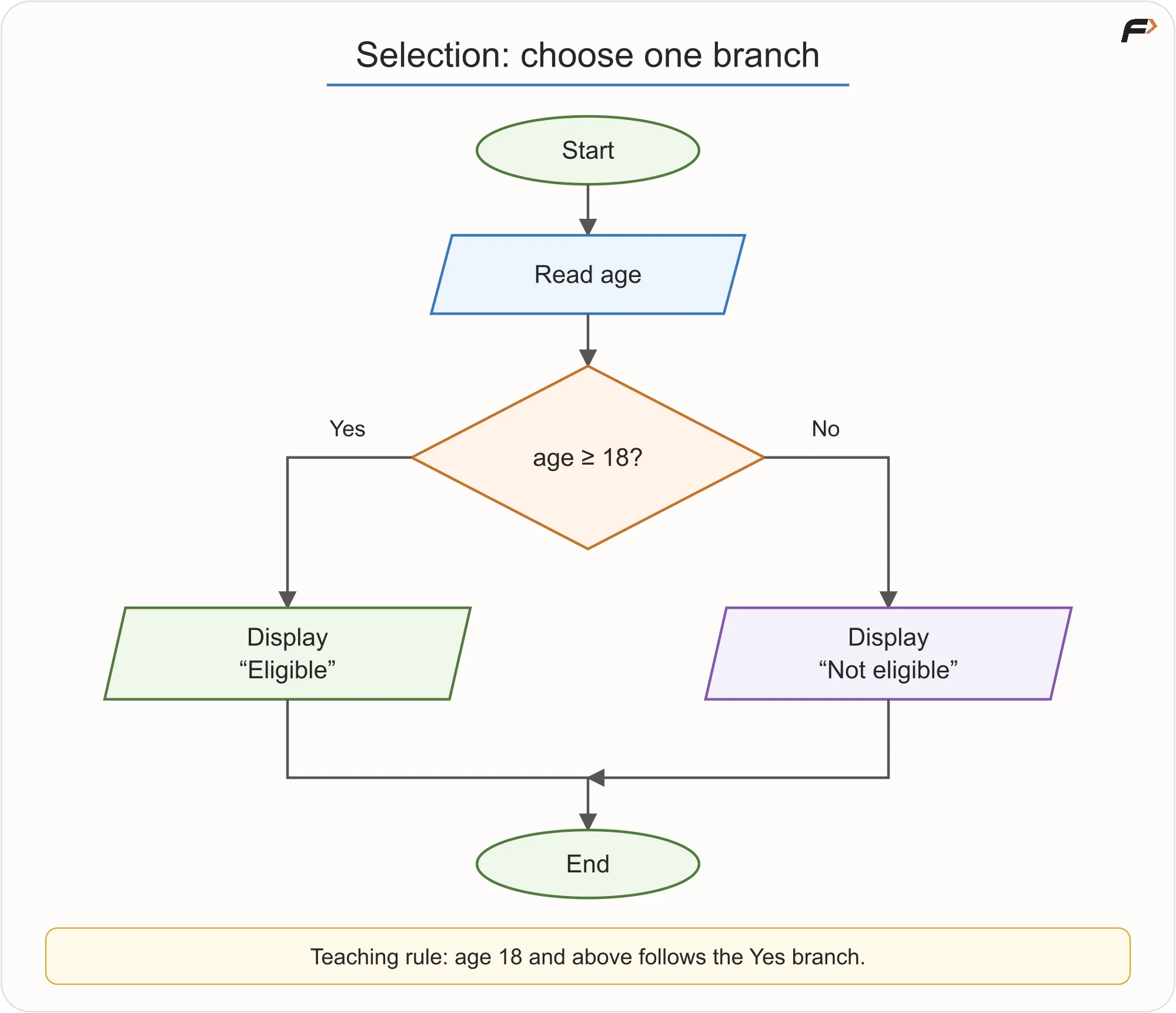
Read age and check whether age is at least 18.
The condition is age >= 18. If the age is 20, the Yes branch displays “Eligible.” If it is 17, the No branch displays “Not eligible.” An age of exactly 18 also takes the Yes branch because the comparison includes equality.
Only one message is displayed for a given age. The two branches later join at End; joining paths does not mean executing both branches.
More than two outcomes
Some problems need several outcomes. To classify a number as positive, negative, or zero, use two decisions in order:
- If
number > 0, display “Positive.” - Otherwise, check whether
number < 0. If it is, display “Negative.” - Otherwise, display “Zero.”
The second condition is reached only when the first condition is false. For an ordinary numeric input, if neither comparison is true, the remaining possibility is zero. Thus 4, -2, and 0 lead to three different outcomes without needing three unrelated paths.
5. Iteration: repeat with a stopping condition
Suppose the task is to print the integers from 1 through N. Writing three separate print steps works when N = 3, but it does not describe a solution for a different value of N.
An iteration, or loop, describes the repeated action once and controls how many times it happens.
We use i to track the next number to print:
- Initialize: set
i = 1. - Check the condition: is
i <= N? - Perform the body: if Yes, display
i. - Update: increase
iby one, then check the condition again.
When the condition becomes false, follow the No branch to End.
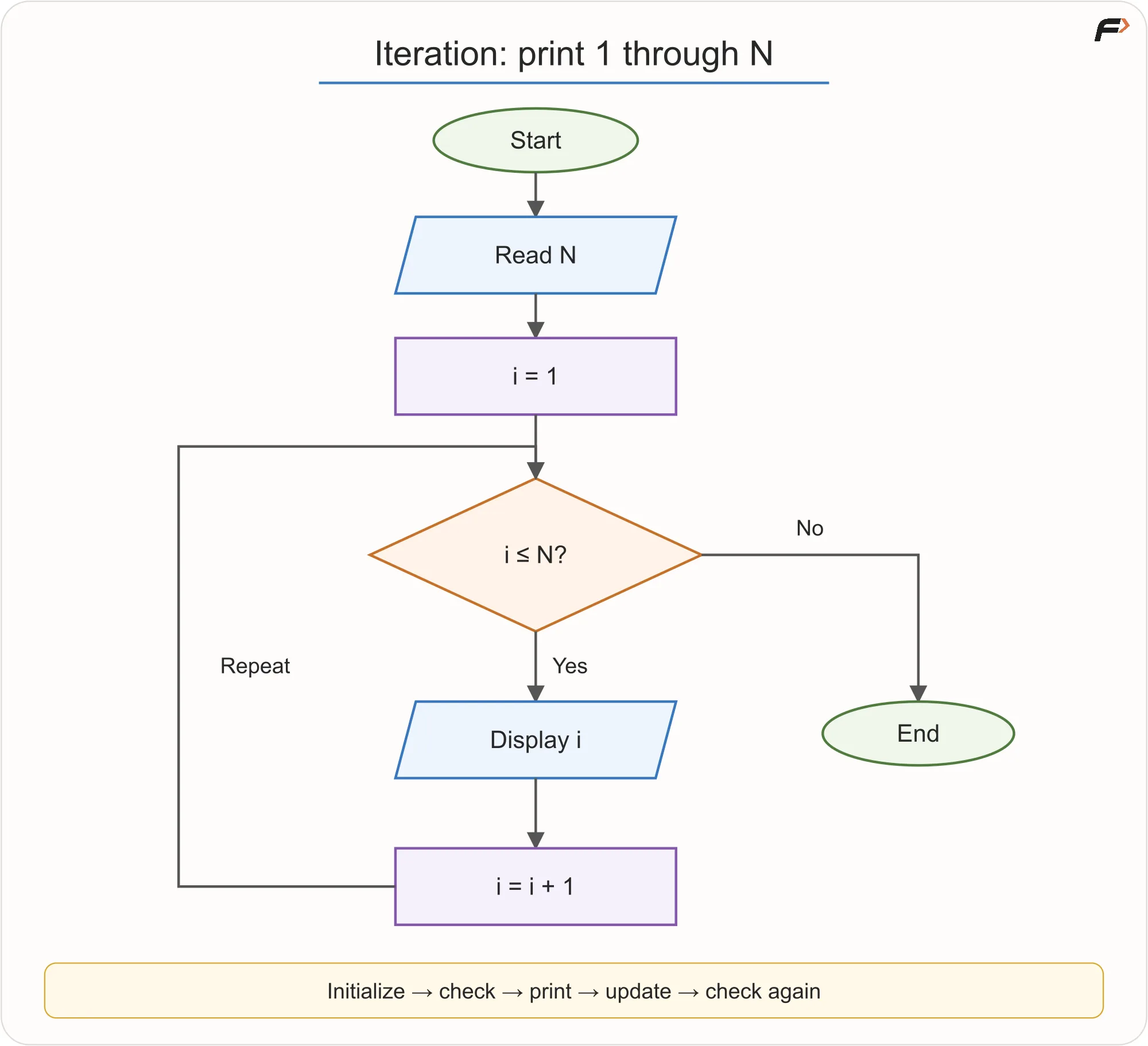
Read N, initialize i to 1, check i less than or equal to N.
Trace the loop for N = 3
A dry run means following the algorithm manually with a specific input. Track the current value each time the condition is checked.
| Current i | Is i <= 3? | What happens? |
|---|---|---|
| 1 | Yes | Print 1; update i to 2. |
| 2 | Yes | Print 2; update i to 3. |
| 3 | Yes | Print 3; update i to 4. |
| 4 | No | End without printing 4. |
The output is 1 2 3. Notice that the condition is checked four times even though the body runs only three times. The final check is what tells the process to stop.
Why placement matters
The initialization happens before the loop. If i were reset to 1 on every repetition, it would not progress through the numbers.
The update happens after printing. In i = i + 1, the right-hand side uses the current value, and the result becomes the new value of i. This is an assignment, not a mathematical claim that a number equals itself plus one.
For a positive N, forgetting the update would keep printing the same number because the condition would remain true. Also, using i < N instead of i <= N would leave out N.
For this exercise, assume N is a non-negative integer. If N = 0, the first check, 1 <= 0, is false. The loop prints nothing and ends. A loop that checks its condition before the body may run zero times.
6. Combine a decision with repetition
Sequence, selection, and iteration can appear together. Consider a class of N students. Read one marks value for each student and display:
- Pass if the marks are at least
40. - Fail otherwise.
The outer loop tracks which student is being processed. Inside that loop, a decision chooses the result for the current student. This is selection inside iteration, an example of nested control structures.
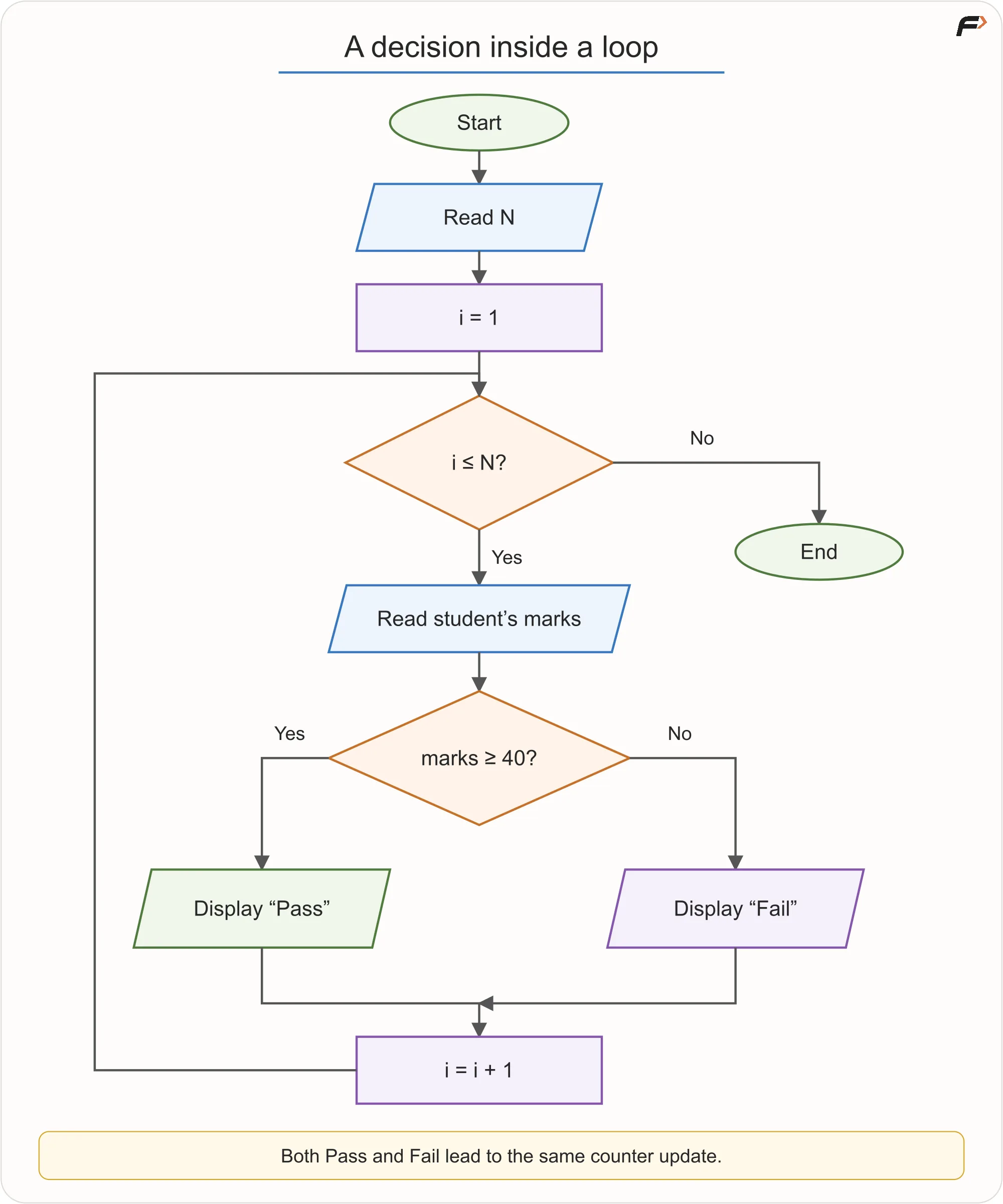
Loop through N students, read each student's marks, display Pass for marks at least 40 or Fail.
For three students with marks 42, 39, and 40, the outputs are Pass, Fail, and Pass. The boundary value 40 passes because the rule uses >=.
Two placements are essential:
- Read the marks inside the loop. Each repetition needs the next student's marks.
- Update the counter after either result. Both Pass and Fail must lead to
i = i + 1, then return to the student-count condition.
Neither result should flow into the other result. Each student receives one classification, and the process advances once. If N = 0, the outer condition fails immediately and no marks are read.
7. ATM withdrawal: put checks before actions
An ATM brings sequence, selection, and repetition together. For this simplified teaching model, the requirements are:
- Read the card and ask for a PIN.
- Allow at most three incorrect PIN attempts; block the session after the third.
- Ask for a withdrawal amount only after successful authentication.
- Require a valid positive amount, sufficient account balance, and the required cash in the ATM.
- Only after the checks may the withdrawal be authorized, cash successfully dispensed, and the balance updated.
The complete flow is split into two connected diagrams for readability. Connector A means continue from successful authentication into the withdrawal flow below.
Authenticate and limit retries
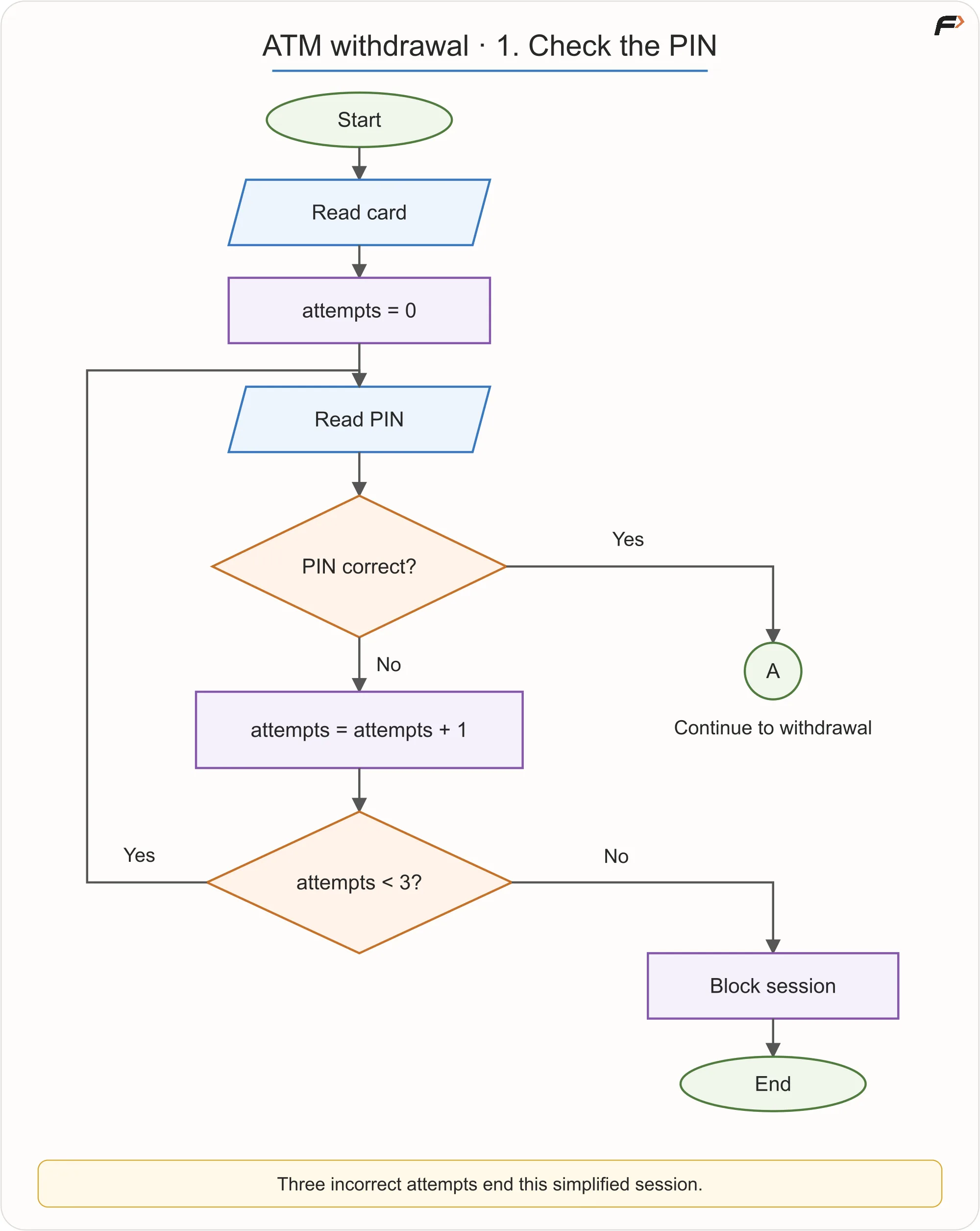
ATM authentication
Initialize attempts = 0 once. A wrong PIN increments the count, then attempts < 3 decides whether to retry. The first and second wrong attempts return to Read PIN. The third blocks the session and ends. A correct PIN continues to A without taking the incorrect-attempt branch.
The retry arrow returns to Read PIN, not to attempts = 0; resetting the counter would defeat the limit.
Validate the withdrawal and finish the transaction
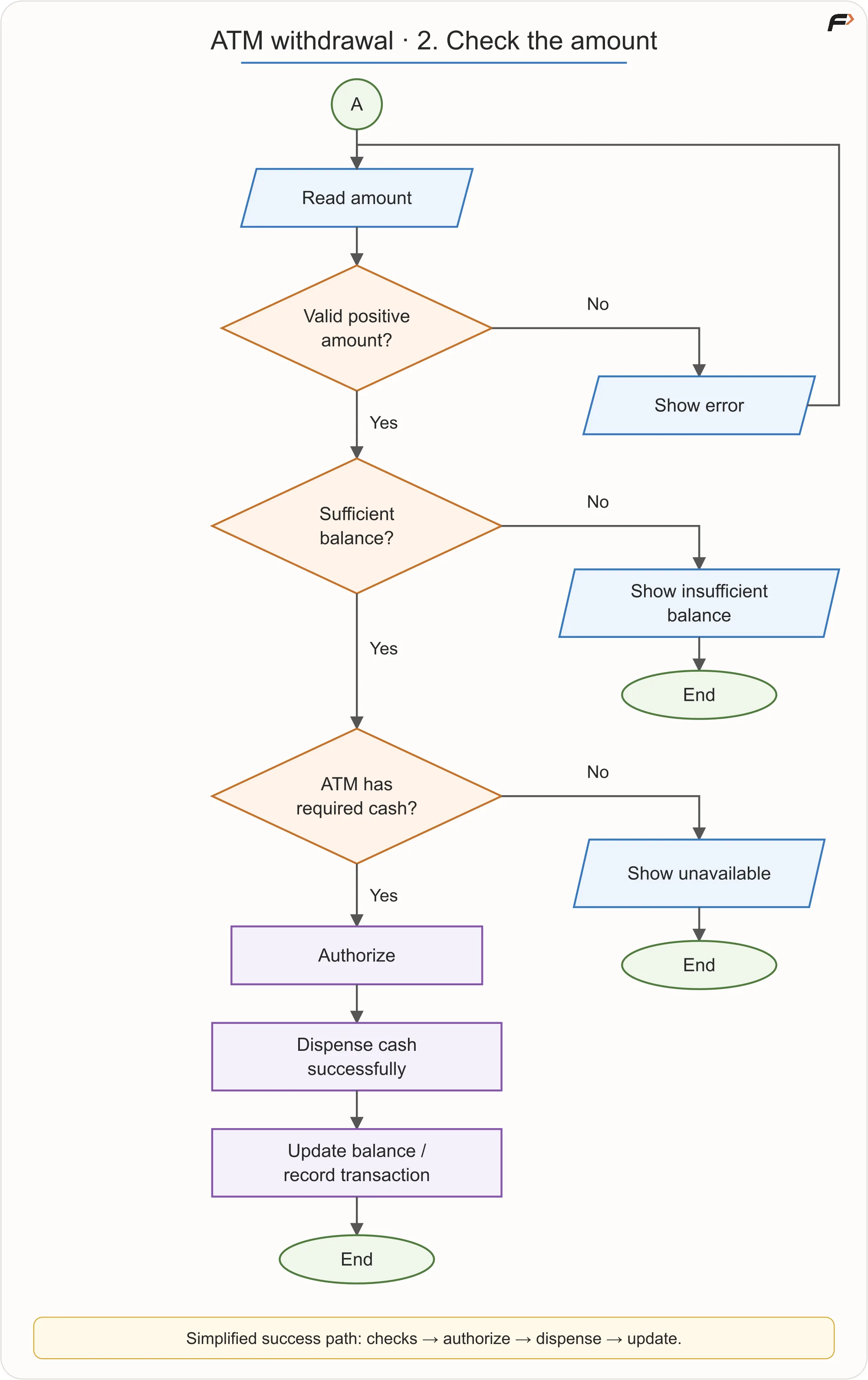
ATM Transaction
An invalid amount shows an error and returns to amount entry. An amount above the account balance shows “Insufficient balance” and ends. If the machine lacks the required cash, it shows “Unavailable” and ends. Each failure has a defined route; the chart does not assume every request succeeds.
On the simplified success path, the order is authorize → successfully dispense → update the balance and record the transaction. For example, the balance calculation is remainingBalance = balance - amount. Do not put that change before the required checks, authorization, and successful dispensing in this model.
This is also an abstraction exercise. Encryption, bank networks, hardware sensors, transaction rollback, and fraud detection are deliberately hidden. Real transaction handling is more complex; the diagram teaches control flow rather than specifying a banking implementation. Its invalid-amount retry assumes the user eventually supplies a valid amount; cancellation and timeouts are outside these simplified requirements.
8. Pseudocode: write the same logic in structured words
A flowchart expresses an algorithm through shapes and arrows. Pseudocode expresses an algorithm through readable, structured instructions, without requiring the exact syntax of a programming language.
Here is the earlier eligibility example written as pseudocode:
READ age

IF age >= 18 THEN
    DISPLAY "Eligible"
ELSE
    DISPLAY "Not eligible"
END IF
Read it in order: take the input, evaluate the condition, and execute the matching branch. The indentation makes the two groups of instructions easy to see; END IF shows where the decision finishes.
There is no single universal pseudocode compiler or official grammar. PRINT and DISPLAY, for example, may serve the same purpose. What matters is that the steps are precise, consistent, and easy to follow.
| Common words | Purpose |
|---|---|
| READ, INPUT | Obtain an input value. |
| DISPLAY, PRINT, OUTPUT | Show a result. |
| SET | Assign or update a value. |
| IF, ELSE IF, ELSE | Choose between alternatives. |
| WHILE | Repeat while a condition remains true. |
| FOR | Repeat over a known range or collection. |
| RETURN | Leave a routine, optionally giving back a result. |
| STOP | End the process. |
You do not need to master every keyword immediately. Begin by recognizing the same structures you have already drawn: ordered instructions, conditions, and repetition.
Pseudocode helps you check completeness, order, missing branches, and termination before handling language syntax. Engineers also use it in design discussions and interviews, where imports, detailed types, and APIs would distract from the algorithm.
Assignment: read, calculate, store
SET count = count + 1 means: read the current count, add one, and store the result back under that name. If count is 4, it becomes 5. The name stays the same while the stored value changes.
9. Convert a flowchart into pseudocode: sum 1 to N
This example adds the integers from 1 through N. Unlike the earlier printing loop, it keeps a running total and displays one final result. Assume N is a non-negative integer.
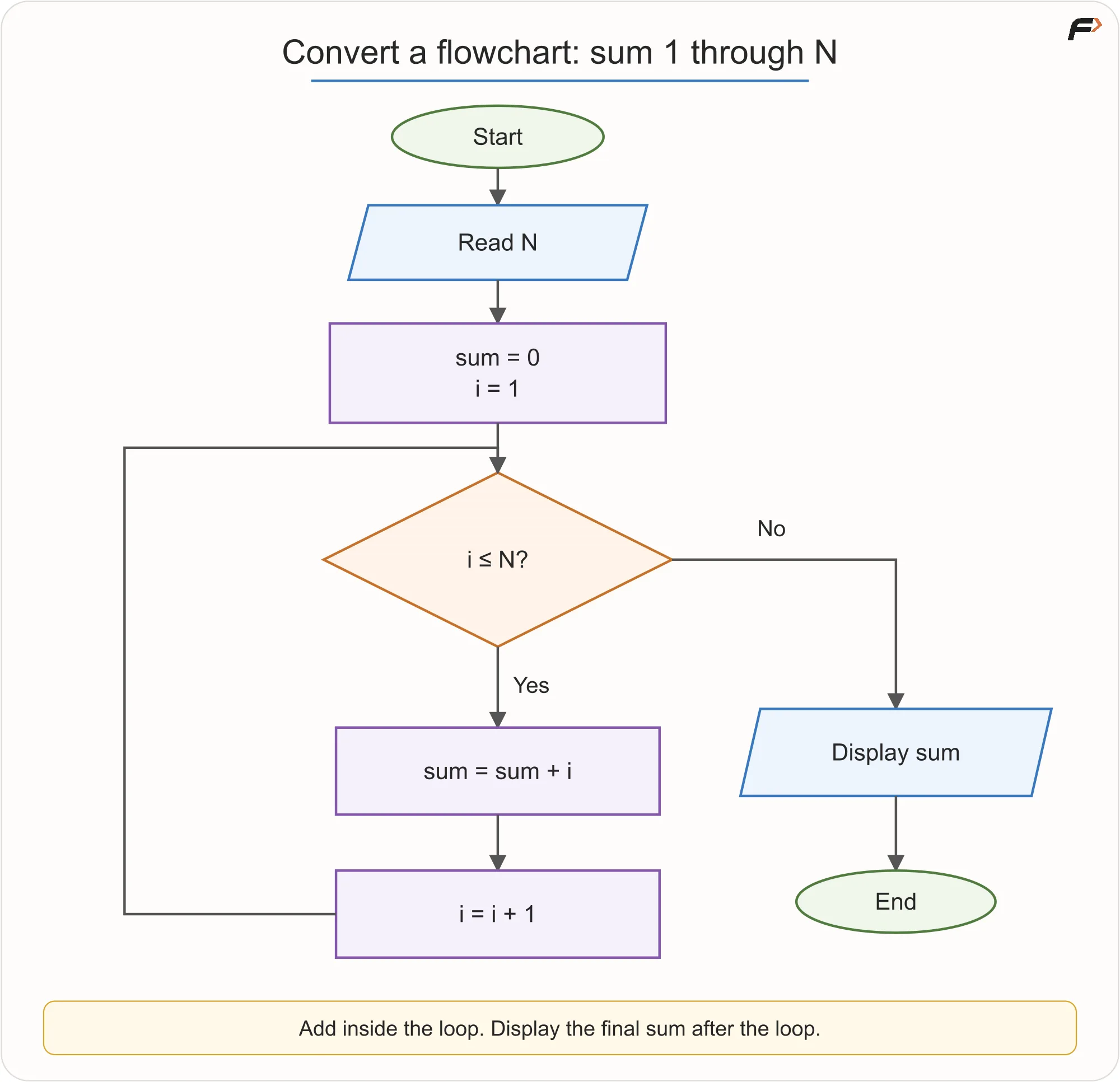
Sum flowchart.
READ N
SET sum = 0
SET i = 1

WHILE i <= N
    SET sum = sum + i
    SET i = i + 1
END WHILE

DISPLAY sum
| Flowchart element | Pseudocode equivalent |
|---|---|
| Input parallelogram | READ N |
| Process rectangles | SET statements that initialize or update values |
| Decision with a backward path | WHILE i <= N and its repeated body |
| Output parallelogram | DISPLAY sum |
For N = 3, the running total changes from 0 to 1, then 3, then 6. The output is 6. For N = 0, the body runs zero times and the output is the initial sum, 0.
Indentation groups the two actions that repeat. It improves readability in pseudocode and is required syntax for blocks in Python. DISPLAY sum is outside the loop because the requirement is to show the final total once, not every intermediate total.
10. Three representations, one algorithm
| Representation | Strongest use | Limitation |
|---|---|---|
| Flowchart | Seeing routes, branches, and repetition | Large logic can become visually crowded. |
| Pseudocode | Explaining precise, language-independent steps | Cannot normally be executed directly. |
| Program | Running the solution on a computer | Syntax can distract from unfinished logic. |
None is automatically better. Choose the representation that helps at the current stage.
When translating between representations, preserve the logic. A process box becomes an action or assignment. A decision becomes a conditional structure. A repeating path becomes a loop, keeping its initialization, condition, body, and update in the correct places.
Pseudocode is generally not something you run directly. It is a way to settle what the program should do before dealing with language-specific details.
11. Common mistakes to catch
| Mistake | Correction |
|---|---|
| A decision is written in a process box. | Use a diamond when True/False determines the next path. |
| Branches are not labeled. | Mark the outcomes so readers do not have to guess. |
| A reachable arrow goes nowhere. | Make every reachable path continue or terminate. |
| A loop makes no progress. | Update the state toward its stopping condition, unless the process is intentionally continuous. |
| Output is in the wrong place. | Decide whether it belongs once after completion or once per iteration. |
| Pseudocode becomes disguised C++. | Avoid unnecessary braces, semicolons, detailed types, and library calls. |
| One vague box hides an entire system. | Decompose “Process order” if validation, pricing, and payment decisions are the focus. |
| Only the happy path exists. | Include wrong passwords, locked accounts, unavailable servers, and other failure states when the requirements include them. |
12. Check the logic before moving to code
Use a short dry run to check your diagram or pseudocode:
- Are inputs available before they are used?
- Does each decision state a clear condition and label its paths?
- Does each input follow the intended branch, including boundary values?
- Does the loop update its state and eventually reach an exit for valid inputs?
- Can the loop correctly skip its body when the initial condition is false?
- Do the flowchart and pseudocode describe the same actions in the same order?
Try explaining why the printing loop checks i <= N, why the student loop reads marks repeatedly, and why its two result branches share one counter update. If you can answer those questions, you are following the logic rather than simply recognizing the shapes.
A clear algorithm should remain the same solution whether you draw it, describe it in pseudocode, or eventually write it as a program.
Self-explanation exercise
Key terms
| Term | Meaning |
|---|---|
| Flowchart | A visual map of the steps and routes in a process. |
| Control flow | The order in which instructions are considered and executed. |
| Sequence | Execute steps in order. |
| Selection | Choose a route using a condition. |
| Iteration | Repeat steps while or until a condition changes. |
| Initialization | Establish the starting state before repetition. |
| Condition | A True/False question controlling a route. |
| Update | A state change that progresses an iteration. |
| Pseudocode | A structured, language-independent description of an algorithm. |
| Assignment | Calculate a value and store it under a name. |
A flowchart lets us see logic. Pseudocode lets us state it precisely. When both describe the same complete story, with every route progressing or ending, implementation becomes a translation of the solution into code.