Flowchart Problem-Solving Lab
A programming language can express a solution, but it cannot repair flawed logic. In this lab, we use the ideas from the previous lessons i.e. inputs, outputs, constraints, sequence, selection, iteration, and pseudocode to solve problems before writing language-specific code.
Follow the same cycle each time:
Understand → Model → Draw → Dry-run → Challenge → Express as pseudocode
The worked examples follow the video’s order: student results, largest values, grades, sums, and digits. The restaurant, free-delivery, and slab-billing exercises from the learning notes follow as further applications. All eight problems from the notes are included.
Before drawing: answer seven questions
- What is the problem asking in one sentence?
- What inputs are available?
- What output is required?
- Which calculations are necessary?
- Which conditions create different paths?
- Which actions repeat?
- Which boundaries or invalid cases must be considered?
Only then choose the shapes. A flowchart records executable reasoning, not the order in which ideas happened to occur.
1. Student result with a subject-wise rule
Requirement
Read marks in three subjects. Marks must lie from 0 to 100. Display “Invalid marks” if any input is outside that range. Otherwise, display the average and report Pass only when every subject has at least 40 marks.
Decompose the problem
- Validate all inputs.
- If valid, calculate the average.
- Check the subject-wise pass rule.
- Display the result.
Why validation comes first
For marks 90, 105, 80, calculating an average gives a number, but that number has no valid meaning under the stated system because 105 is outside the allowed range.
Flowchart
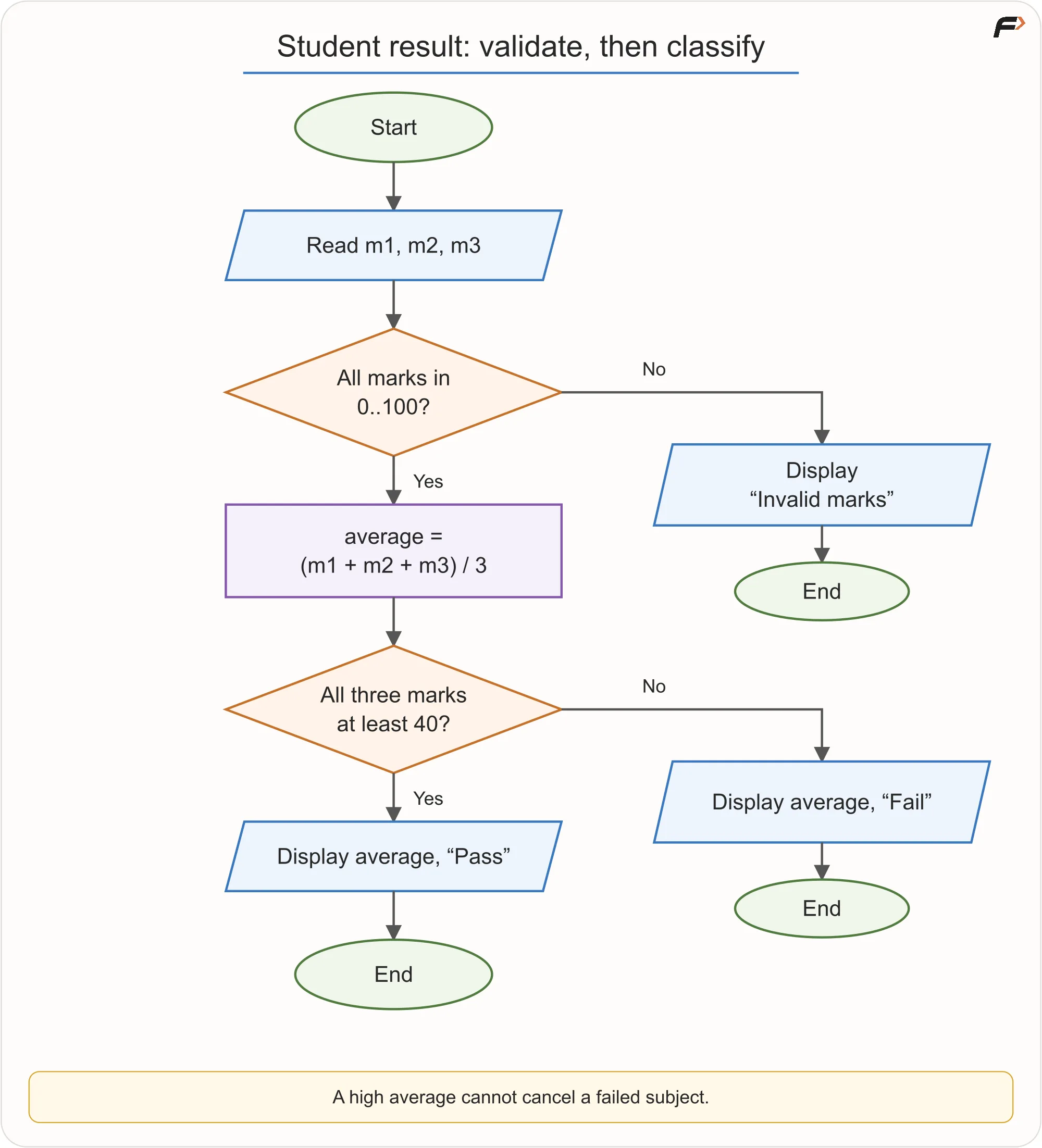
Three Subject Results
Dry runs
Case A: 70, 80, 90
All values are valid. Average is 80. Every mark is at least 40. Result: Pass.
Case B: 90, 90, 30
All values are valid. Average is 70. One subject is below 40. Result: Fail.
Case C: 90, 105, 80
One mark exceeds 100. Result: Invalid marks. Average and pass status should not be reported.
Pseudocode
READ m1, m2, m3

IF m1 < 0 OR m1 > 100 OR
   m2 < 0 OR m2 > 100 OR
   m3 < 0 OR m3 > 100
    DISPLAY "Invalid marks"
    STOP
END IF

SET average = (m1 + m2 + m3) / 3

IF m1 >= 40 AND m2 >= 40 AND m3 >= 40
    DISPLAY average, "Pass"
ELSE
    DISPLAY average, "Fail"
END IF
Key idea: Validation asks whether the data is allowed. Business logic asks what the valid data means. Keep those questions separate.
Extend the same rule to N subjects
The video generalizes the three-subject problem to N marks. Read a positive integer N; reject N <= 0 before proceeding, because the average would otherwise be undefined or the count invalid. For the loop below, that positive-count check has already passed.
Track three pieces of state: i = 1, sum = 0, and allPass = True. Each mark is checked for validity before it contributes to the running sum. A mark below 40 changes allPass to False. A later passing mark must not reset it to True: one failed subject is enough to fail the subject-wise rule.
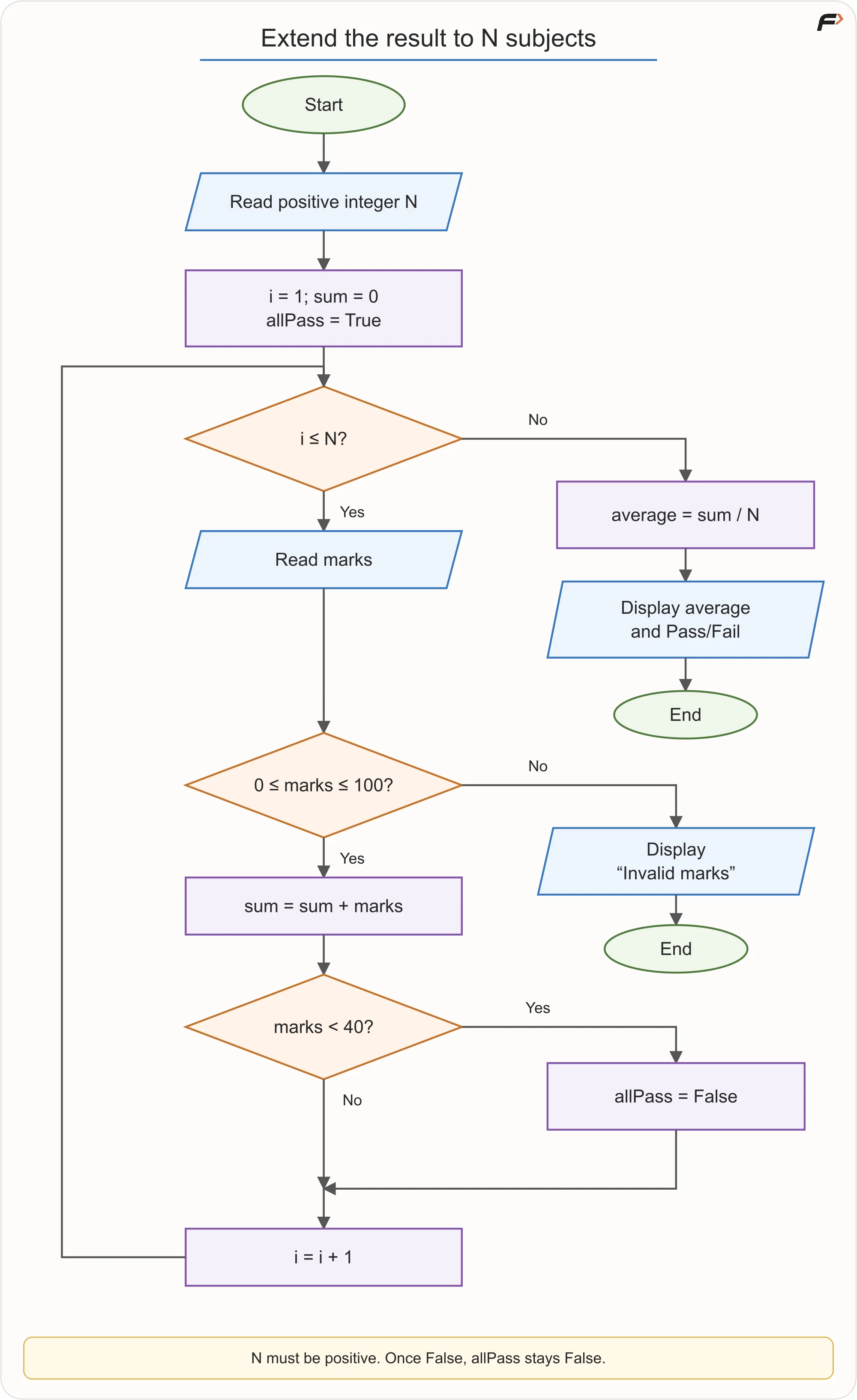
Results of N Subjects
READ N
IF N <= 0
    DISPLAY "Invalid subject count"
    STOP
END IF
SET i = 1
SET sum = 0
SET allPass = True
WHILE i <= N
    READ marks
    IF marks < 0 OR marks > 100
        DISPLAY "Invalid marks"
        STOP
    END IF
    SET sum = sum + marks
    IF marks < 40
        SET allPass = False
    END IF
    SET i = i + 1
END WHILE
SET average = sum / N
IF allPass
    DISPLAY average, "Pass"
ELSE
    DISPLAY average, "Fail"
END IF
Divide by N, not a fixed 3. For N = 3 and marks 60, 70, 30, the total is 160, the average is approximately 53.33, and the result is Fail. A mark such as -14 instead produces “Invalid marks” and stops without displaying an average or result.
All these examples assume numeric marks and an integer subject count; handling non-numeric text is outside this lab.
2. Largest of three numbers
Requirement
Read three numbers and display the largest value.
Approach A: compound conditions
READ a, b, c
IF a >= b AND a >= c
    DISPLAY a
ELSE IF b >= a AND b >= c
    DISPLAY b
ELSE
    DISPLAY c
END IF
This is correct, including ties, when the requirement asks only for the largest value.
Approach B: current champion
READ a, b, c
SET largest = a

IF b > largest
    SET largest = b
END IF

IF c > largest
    SET largest = c
END IF

DISPLAY largest
Flowchart for the champion approach
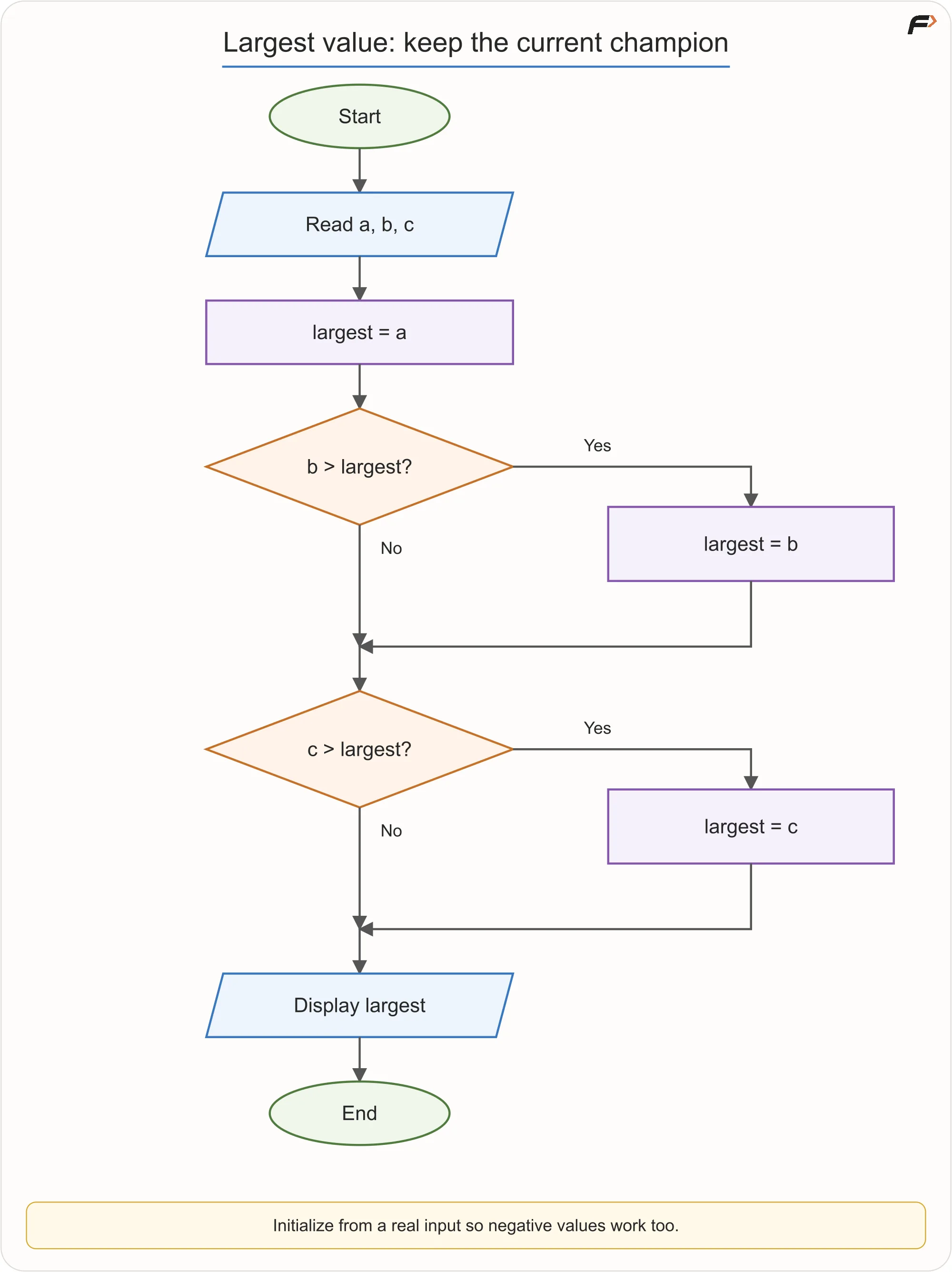
Current Champion
Why Approach B scales better mentally
For three values, both are manageable. For 100 values, writing one giant condition is absurd. The current-champion idea naturally becomes repetition: compare every new value with the best seen so far.
Edge cases
7, 7, 2→ 75, 5, 5→ 5-8, -3, -12→ -3
Key idea: A good small-problem mental model can grow into a reusable large-problem pattern.
Extend the champion idea to N values
For 7, 8, 2, the champion starts at 7, changes to 8, and stays 8. After every comparison, it means the greatest value seen so far.
The video’s loop assumes N is positive and every number is non-negative. Under those constraints, initializing largest = -1 is safe because the first valid input will replace it:
READ N
IF N <= 0
    DISPLAY "Invalid count"
    STOP
END IF
SET largest = -1
SET i = 1
WHILE i <= N
    READ number
    IF number > largest
        SET largest = number
    END IF
    SET i = i + 1
END WHILE
DISPLAY largest
This version assumes the non-negative input guarantee. Do not reuse -1 if negative values are permitted: for -8, -3, -12, it would remain -1, which is not an input. Initializing from the first actual input, then looping over the remaining values, works without needing a lower-bound sentinel.
Both approaches return the largest value. Reporting its position or choosing among tied positions requires an additional rule.
3. Grade classification
Requirement
Read an integer mark from 0 to 100 and assign:
- A: 90–100
- B: 75–89
- C: 60–74
- D: 40–59
- F: 0–39
Report invalid input outside 0–100.
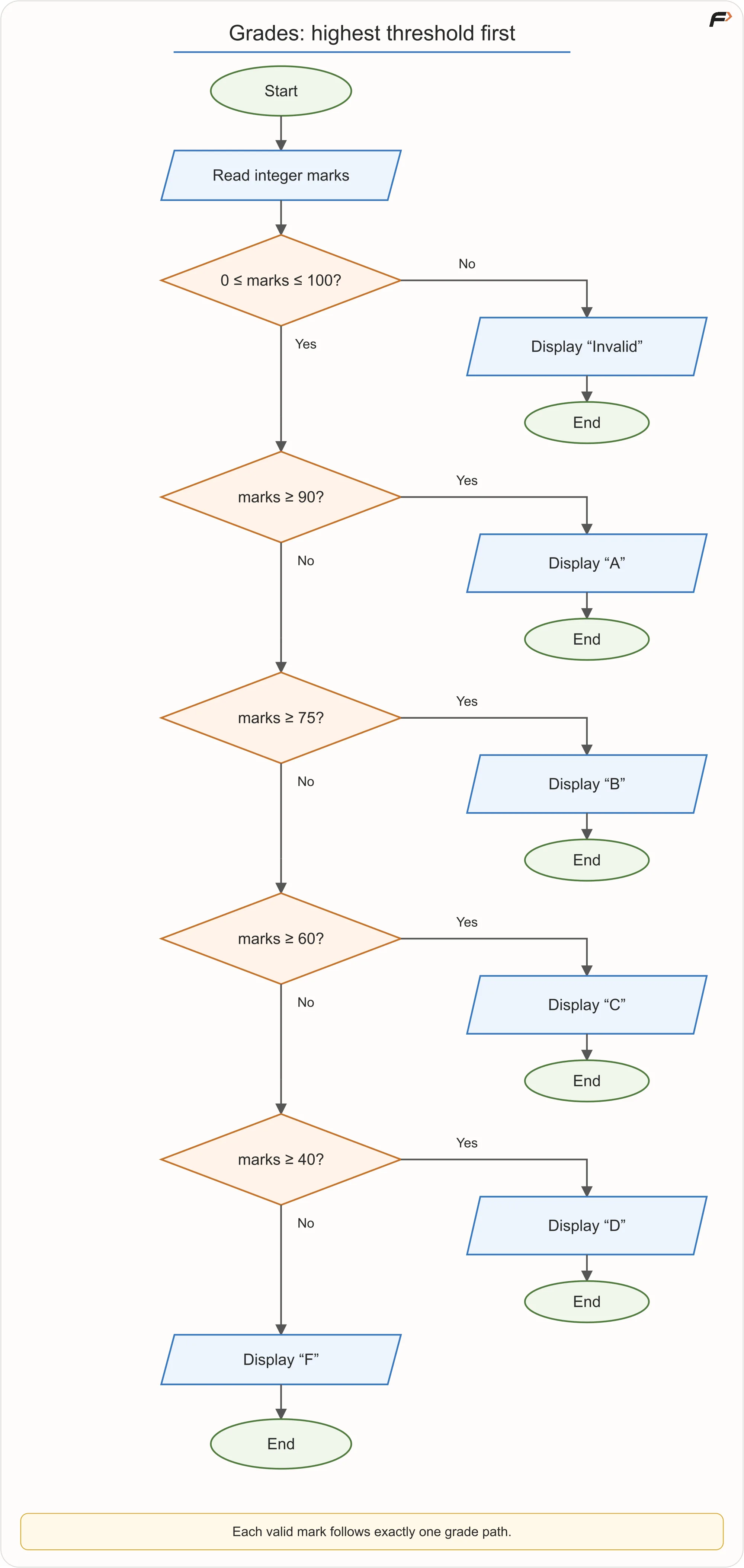
Grade Classification
The ordering trap
Suppose the checks run in this order:
IF marks >= 40 → D
ELSE IF marks >= 60 → C
...
A mark of 95 satisfies marks >= 40, so it would incorrectly receive D. In a chained selection, the first true branch wins.
Check thresholds from highest to lowest:
IF marks < 0 OR marks > 100
    DISPLAY "Invalid"
ELSE IF marks >= 90
    DISPLAY "A"
ELSE IF marks >= 75
    DISPLAY "B"
ELSE IF marks >= 60
    DISPLAY "C"
ELSE IF marks >= 40
    DISPLAY "D"
ELSE
    DISPLAY "F"
END IF
Why upper bounds disappear
At the marks >= 75 branch, the earlier marks >= 90 branch has already failed. Therefore marks must already be below 90. The control flow carries information.
Boundary table
| Mark | Expected result |
|---|---|
| -1 | Invalid |
| 0 | F |
| 39 | F |
| 40 | D |
| 59 | D |
| 60 | C |
| 74 | C |
| 75 | B |
| 89 | B |
| 90 | A |
| 100 | A |
| 101 | Invalid |
Key idea: In chained decisions, branch order is part of the algorithm.
4. Sum from 1 to N
Requirement
Read a positive integer N and calculate 1 + 2 + ... + N using repetition.
The formula N × (N + 1) / 2 also gives the sum; for N = 5, it gives 15. Here, the requirement is to practise repetition, so build the loop. Unlike the earlier lesson’s non-negative variant, this contract rejects zero as well as negative N. Assume integer input.
Build the loop from four questions
- Starting state?
sum = 0,i = 1 - Continue while?
i <= N - Repeated work? Add
itosum - Progress? Increase
iby 1
Flowchart
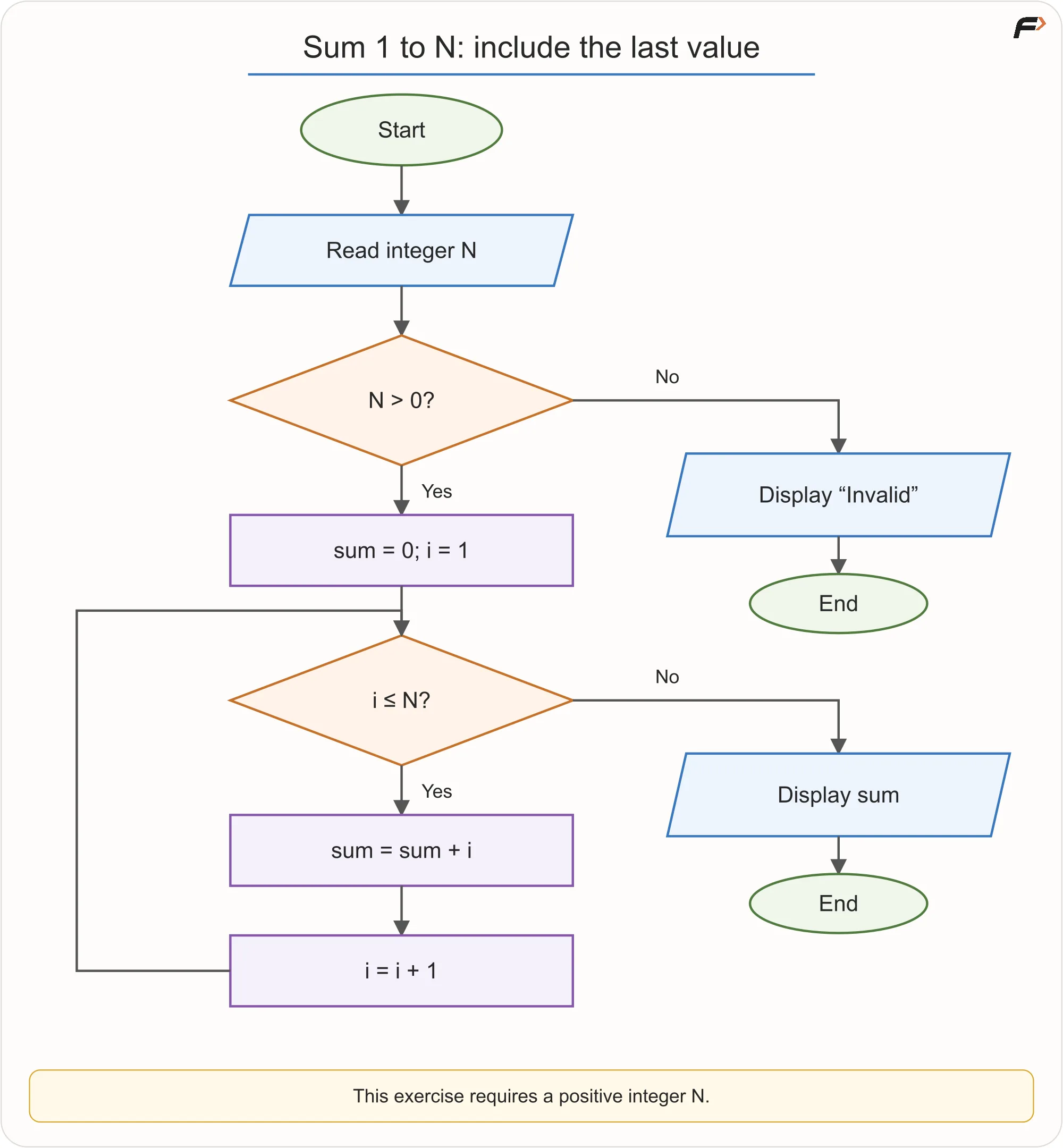
Sum to N
Dry run for N = 5
| Before iteration | Operation | New sum | New i |
|---|---|---|---|
i=1, sum=0 | add 1 | 1 | 2 |
i=2, sum=1 | add 2 | 3 | 3 |
i=3, sum=3 | add 3 | 6 | 4 |
i=4, sum=6 | add 4 | 10 | 5 |
i=5, sum=10 | add 5 | 15 | 6 |
At i = 6, i <= 5 is false. Output 15.
Why sum starts at zero
Zero is the identity for addition: adding zero does not change the total. The accumulator begins as the total of no processed values.
Common failures
i < Nmisses N.i = 0adds an unnecessary iteration but may still produce the same sum.- missing
i = i + 1causes an infinite loop. - displaying
suminside the loop prints intermediate totals rather than only the final result.
Pseudocode
READ N
IF N <= 0
    DISPLAY "Invalid"
    STOP
END IF
SET sum = 0
SET i = 1
WHILE i <= N
    SET sum = sum + i
    SET i = i + 1
END WHILE
DISPLAY sum
5. Sum of digits
Requirement
Read a non-negative integer and display the sum of its digits.
Mental model: peel from the right
For 472:
- last digit is 2;
- remaining number is 47;
- last digit is 7;
- remaining number is 4;
- last digit is 4;
- remaining number is 0.
Two integer operations express this:
N MOD 10gives the last digit.N DIV 10removes the last digit.
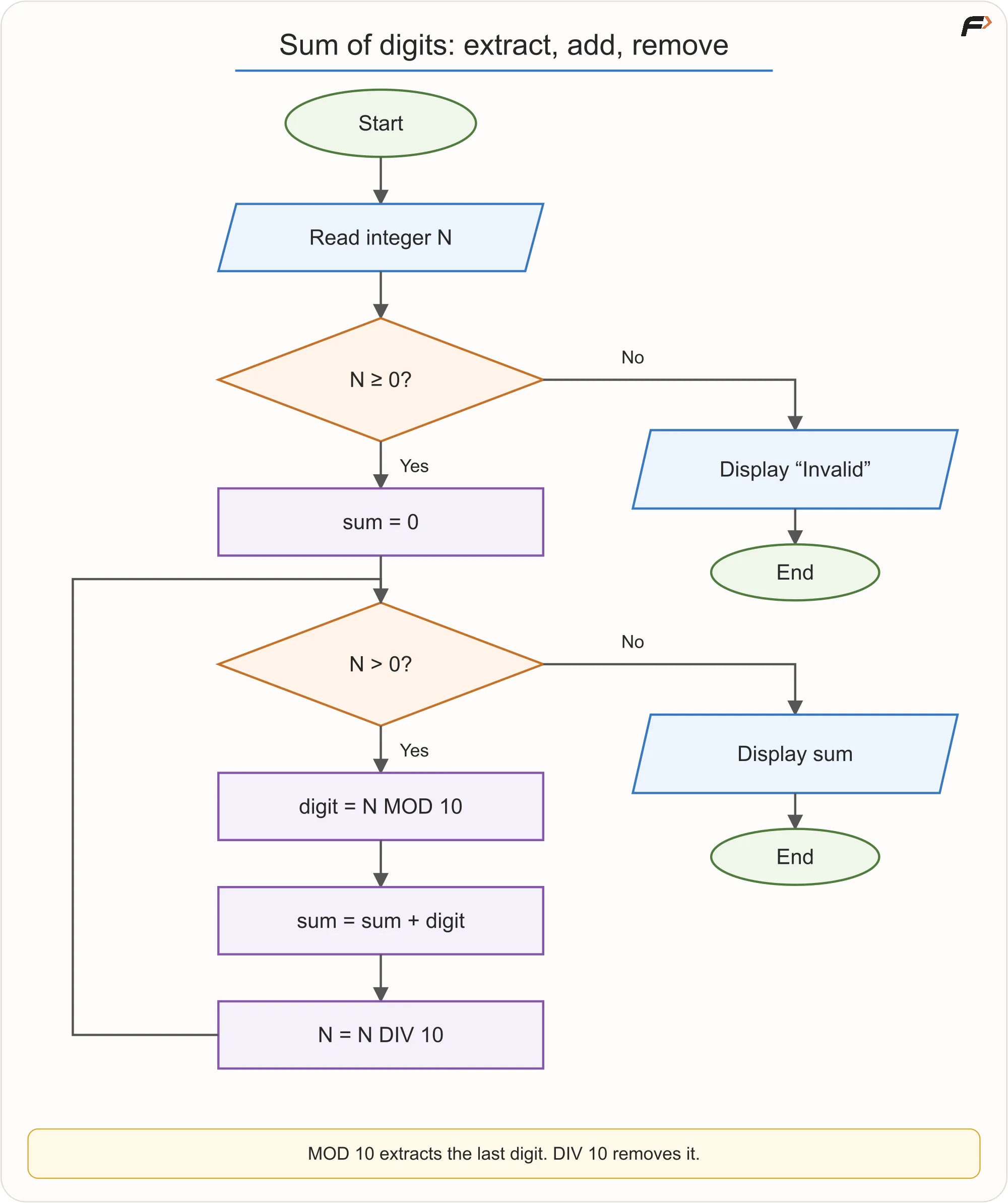
Sum of Digits
Pseudocode
READ N

IF N < 0
    DISPLAY "Invalid"
    STOP
END IF

SET sum = 0

WHILE N > 0
    SET digit = N MOD 10
    SET sum = sum + digit
    SET N = N DIV 10
END WHILE

DISPLAY sum
Trace for 472
N before | Last digit | Sum after | N after |
|---|---|---|---|
| 472 | 2 | 2 | 47 |
| 47 | 7 | 9 | 4 |
| 4 | 4 | 13 | 0 |
What about input zero?
The loop executes zero times, sum remains zero, and the output is correctly zero. This is a useful example of a loop that may validly run no times.
Key idea: A number can be processed one digit at a time by repeatedly extracting and removing its final digit.
Zero when the task changes
For digit sum, input 0 correctly gives 0 without entering the loop. Counting digits is different: the number zero contains one digit. Do not assume the same zero-iteration result solves both tasks.
DIV means integer division here: 472 DIV 10 = 47, not 47.2. The next repetition works on a smaller remaining number, so the loop eventually reaches zero. For the video’s additional example 516, the extracted digits are 6, 1, 5, giving 12.
6. Calculate a restaurant bill
Requirement
Read the price of two food items and a delivery fee. Display the total payable amount. Assume the prices and fee are valid non-negative amounts; the stated contract does not add an input-validation rule.
Understand the contract
- Inputs:
item1,item2,deliveryFee - Output:
total - Calculation: add the three values
- Decisions: none in the current requirement
- Repetition: none
Algorithm
- Read both item prices and the delivery fee.
- Add them.
- Display the total.
Flowchart
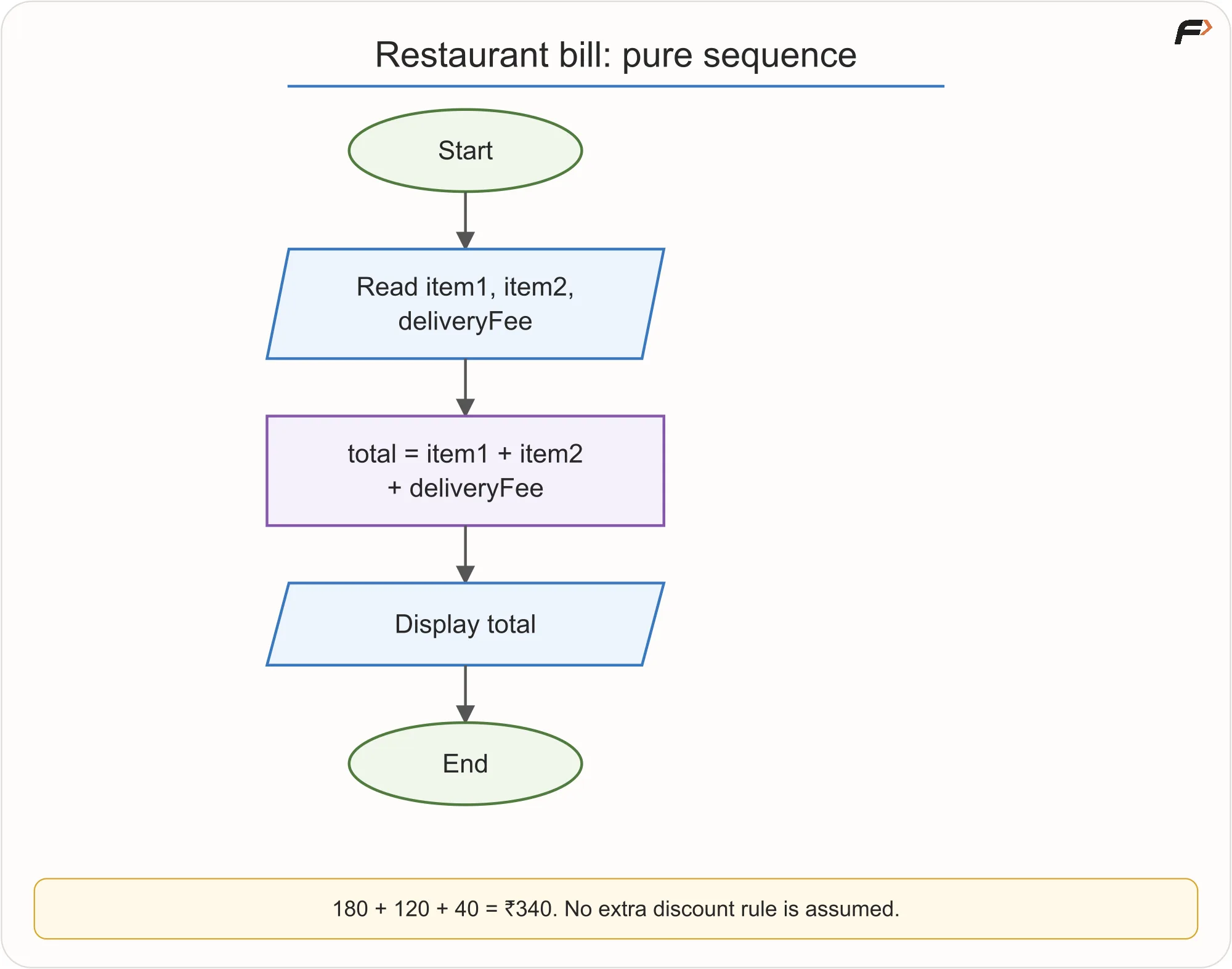
Restaurant Bill
Dry run
Input: 180, 120, 40
total = 180 + 120 + 40 = 340
Output: ₹340
Challenge the solution
What if delivery is free above ₹299? That is a new rule and changes the problem from pure sequence to selection. Never silently invent or omit business rules.
Pseudocode
READ item1, item2, deliveryFee
SET total = item1 + item2 + deliveryFee
DISPLAY total
Key idea: Do not add a decision because “real apps have discounts.” Solve the stated contract first.
7. Free delivery eligibility
Requirement
Read a valid non-negative cart value. Delivery costs ₹40 when the cart value is below ₹499; otherwise delivery is free. Display the final payable amount.
Contract
- Input:
cartValue - Output: final payable amount
- Rule: delivery fee is ₹40 only when
cartValue < 499 - Boundary: exactly ₹499 receives free delivery
First thought and its hidden bug
A learner may check cartValue > 499 for free delivery. That incorrectly charges a fee at exactly 499. The word “below” means <; “otherwise” includes equality.
Flowchart
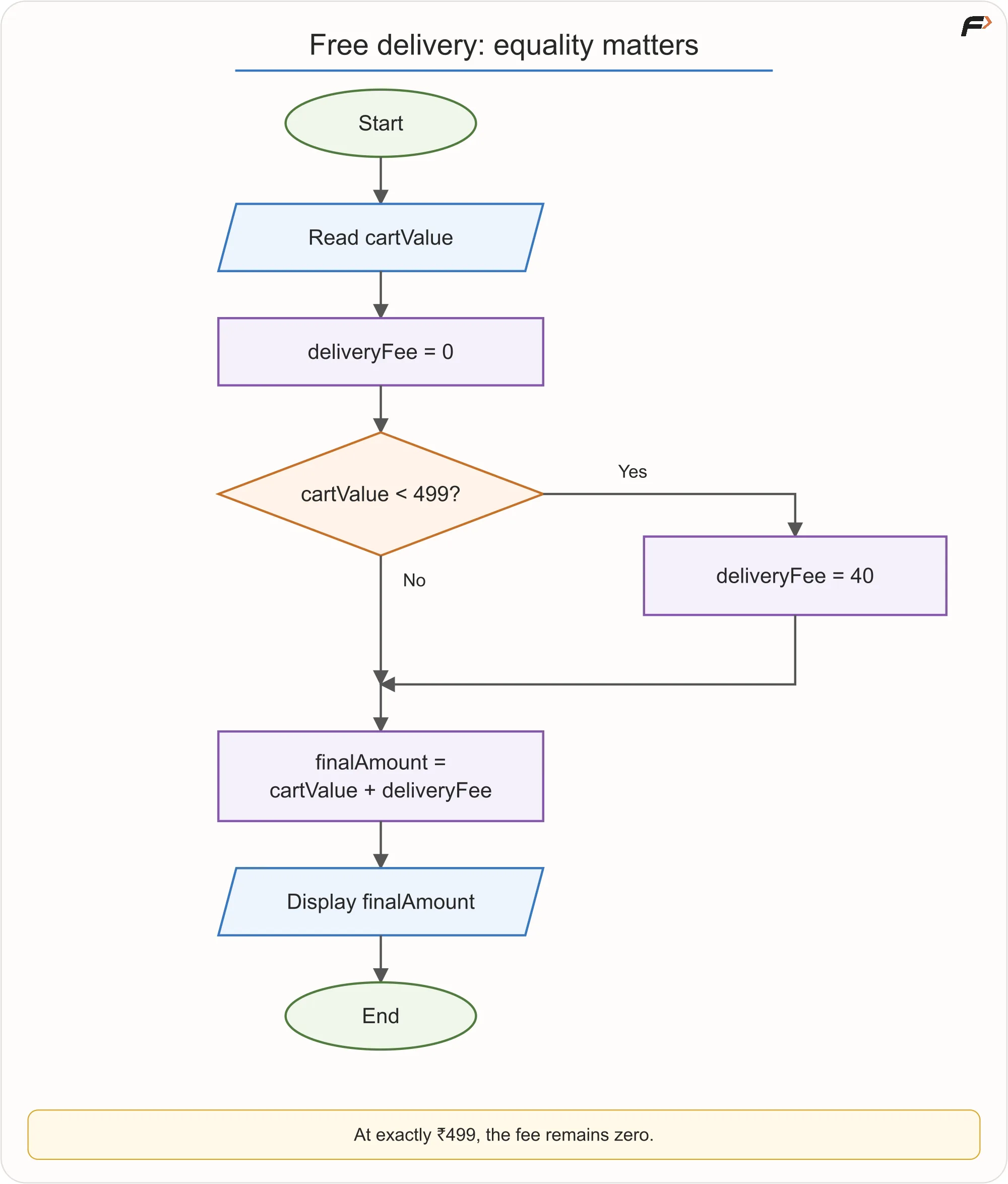
Free Delivery
Dry runs
| Cart value | Condition < 499 | Fee | Final amount |
|---|---|---|---|
| 498 | True | 40 | 538 |
| 499 | False | 0 | 499 |
| 700 | False | 0 | 700 |
Pseudocode
READ cartValue

IF cartValue < 499
    SET deliveryFee = 40
ELSE
    SET deliveryFee = 0
END IF

SET finalAmount = cartValue + deliveryFee
DISPLAY finalAmount
Key idea: Boundary inputs are not afterthoughts. They reveal whether the condition expresses the sentence correctly.
8. Electricity bill using slabs
Requirement
Use this simplified tariff:
- First 100 units: ₹2 per unit
- Next 100 units: ₹3 per unit
- Units above 200: ₹5 per unit
Read non-negative units and calculate the bill.
The wrong interpretation
For 250 units, multiplying all 250 by ₹5 gives ₹1,250. But slab pricing applies different rates to different portions.
Correct decomposition for 250 units
- First 100:
100 × 2 = 200 - Next 100:
100 × 3 = 300 - Remaining 50:
50 × 5 = 250 - Total:
750
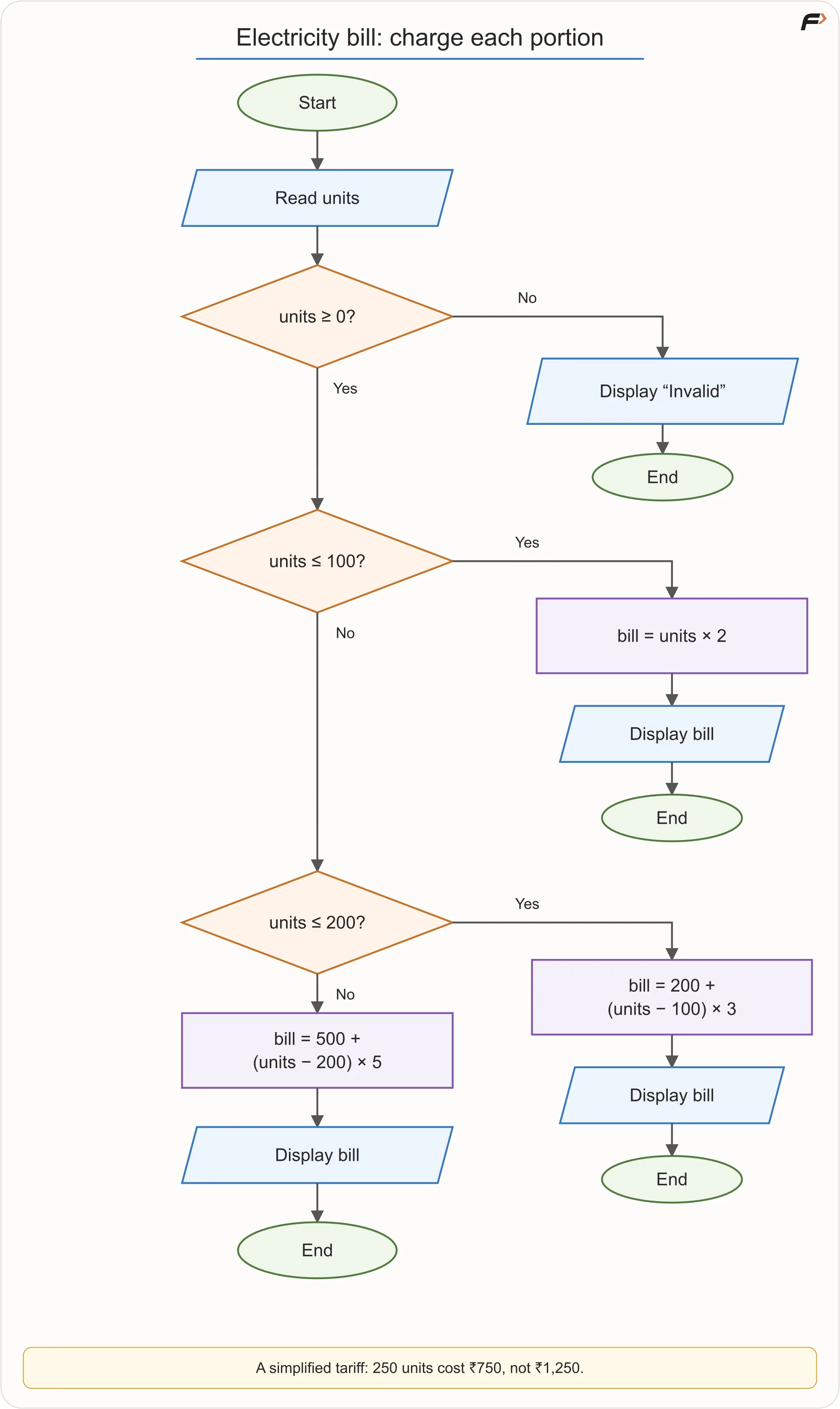
Slab Billing
Pseudocode
READ units

IF units < 0
    DISPLAY "Invalid"
    STOP
END IF

IF units <= 100
    SET bill = units * 2
ELSE IF units <= 200
    SET bill = 100 * 2 + (units - 100) * 3
ELSE
    SET bill = 100 * 2 + 100 * 3 + (units - 200) * 5
END IF

DISPLAY bill
Boundary checks
- 0 units → ₹0
- 100 units → ₹200
- 101 units → ₹203
- 200 units → ₹500
- 201 units → ₹505
- 250 units → ₹750
Key idea: “Rate for the highest slab reached” and “rate for each portion” are different models. Read pricing rules literally.
9. A deeper skill: explain why each shape exists
For any finished flowchart, point to every shape and ask:
- Why is this an input rather than a process?
- What state changes in this process box?
- Why is this decision placed here?
- What knowledge is carried into this branch?
- What makes this backward arrow terminate?
- Could any path reach the end without producing the required output?
If a learner cannot answer, the drawing may be memorized rather than understood.
10. Common laboratory mistakes
Drawing while still reading
The chart becomes a record of guesses. Extract the contract first.
Treating every sentence as a separate shape
Flowcharts model execution, not grammar. Combine one precise calculation in one process box.
Ignoring invalid input without stating an assumption
Either validate it or explicitly state that constraints guarantee validity.
Using examples instead of variables
total = 180 + 120 + 40 solves one instance. total = item1 + item2 + deliveryFee solves the stated problem.
Branches overlap or leave gaps
Grade ranges must cover every valid mark exactly as intended.
Hiding a system in one vague box
If a step hides the validation, calculations, and decisions being studied, break it into precise actions.
Loop output is misplaced
Printing each table entry belongs inside a loop. Printing one final sum usually belongs after it.
11. Final no-code assessment
Solve this without C++, Java or Python:
Read a positive integer. Count how many of its digits are even and how many are odd. Treat digit 0 as even. Display both counts.
The learner must submit:
- Input, output and assumptions.
- Plain-language algorithm.
- Flowchart.
- Pseudocode.
- Trace for
24071. - Tests for
8,0,111, and a negative input. - Explanation of termination.
Expected reasoning for 24071
Digits processed from right: 1, 7, 0, 4, 2.
- Odd: 1 and 7 → 2 digits
- Even: 0, 4 and 2 → 3 digits
Clarify the zero contract. The stated assessment asks for a positive integer, so its strict version must reject input 0 and negative inputs. The digit 0 inside a valid positive number such as 24071 still counts as even.
If you extend the task to non-negative integers, explicitly accept input 0 and return one even digit and zero odd digits. A plain WHILE N > 0 loop would miss that single digit, so this extended version needs a special zero branch. State which contract your solution implements.
| Test | Strict positive-input task | Optional non-negative extension |
|---|---|---|
24071 | Even 3, odd 2 | Even 3, odd 2 |
8 | Even 1, odd 0 | Even 1, odd 0 |
0 | Invalid | Even 1, odd 0 |
111 | Even 0, odd 3 | Even 0, odd 3 |
| Negative input | Invalid | Invalid |
For a positive working value, N DIV 10 removes one digit on each iteration. That shrinking state explains termination.
12. Key terms and revision
| Term | Meaning |
|---|---|
| Validation | Check whether input follows allowed rules |
| Boundary | Value at which behaviour changes |
| Accumulator | Variable that carries a growing result, such as a sum |
| Counter | Variable tracking how many times something occurs |
| Identity value | Starting value that does not change an operation, such as 0 for addition |
| Slab | Portion of a range charged or processed under one rule |
| Trace | Recorded state changes during a dry run |
| Termination | Condition under which repetition ends |