Why SQL Is So Often Learned the Wrong Way
Most people begin SQL with commands. They see SELECT,WHERE,JOIN and immediately jump into writing queries. The learning becomes mechanical: write this, get that output, move on. But SQL was never designed to be learned like a formula sheet. The real problem is not that SQL is difficult.
The problem is that learners are rarely told why SQL exists in the first place.
Why SQL Exists
Let’s begin with a simple, real scenario. Imagine you are running a coaching institute. Very quickly, you realize you are no longer just teaching. You are managing data. You need to store:
- Student data: name, email, phone number, joining date, agreed fees
- Attendance data: date, student identifier, present or absent
- Fees data: month, student identifier, amount paid
At first, this data feels manageable. You might start with a notebook. Then you move to Excel and initially, it works. But the real question is not “Can I store this data?”
The real question is “What happens when this grows?”
Data always grows.
Why Excel Eventually Breaks
Excel is not bad software. It is simply not designed for what databases are designed for.
1. Excel does not scale
Excel struggles when data becomes large. Real systems don’t have one sheet with a few thousand rows. They have multiple datasets, millions of records, and relationships between them.
Think of a platform like Swiggy or Uber. There is no realistic way to manage that volume in Excel.
2. Multiple people working together becomes unsafe
Excel allows multiple users to open a file, but it does not guarantee safe coordination. If two people edit the same cell at the same time, data corruption becomes possible.
Excel does not enforce strict locking mechanisms the way databases do.
In real systems, concurrency is not optional.
3. Excel cannot enforce strong data rules
Businesses survive on rules.
- Fees must always be greater than zero
- Email must be unique
- Attendance must follow valid formats
Excel cannot enforce these rules reliably. You might manually check when the data is small. But manual checks collapse the moment scale enters.
4. Complex questions become painful
Simple questions are easy: “How much fees did we collect this month?”
But real business questions are rarely simple:
- “How many students paid late in the last six months?”
- “Which batch has the lowest attendance trend?”
- “How many students attended more than 80% classes but paid late?”
Excel is not built to answer such questions efficiently at scale.
5. Security, audit, and reliability are weak
Databases allow:
- Fine-grained access control
- Audit trails
- Safe recovery if systems crash
Excel assumes things will go right. Databases assume things will go wrong, and prepare for it.
This is the moment SQL becomes necessary.
What SQL Really Is
SQL stands for Structured Query Language. It is the language used to communicate with databases. But SQL is different from most languages beginners know.
In languages like Java or Python, you tell the computer how to do something step by step:
- Loop
- Check
- Compare
- Move forward
That is called imperative programming.
SQL is declarative. In SQL, you say:
“This is what I want.”
You don’t explain the steps.
You don’t write loops.
You don’t explain how to search.
The database engine figures that out internally. Common beginner mistake: trying to think of SQL like Java or Python.
Correct SQL thinking is about clearly describing the result, not the process.
SEQUEL vs SQL
- SEQUEL was the earlier name used historically for the language during early development (it stands for Structured English Query Language).
- SQL (Structured Query Language) is the official name that became the standard.
- People sometimes still say “sequel” in speech, but in writing it’s SQL.
What a Database Actually Is
A database is simply an organized collection of data.
A practical mental model:
- A database is like a folder
- Inside it are multiple tables
- Each table looks like an Excel sheet: rows and columns
What if your laptop shuts down?
Databases store data persistently on disk or SSD. If a system crash happens mid-operation:- The database checks its logs
- Incomplete operations are rolled back
- Completed operations are preserved
This is not luck. This is deliberate design.
How Databases Store and Access Data Internally
Databases do not store everything as one big file.
Internally:
- Rows are stored inside pages
- Pages move between disk and memory as blocks
- Frequently used pages are cached in RAM
To search efficiently, databases use:
- B-trees / B+ trees (similar to a book index)
- Hash structures for fast lookups
- Buffer cache to reduce disk reads
You don’t need to master these internals immediately. But understanding them explains why SQL behaves the way it does.
Tables, Rows, and Columns
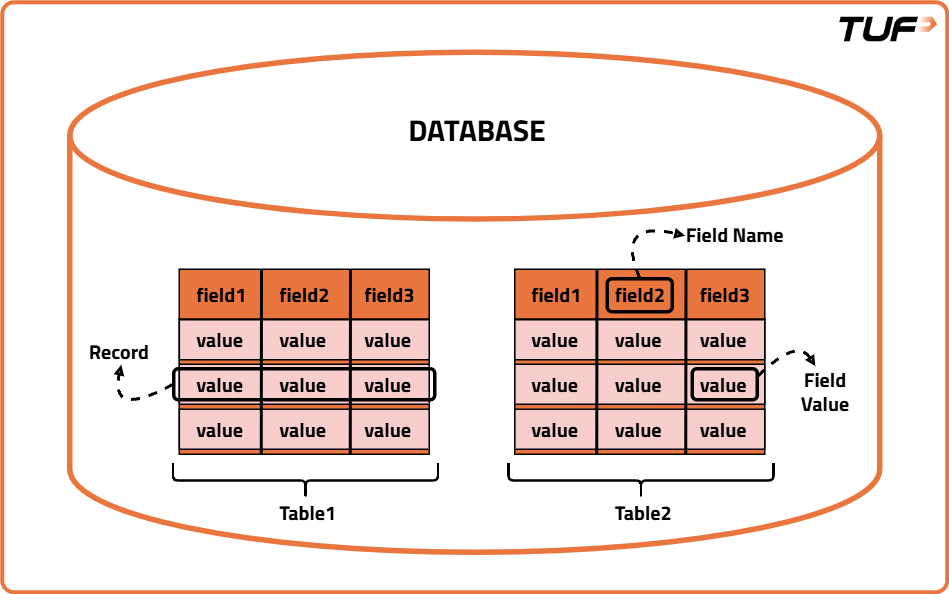
Image 1
1. Table
A table is a structured collection of related data stored in rows and columns inside a database. You can think of a table as one sheet in Excel. Each table usually represents one type of real-world thing.
Example: customers Table
| customer_id | name | signup_date | is_active | |
|---|---|---|---|---|
| 1 | Aisha Khan | aisha@example.com | 2024-01-10 | 1 |
| 2 | Raj Patel | raj.patel@sample.org | 2024-02-15 | 0 |
| 3 | Meera Joshi | meera.j@example.com | 2024-03-01 | 1 |
- Customers table - stores information about customers
- Orders table - stores information about orders
2. Row / Record
A row (also called a record) represents one complete entry in a table. Each horizontal row represents one item.
Example:
| id | name | city | |
|---|---|---|---|
| 1 | Rahul Mehta | rahul.mehta@mail.com | Mumbai |
3. Column / Field
A column (also called a field) represents one specific attribute or property of the data stored in the table. Each vertical column has a heading.
Example (same Customers table):
- name - column that stores the name of each customer
- email - column that stores the email of each customer
Relational vs NoSQL Databases
Image 2
Relational Databases
Relational databases store data in tables and connect tables using relationships.
In the coaching institute example:
- Student table
- Attendance table
- Fees table
All connected through a common identifier like email. That connection is the relation.
Examples: MySQL, PostgreSQL, Oracle
NoSQL Databases
NoSQL databases store data differently:
- JSON documents
- Key-value pairs
- Graph structures
Instead of splitting data across tables and joining, NoSQL often stores related data together for fast access.
Examples: MongoDB
NoSQL prioritizes speed and flexibility.
Relational databases prioritize structure and correctness.
Neither is “better.” They solve different problems.
Understanding Workloads: OLTP vs OLAP
A workload describes the pattern of how a database is used, who is using it, what kind of queries they run, how often they run them, and how fast results are needed. Different systems are built for different workloads. The two most common types are OLTP and OLAP.
OLTP (Online Transaction Processing)
OLTP systems handle day-to-day operations. They are built for:
- Many users working at the same time
- Very small but frequent queries
- Fast response time
- High accuracy and consistency
Example: Paying college fees, Marking attendance, Booking a cab, Placing an order on Amazon
OLAP (Online Analytical Processing)
OLAP systems are used for analysis and decision-making. They are built for:
- Fewer users (mostly analysts, managers, leadership)
- Large and complex queries
- Scanning huge amounts of data
- Finding patterns and trends
Example: “How many students enrolled each year for the last 5 years?”, “Which city has the highest number of users?”
Understanding this distinction helps explain why some systems are optimized for speed and others for analysis.
Transactional Databases
A transaction is a group of operations that must succeed together. A transaction is not a single query. It is a bundle of operations that logically belong together and must behave as one unit.
The rule is simple: Either everything in the transaction succeeds, or nothing is allowed to change.
There is no “half done” state.
What a Transaction Looks Like in Real Life
Suppose a student pays college fees online. Internally, the system might do:
- Deduct money from the student's wallet
- Record the payment in the finance table
- Update the student's status as “Fees Paid”
These are three different operations. But from the user's point of view, it is one action: “Pay Fees”.
Now imagine:
- Money is deducted
- But the payment record is not saved
- And status is not updated
That would be a disaster. The student loses money but the system says “Not Paid”.
This is the all-or-nothing rule.
How Databases Actually Enforce It
Databases use three main ideas behind the scenes:
1. Transaction Log (Write-Ahead Logging)
Before changing real data, the database:
- Writes the intended change to a transaction log
- This log is stored safely on disk
So the order is:
- Write “I am about to change X to Y” into the log
- Then change the actual data
If the system crashes:
- On restart, the database reads the log
- If a transaction was not fully finished, it is rolled back
- If it was fully committed, its changes are reapplied from the transaction log.
This is why money does not vanish during crashes.
2. Isolation: Locks or MVCC
While one transaction is running, others should not see broken or half data.
Databases ensure this using:
- Locks: block others from touching the same data
- Or MVCC (Multi-Version Concurrency Control): keep multiple versions of rows
This means:
- One user never sees another user’s half-completed work
- Everyone sees either old data or fully committed new data
No messy in-between state.
3. Commit Only When Everything Is Safe
A transaction is marked “successful” only when:
- All operations ran without error
- Log is safely written
- Data is consistent
Only then the database says: COMMIT.
If anything goes wrong before commit:
- The database throws away all changes
- Data returns to the old state
- This is called ROLLBACK.
ACID Properties
When people trust a database with money, marks, attendance, orders, or medical data,
they are really trusting one idea:
The database will never leave data in a broken state.
This trust comes from ACID properties.
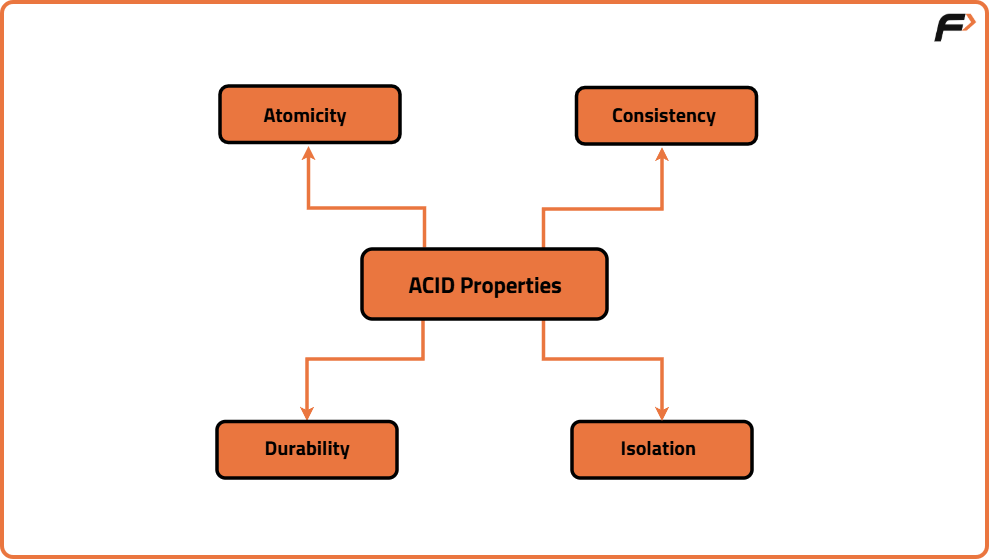
Image 3
Every serious transactional database is designed around these four guarantees.
A-Atomicity (All or Nothing)
Atomicity means, a transaction is treated as one single unit. If it has 10 steps:
- Either all 10 happen
- Or none happen
There is no “50% done”.
Example:
Paying college fees:
- Deduct money
- Save payment record
- Update student status
If step 2 fails:
- Step 1 is undone
- Step 3 never runs
- System goes back to original state
So the system never shows: “Money gone but fees not paid.” That is atomicity.
C-Consistency (Rules Are Never Broken)
Consistency means, After every committed transaction, the data must obey all rules.
Rules can be:
- Primary key uniqueness
- Foreign key relations
- Balance can’t be negative
- Attendance can’t exceed total classes
- Marks must be between 0 and 100
Example:
If rules say: “Account balance cannot go below 0.” Then a transaction that tries to make it -500:
- Is rejected
- Or rolled back
Database will not allow broken data to become permanent.
I-Isolation (Users Don’t Interfere)
Isolation means, Many users can work at the same time, but each transaction behaves as if it is alone.
Example:
Two people booking the last seat, Both click “Book” at the same time.
Database ensures:
- One gets the seat
- The other gets a failure
- Not both
Without isolation:
- Both might see “Seat Available”
- Both book it
- System becomes wrong
Isolation is achieved using Locks, Or MVCC
So users never see half, completed work of others.
D-Durability (Committed Means Permanent)
Durability means, Once the database says “Committed”:
- Data will survive power loss
- Server crash
- Restart
This is done using:
- Transaction logs
- Writing to disk before confirming
- Recovery on restart
So if you get a message: “Payment Successful.” Even if the server crashes one second later:
- Your payment is not lost
- Database will recover it
That is durability.
DBMS and RDBMS
A common beginner misunderstanding is to think that a database is just “data stored on disk”.
In reality, data alone is useless. What makes a database powerful is the software layer that controls how data is stored, accessed, protected, and recovered.
That software is called a DBMS.
What a DBMS Really Is
A DBMS (Database Management System) is the engine that sits between:
- Your applications
- And the raw data on disk
It is responsible for everything that happens to data.
A DBMS does not just store data. It actively manages it.
A DBMS:
- Decides how data is stored on disk
- Decides who can access it
- Ensures data is not corrupted
- Handles crashes and recovery
- Manages multiple users at the same time
Without a DBMS, you would be manually reading and writing files and any crash would destroy consistency.
What Is an RDBMS Then?
An RDBMS (Relational Database Management System) is a special type of DBMS designed specifically for relational data.
Relational data means:
- Data is stored in tables (rows and columns)
- Tables are connected using relationships
- Rules are enforced using keys and constraints
An RDBMS supports:
- Tables with fixed schemas
- Primary keys and foreign keys
- Joins between tables
- SQL as the query language
- Strong transactional guarantees
So:
- DBMS - general concept
- RDBMS - DBMS built for relational databases
All RDBMS are DBMS.
Not all DBMS are relational.