Image 1
Introduction
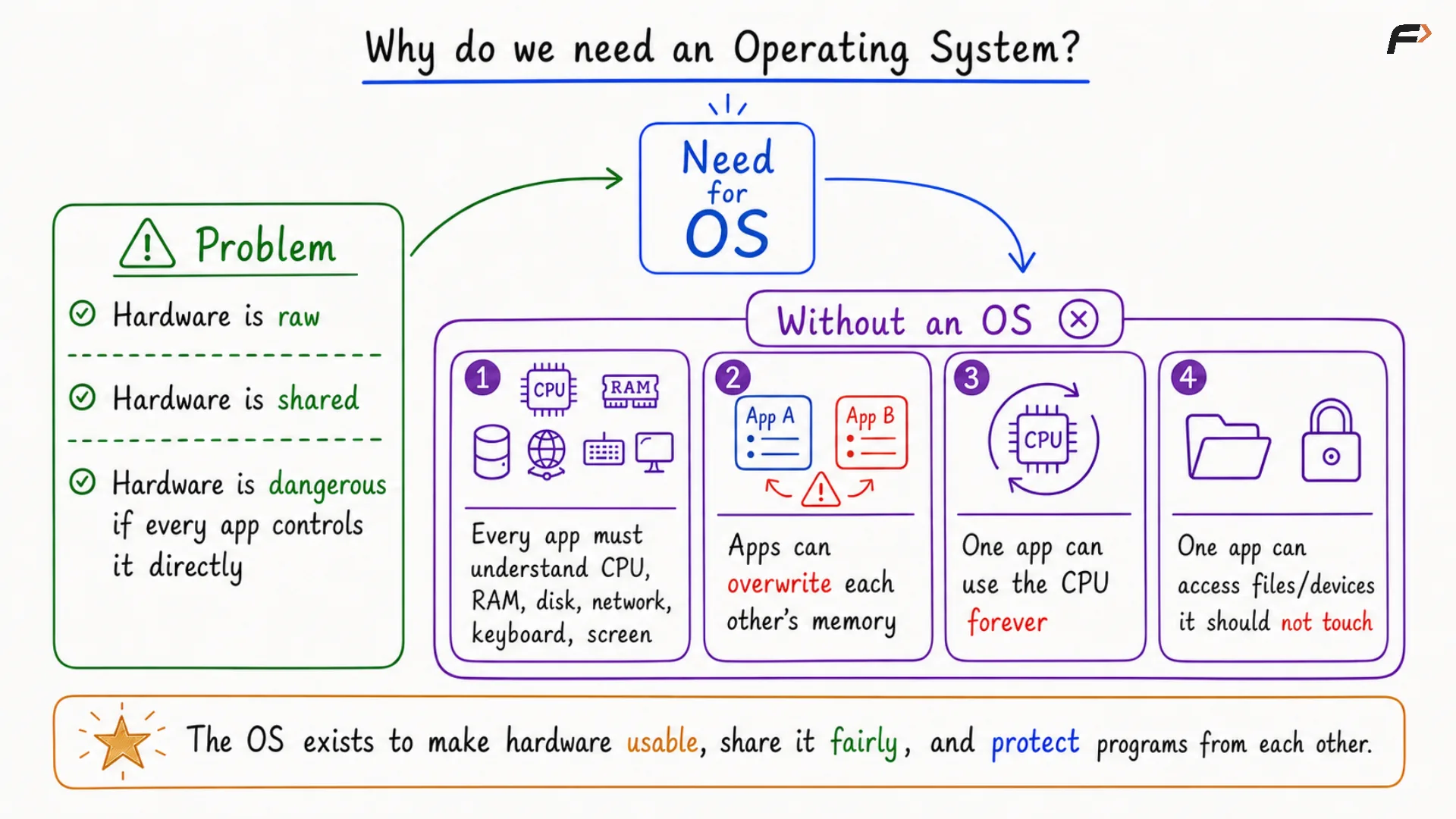
An operating system is needed because applications cannot use hardware safely and conveniently on their own. Every application ultimately depends on hardware such as the CPU, memory, storage, input devices, output devices, and networking hardware.
However, hardware is raw, shared, and dangerous if every application controls it directly. The operating system exists to make hardware usable, share it fairly, and protect programs from each other.
Why Applications Need Help From An Operating System
Hardware Is Raw
Hardware provides the basic physical capability required to run software, but it does not provide a simple application-level environment by itself.
- The CPU is the processing unit of the system.
- RAM is temporary memory used for faster processing.
- ROM stores information required during booting.
- Storage devices such as SSDs store data permanently.
- Input devices include keyboard and mouse.
- Output devices include monitor and other display devices.
- The motherboard helps hardware components communicate with each other.
If every application had to directly understand all these components, application development would become extremely complex.
Hardware Is Shared
The same hardware resources are used by multiple applications. Applications such as WhatsApp, Gmail, Google Maps, and many others may all need CPU time, memory, files, devices, and network access.
Since these resources are limited and shared, there must be a system that decides which application gets which resource and when.
Hardware Is Dangerous To Control Directly
If applications directly controlled hardware, several serious problems could occur.
- Every application would need to understand CPU, RAM, disk, network, keyboard, screen, and other hardware details.
- One application could overwrite another application’s memory.
- One application could use the CPU forever and stop other applications from running properly.
- One application could access files or devices that it should not touch.
For example, if WhatsApp is using memory and another application can directly access the same memory, that application could overwrite WhatsApp’s data. Similarly, Google Maps should not be able to freely access WhatsApp’s files.
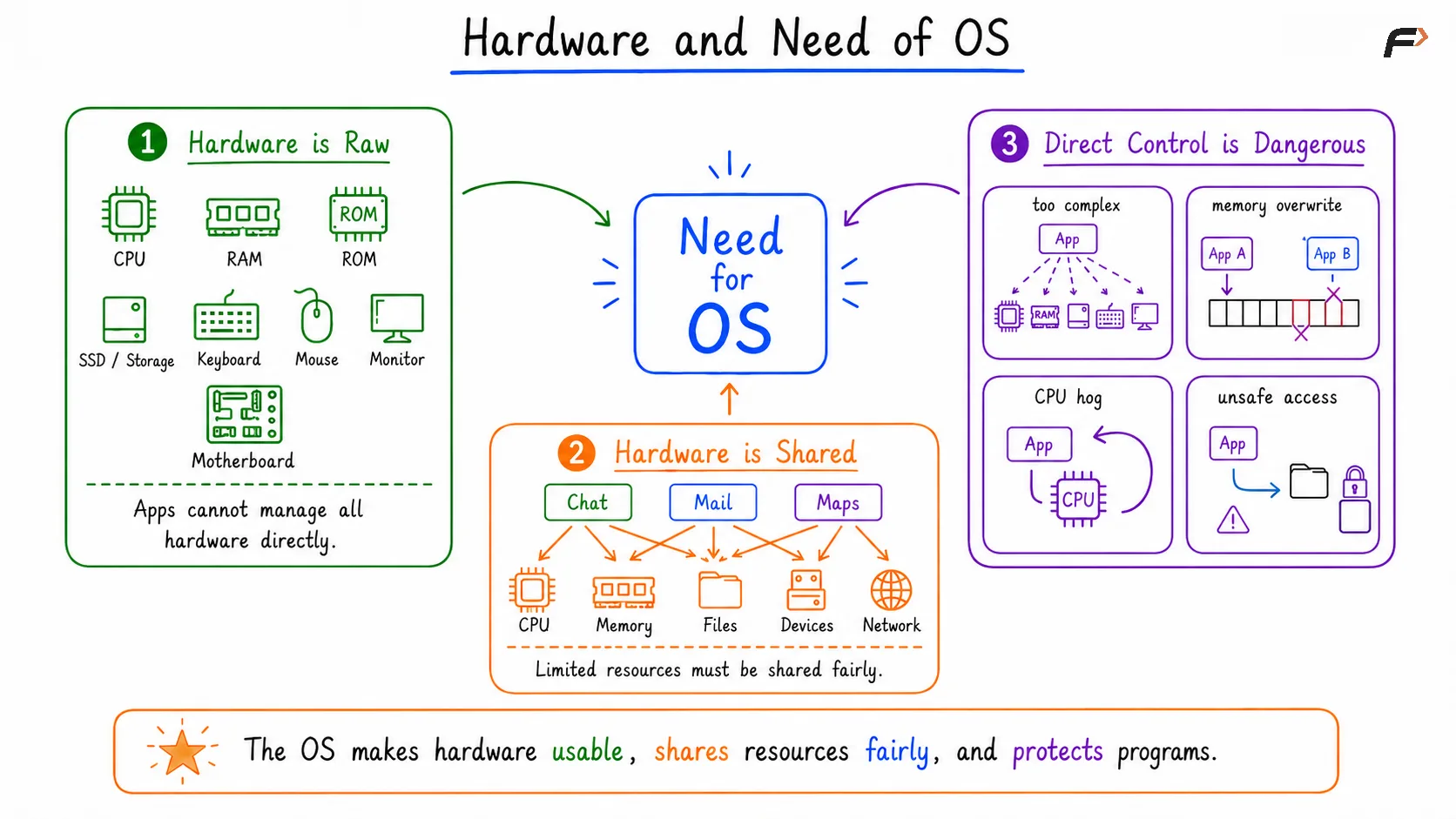
Image 11
The Need For An Operating System
The operating system acts as system software between applications and hardware. Applications do not directly control the hardware; they request services from the operating system.
The operating system checks the request, manages the required resource, performs the action, and returns the result to the application.
- Applications may request the operating system to run code.
- They may request memory allocation.
- They may ask to open files.
- They may ask to use devices.
- They may ask to send network data.
A useful one-line mental model is: applications request, and the operating system checks, manages, and performs.
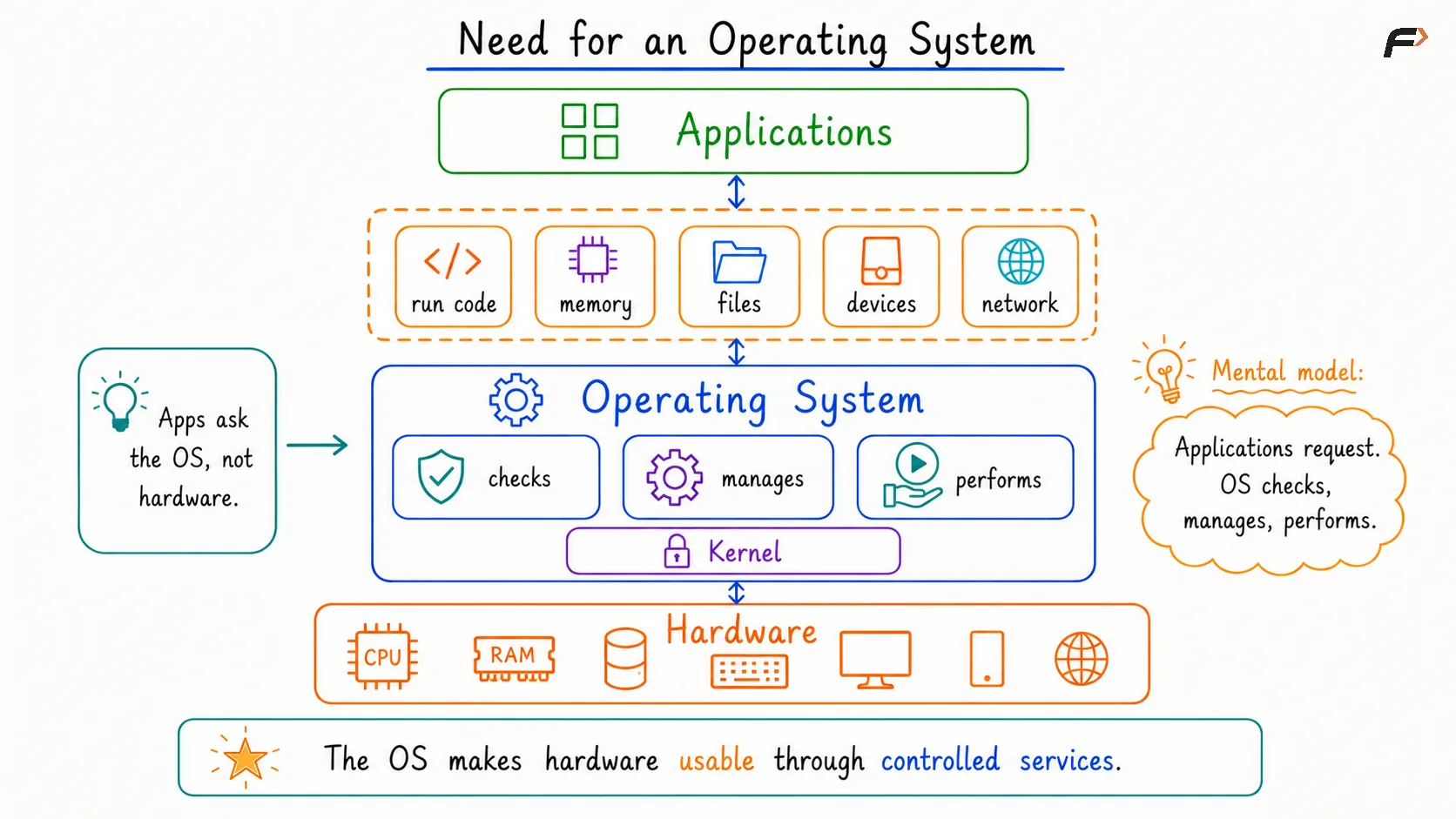
Image 12
Simple Definition Of An Operating System
An operating system is system software that sits between applications and hardware. It provides services to applications and manages the hardware required to run them.
The core privileged part of the operating system is called the kernel. The kernel performs the main operating system functions and has privileged access to manage critical system behavior.
Applications should not directly control the hardware. They make controlled requests, and the operating system handles those requests through the kernel.
The Three Big Roles Of An Operating System
1. Manager
The operating system acts as a manager of resources. It shares CPU, memory, files, and devices among applications.
- It decides which application gets CPU time.
- It decides how memory is distributed.
- It controls access to files.
- It manages access to devices.
If many applications request CPU processing power, the operating system uses algorithms to distribute that processing power so that applications can run according to the chosen policy.
2. Abstraction Layer
The operating system hides hardware complexity by giving applications simpler concepts to work with.
- An application can ask for memory without knowing the exact hardware-level memory details.
- An application can open a file without managing raw storage directly.
- An application can use devices without writing complete hardware-specific code.
This abstraction gives applications simple concepts such as process, file, socket, and virtual memory.
3. Guard
The operating system also acts as a guard. It stops one application from harming another and controls privileged access through system calls.
- It prevents one program from freely modifying another program’s memory.
- It prevents applications from accessing restricted files or devices.
- It protects programs and users through controlled access.
A strong understanding of an operating system should include all three roles: manager, abstraction layer, and guard.
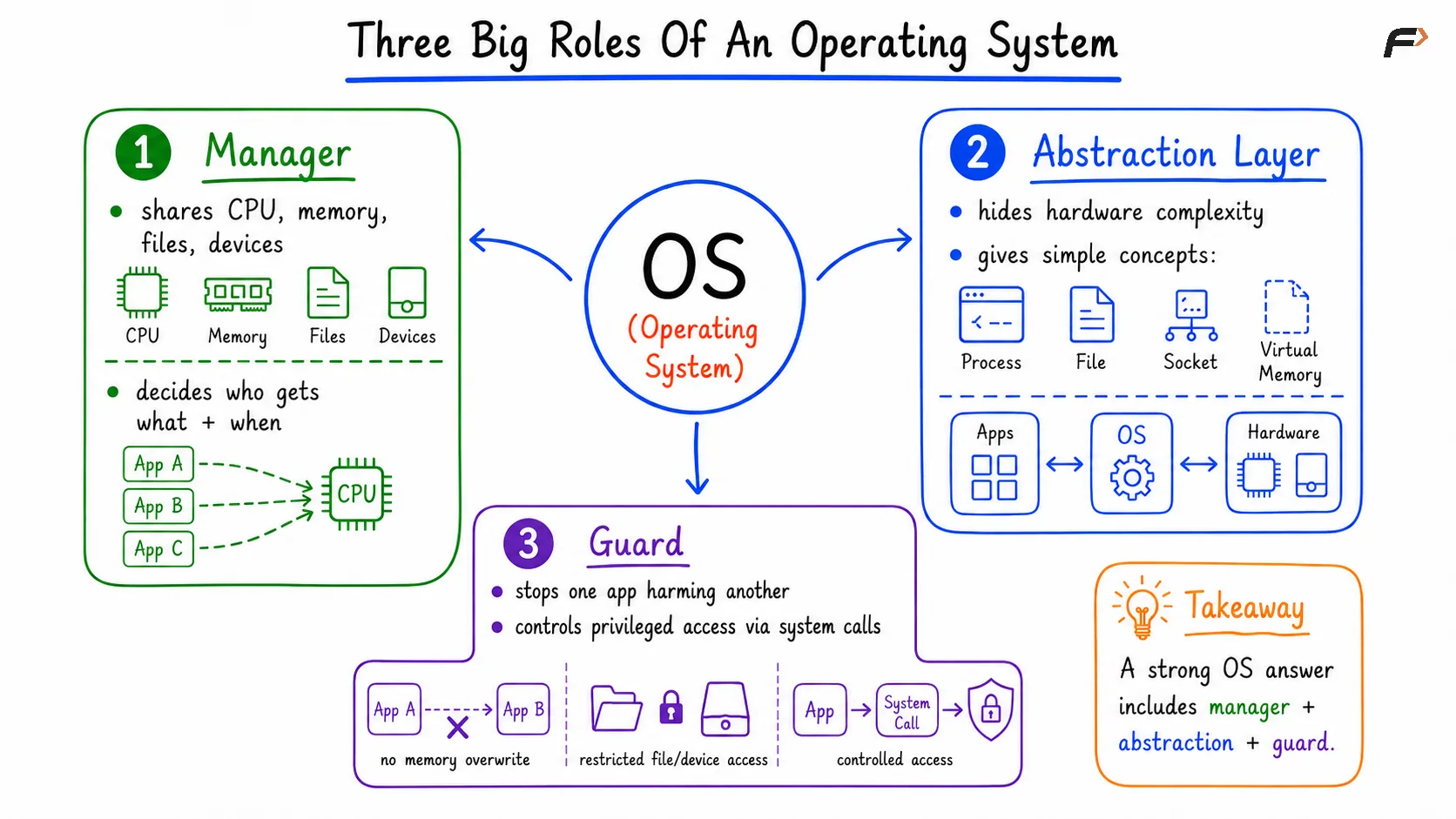
Image 13
Important Operating System Abstractions
Process
A process is a running program. When an application such as WhatsApp, Google Maps, or Chrome runs, the operating system treats that running program as a process.
Thread
A thread is a path of execution inside a process. Chrome may run as a process, but many activities can happen inside it, such as opening a tab or rendering something.
These internal paths of execution are handled through threads.
Virtual Memory
Virtual memory makes each process feel as if it has private memory. The process receives memory addresses that are not directly the real physical memory addresses.
In the background, those addresses are mapped to real memory. This allows processes to work with a private memory view while the operating system manages the actual shared hardware memory.
File
A file is named persistent data. Data that needs to be stored permanently is organized and accessed through files.
Socket
A socket is a communication endpoint for networking. It allows programs to communicate over a network.
System Call
A system call is a controlled request from an application to the kernel. Since the kernel is privileged, applications use system calls to request important operations safely.
Operating Systems And Application Compatibility
Different operating systems provide different services and abstraction layers. Common operating systems include Windows, Linux, macOS, Android, and iOS.
An application written for one operating system may not run directly on another operating system. This is because the application is designed to work with a specific operating system environment.
- WhatsApp written for Android works with Android’s operating system services.
- The same Android version of WhatsApp will not directly run on iOS.
- iOS provides a different operating system environment and different abstraction layers.
This is why different operating systems often require different versions of the same application.
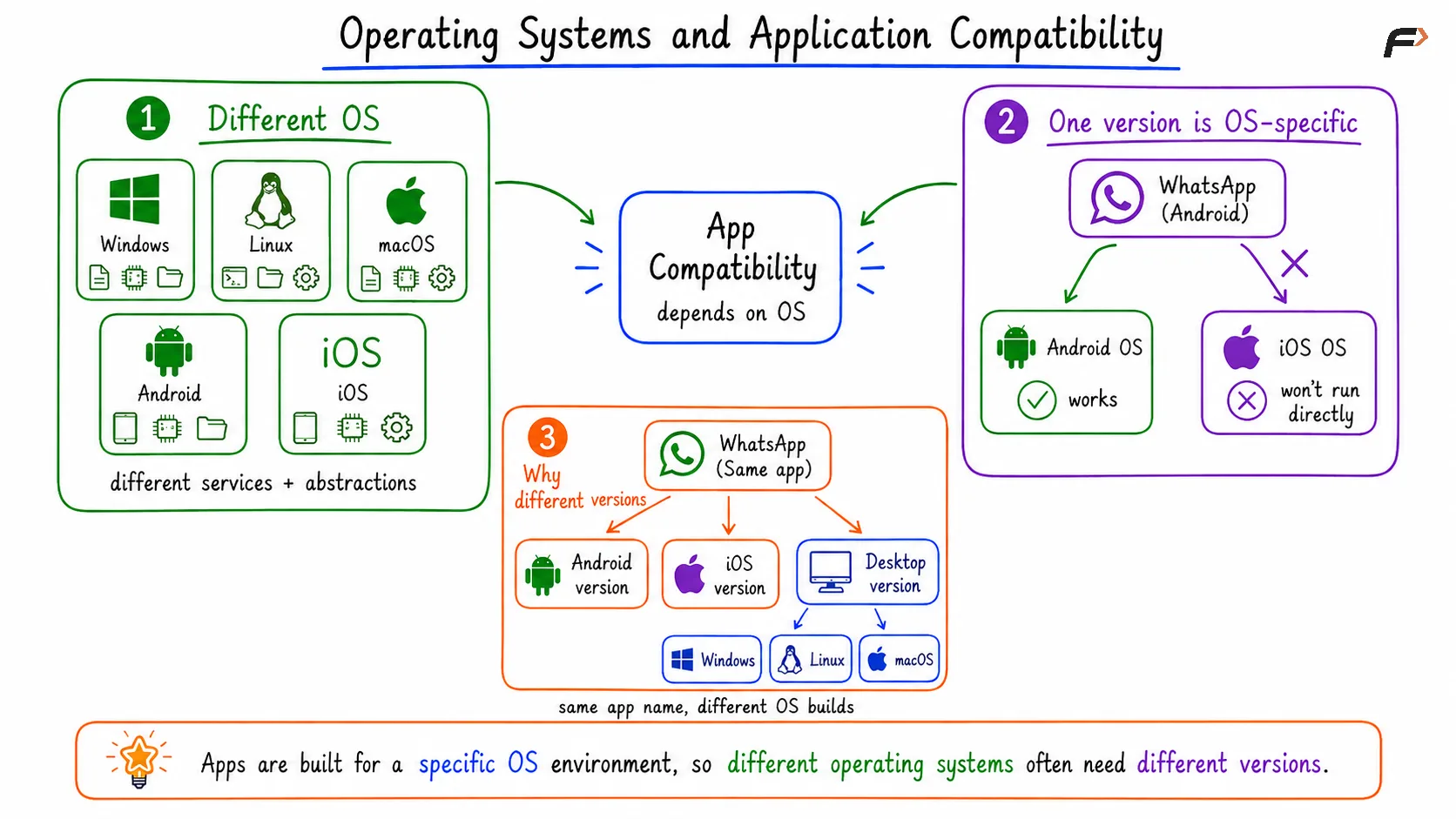
Image 14
Bare Metal Software
A program can run without an operating system. Such software is called bare metal software.
In bare metal software, the program talks directly to the hardware and takes full responsibility for managing it.
- Bootloaders are examples of bare metal software.
- Firmware is an example of bare metal software.
- Some embedded programs also run as bare metal software.
Without an operating system, the program loses many normal operating system facilities.
- Programs must directly manage hardware.
- There is no normal process abstraction.
- There is no normal file system abstraction.
- There is no operating system scheduling.
- There is no general protection between applications.
The operating system is not magic, but most modern applications depend on operating system services. With an operating system, applications deal with the operating system, and the operating system deals with the hardware.
Firmware, Bootloader, And Booting
Firmware
When a device is powered on, firmware runs first. Firmware performs basic hardware initialization and finds a bootable device.
A bootable device is a device that contains an operating system that can be started.
Booting
Booting is the process of starting a computer and loading the operating system into RAM so that it can begin running.
Bootloader
After firmware, the bootloader runs. The bootloader is also bare metal software.
- It loads the selected operating system kernel into memory.
- It transfers control to the operating system.
- After that, the operating system takes over.
A system may contain more than one operating system, such as Windows and Linux. During booting, the user may choose which operating system should start.
The startup flow is: firmware runs first, the bootloader starts the operating system, and then the operating system takes over.
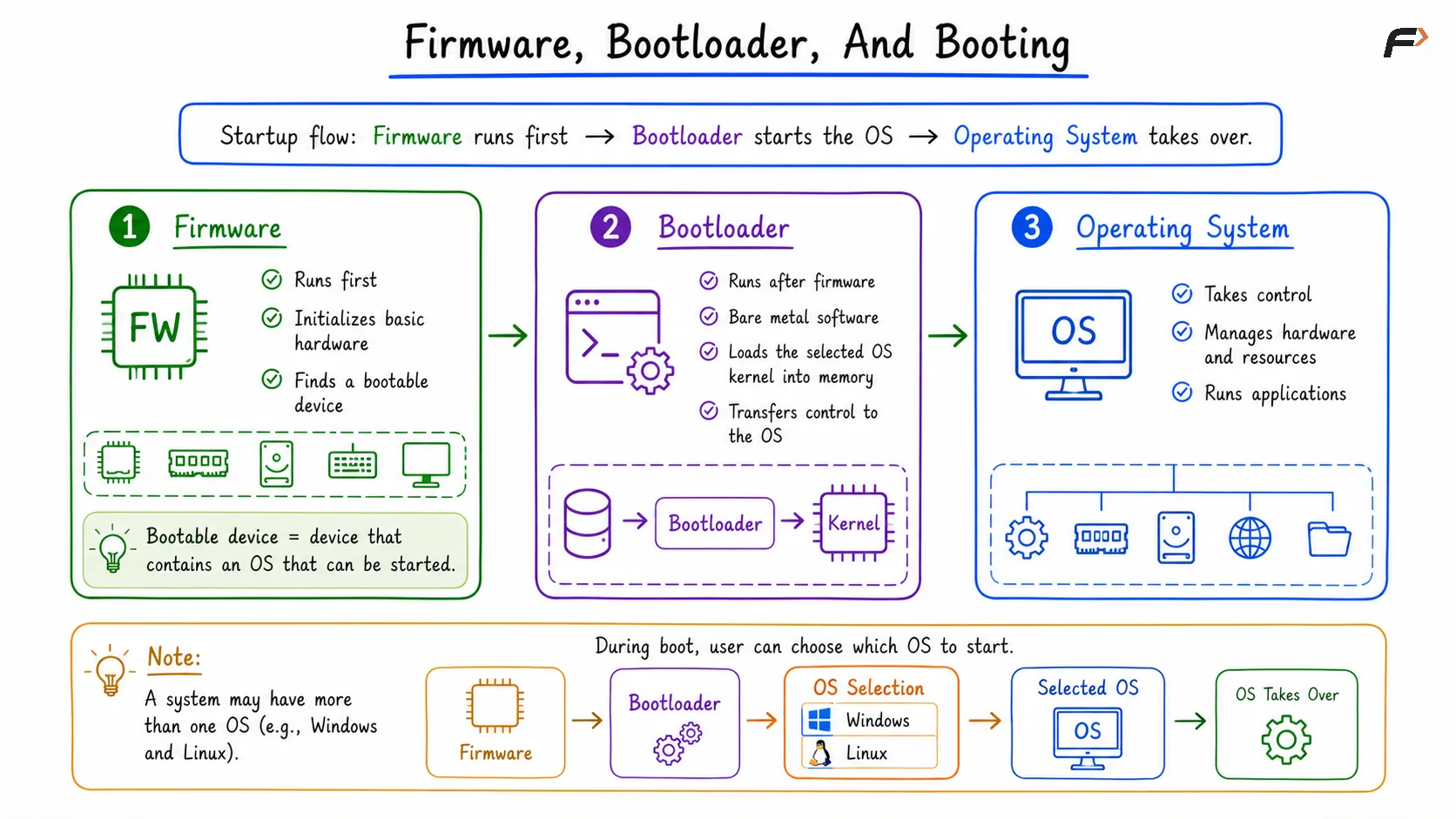
Image 15
Operating System Versus Kernel
The kernel is the core privileged part of the operating system. It performs the heavy lifting inside the system.
- It manages CPU scheduling.
- It manages memory.
- It handles system calls.
- It talks to devices through drivers.
- It enforces protection.
However, the operating system is not only the kernel. The operating system can include other system software outside the kernel.
- A shell allows users to give commands to the operating system.
- System utilities provide basic tools for file processing and system work.
- Services are background programs that keep running.
- Libraries such as the Win32 API provide specific functionality.
- Desktop components include icons and other interface elements.
- Package tools support actions such as install and update.
When we say that the operating system manages memory, we usually mean that the kernel is doing that heavy lifting.
Why Applications Do Not Directly Access Hardware
Applications do not directly access hardware because direct access creates problems of safety, sharing, and complexity.
- One application could break a device state.
- One application could read private data.
- One application could block other applications.
- Every application would need hardware-specific code.
This approach is not scalable. The operating system solves this by giving applications abstraction layers and managing the hardware system on their behalf.
The application makes a system call. The kernel handles the request. The hardware action is performed in a controlled way, and the result is returned to the application.
This is how the operating system makes hardware access simple, shared, and controlled.
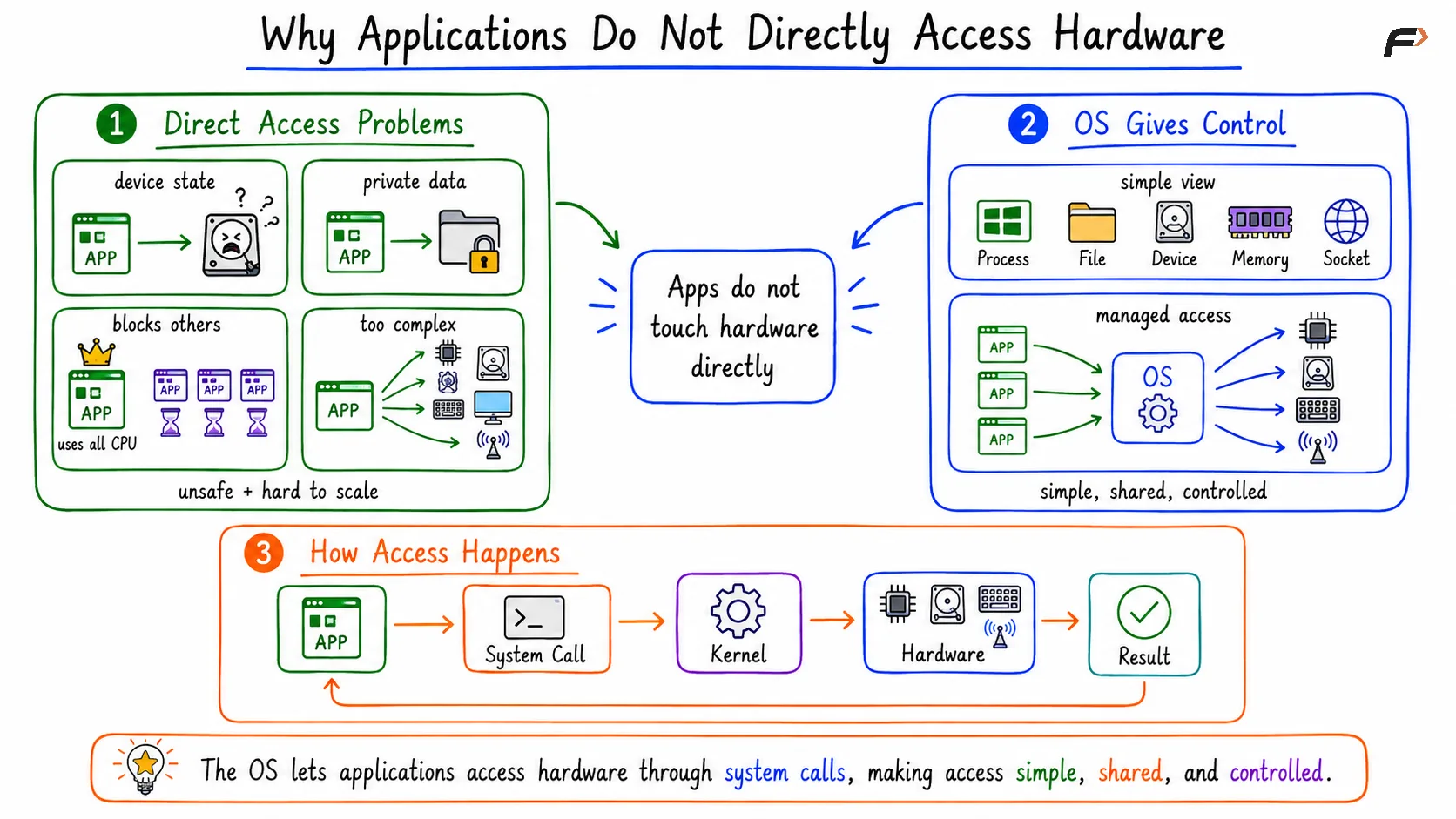
Image 16
Interview Angle: Strong Versus Weak Definition
A weak answer to “What is an operating system?” is: “An operating system is an interface between user and hardware.”
This answer is incomplete because it misses the deeper purpose of an operating system.
- It does not mention resource sharing.
- It does not mention protection.
- It does not mention abstractions.
- It does not show real system understanding.
A stronger answer is: “An operating system abstracts hardware, manages CPU, memory, files, and devices, and protects programs and users through controlled access.”
This definition is stronger because it explains what the operating system actually does beyond being a simple interface.
Common Interview Questions
Why Do We Need An Operating System?
We need an operating system to abstract hardware, manage limited resources, and protect programs and users.
It acts as a bridge between applications and hardware so that applications do not directly manage the hardware.
Is The Operating System The Same As The Kernel?
No. The kernel is the core privileged part of the operating system and performs the heavy lifting.
The operating system can include more system software, such as shell, utilities, services, libraries, desktop components, and package tools.
Can Software Run Without An Operating System?
Yes. Software can run without an operating system when it is bare metal software.
However, normal modern applications usually depend on operating system services for usability, sharing, abstraction, and protection.
Summary
An operating system is needed because hardware is raw, shared, and dangerous if every application controls it directly.
The operating system makes hardware usable, shares resources fairly, and protects programs from each other.
- As a manager, it shares CPU, memory, files, and devices.
- As an abstraction layer, it gives simple concepts such as process, thread, virtual memory, file, socket, and system call.
- As a guard, it protects programs and users through controlled access.
The kernel is the core privileged part of the operating system, but the full operating system can include many other system components. Programs can run without an operating system as bare metal software, but most modern applications rely on operating system services.